EasyManua.ls Logo

Pentax PC-555 - Page 13

Pentax PC-555
33 pages
Print Icon
To Next Page IconTo Next Page
To Previous Page IconTo Previous Page
Loading...
4
[--=1--
T
W
I
I
ffie
W
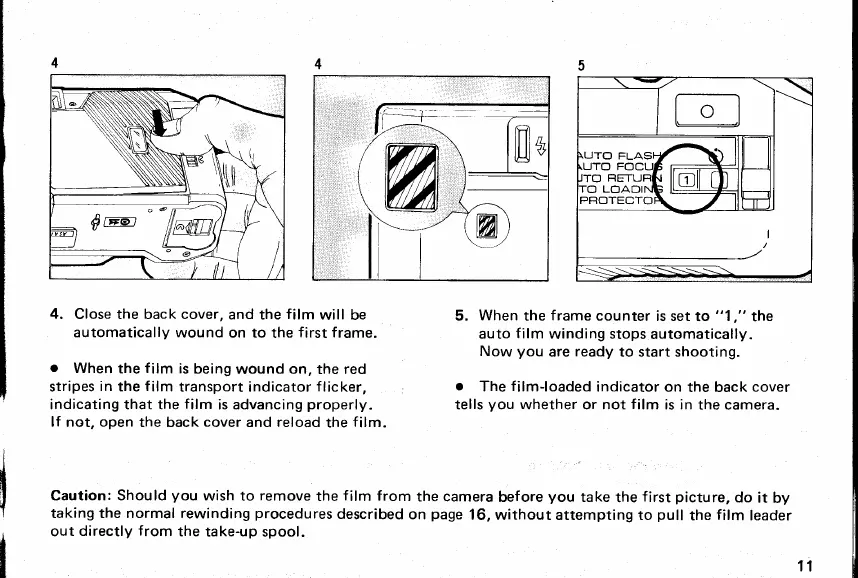
4.
Close the back cover,
and the
film
will be
automatically
wound on to
the
first frame.
o
When
the
film
is
being
wound on, the red
stripes
in
the
f
ilm
transport indicator
f
licker,
indicating that the
film
is
advancing
properly.
lf
not,
open
the back
cover
and reload
the
film.
5.
When
the
f rame
counter
is set
to
"1
,"
the
auto
film
winding
stops
automatically.
Now
you
are
ready
to start shooting.
o
The
film{oaded
indicator
on the back
cover
tells
you
whether or not
film
is in
the camera.
Caution:
Should
you
wish to
remove
the
film
from
the camera
before
you
take
the
first
picture,
do it
by
taking the normal rewinding
procedures
described
on
page
16,
without attempting to
pull
the
film
leader
out
directly
from
the
take-up spool.
11
www.orphancameras.com

Related product manuals