EasyManua.ls Logo

Pentax PC-555 - Page 26

Pentax PC-555
33 pages
Print Icon
To Next Page IconTo Next Page
To Previous Page IconTo Previous Page
Loading...
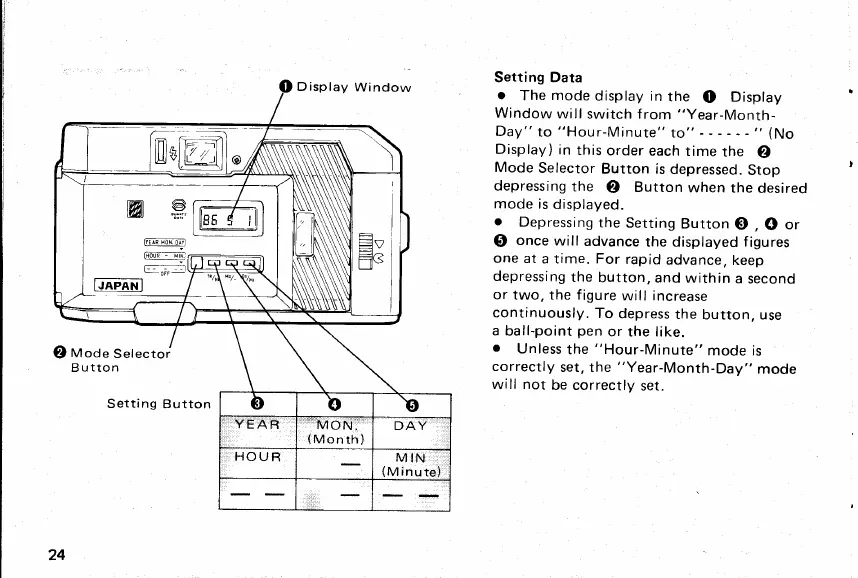
Setting Data
r
The
mode
display in
the
O
Display
Window
will
switch from
"Year-Month-
Day"
to
"Hour-Minute"
to"
-
"
(No
Display)
in
this
order
each
time
the
@
Mode
Selector
Button is
depressed.
Stop
depressing
the
@
Button
when
the
desired
mode
is
displayed.
o
Depressing
the
Setting
Button
G)
,
O
or
@
once
will
advance
the displayed f
igures
one at
a time. For
rapid
advance,
keep
depressing
the
button,
and within
a
second
or
two, the f
igure
will increase
continuously.
To
depress
the
button, use
a
ball-point
pen
or the like.
o
Unless
the
"Hour-Minute"
mode is
correctly
set, the
"Year-Month-Day"
mode
will not
be correctly
set.
)
Llt"
w
"-e
FfmtiMNl
J
lHouF
-
!rNl
..MO
N:'
{Month)
@
Mode
Selector
Button
Setti
ng
24
www.orphancameras.com

Related product manuals