EasyManua.ls Logo

Pentax PC-555 - Self-Timer Operation

Pentax PC-555
33 pages
Print Icon
To Next Page IconTo Next Page
To Previous Page IconTo Previous Page
Loading...
-
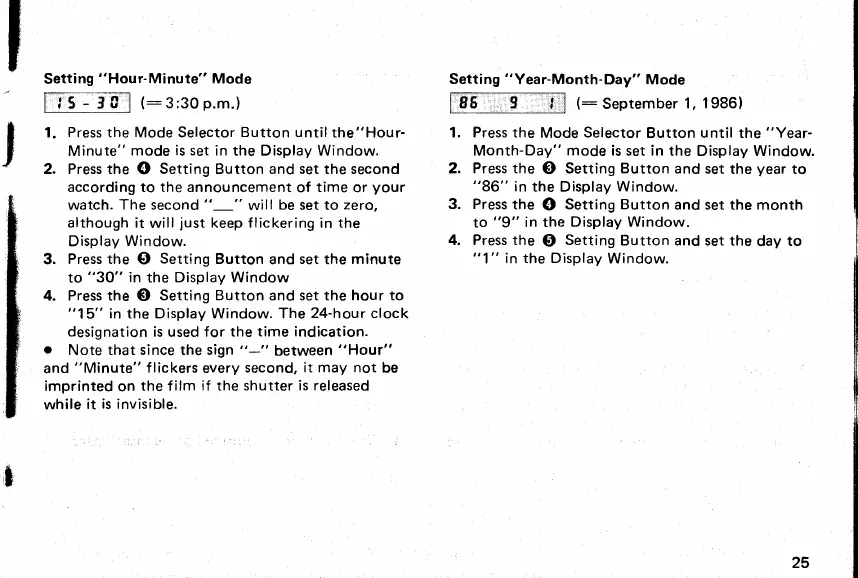
Setting
"Hou
r-
Minute" Mode
lt5-1fl lt:3;30p.m.)
Setting
"Year-Month-Day"
Mode
fT6*.
9
--ll
(:
september
1, 1986)
I
t.
Press
the Mode Selector
Button untilthe"Hour-
1. Press the
Mode
Selector
Button until the
"Year-
I
Minute"
mode
is set
in the Display Window. Month-Day"
mode
is set in the
Display Window.
!
2. Press the
O
Setting Button and set the second
2. Press the
O
Setting
Button
and set
the
year
to
according to the announcement
of time or
your "86"
in
the Display
Window.
watch.
The second
"-"
will
be
set to
zero, 3.
Press
the
O
Setting Button
and set the month
although it
will
just
keep flickering in the
Display
Window.
to
"9"
in the
Display Window.
4. Press the
O
Setting
Button and set
the
day
to
3.
Pressthe
G)
Setting
Button
andsettheminute
"l" inthe Display
Window.
to
"30"
in
the
Display Window
4. Press the
O
Setting Button and set the hour to
"15"
in the Display Window. The
24-hour clock
designation
is used for the
time indication.
.
Note that since the sign "-"
between
"Hour"
and
"Minute"
f lickers
every
second,
it may not
be
imprinted
on
the f ilm
if
the shutter
is released
while
it
is invisible.
t
25
www.orphancameras.com

Related product manuals