EasyManua.ls Logo

Pentax PC35AF-M - Film Rewinding Process

Pentax PC35AF-M
36 pages
Print Icon
To Next Page IconTo Next Page
To Previous Page IconTo Previous Page
Loading...
«max
4
Z
FE
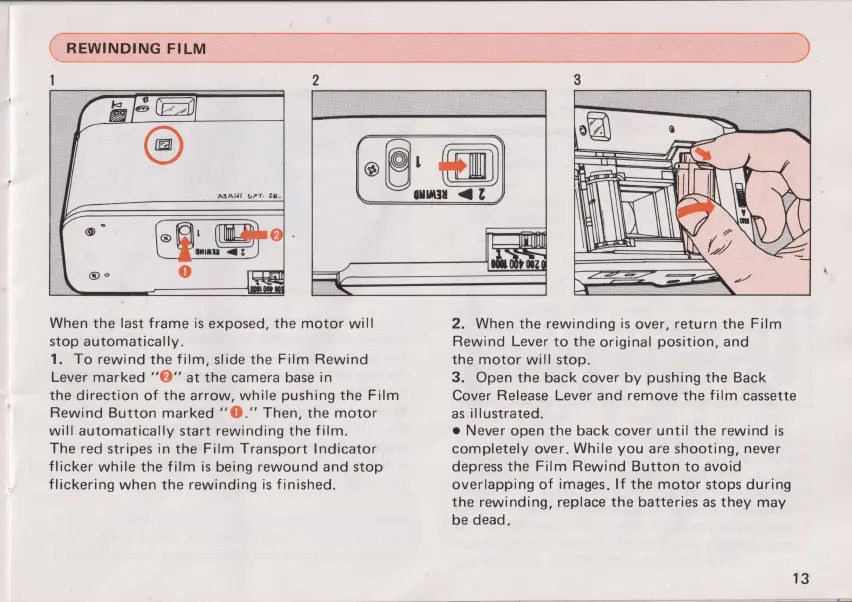
When
the last frame
is
exposed,
the
motor
will
stop
automatically.
1.
To
rewind the
film,
slide
the
Film
Rewind
Lever
marked
“9”
at
the
camera
base
in
the direction of
the
arrow,
while
pushing
the
Film
Rewind
Button
marked
"0."
Then,
the
motor
will
automatically
start
rewinding
the
film.
The
red
stripes
in
the
Film
TranSport
Indicator
flicker
while
the
film
is
being
rewound and
stop
flickering
when
the
rewinding
is
finished.
2.
When
the
rewinding
is
over,
return
the
Film
Rewind
Lever
to
the
original
position,
and
the
motor
will
stop.
3.
Open
the back
cover
by
pushing
the
Back
Cover
Release
Lever
and
remove
the
film
cassette
as
illustrated.
0
Never
open
the back
cover
until the
rewind
is
completely
over.
While
you
are shooting,
never
depress
the
Film
Rewind Button
to
avoid
overlapping
of
images.
If
the
motor
stops
during
the
rewinding, replace
the
batteries
as
they
may
be
dead.
13

Other manuals for Pentax PC35AF-M

Related product manuals