OFF
ON
OFF
ON
OFF
ON
OFF
ON
OFF
ON
Signal to Noise Ratio
If you would like to look at the
signal to noise ratio, the BirDog
can provide that information.
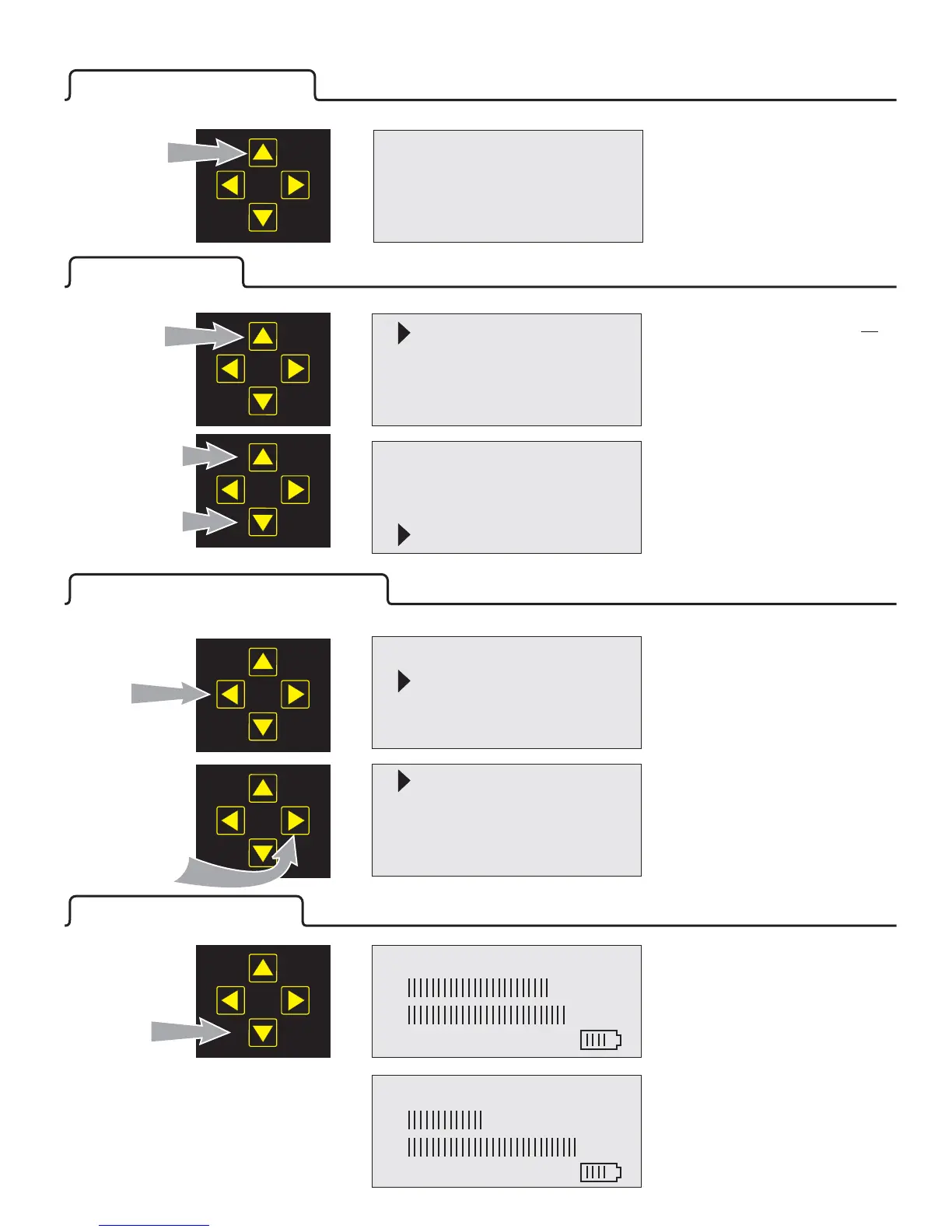
With the satellite “Found”, press
the bottom (ON) button once.
®
B R DirecTV 101
S 175
Q95%
Found
B R DirecTV 101
C65
V95%
Found
Press
The “S” changes to a “C” and now
reflects the C/N or signal to noise
ratio in db.
The V indicates inverse Bit Error
Rate after error correction.
4
Shutting Down
Press and
Hold 5 seconds
To turn the BirDog off, press and
release the upper (OFF) button.
The display will indicate “Shutting
Down” and then the display
screen will go blank.
®
To Turn The Meter OFF
Other Features
Exit
Backli
g
ht on
Clickin
g
off
Sleep 9 Mins
The BirDog must be turned to
access the optional setup screen.
To access other features, press
and hold the up arrow. You will see
this screen.
®
off
Press
and Hold
Up or down
to select
Options
In this example we have selected
the “Sleep” timer adjustment and
changed the “Sleep” mode to 15
minutes.
Press left or right
to change the
option setting
To save the selection(s) you have
made, press the upper button to
position the arrowhead on “Exit”,
then press the right button.
To ‘Save’ and
Exit, Press
the right
button.
To Change and Save a Feature
Press down or up keys to select the
required function. The arrow head
will indicate the selected item. The
Auto Shutoff timer adjustment is
selected in this example.
Exit
Backli
g
ht on
Clickin
g
off
Sleep 9 Mins
Clickin
g
off
Sleep 15 Mins
Defaults
English
OFF
ON
Exit
Backli
g
ht on
Clickin
g
off
Sleep 15 Mins
To return all adjustable options (other than language) to their original
factory setting, select “Defaults” and press the right arrow.
Continue scrolling down to reach the “Defaults” and Language selections.


 To Next Page