This document provides an instruction manual for the G27Q LCD color monitor, designed for continuous operation in closed-circuit TV systems. It features an active matrix, thin-film transistor (TFT), liquid crystal display (LCD).
Function Description:
The G27Q is an LCD color monitor primarily intended for gaming. It serves as a display unit for video signals, offering various input options and customizable display settings. The monitor is designed to provide a high-quality visual experience with features like high resolution, fast response time, and wide viewing angles. It can be used as a standalone display or integrated into a larger system, such as a gaming setup or a professional workstation.
Important Technical Specifications:
- Model: PG27Q
- Resolution: 2560x1440
- Refresh Rate: 170Hz
- Brightness (MAX): 350 cd/m²
- Response Time (Typical): 1ms
- Aspect Ratio: 16:9
- Viewing Angle: 178°(H)/178°(V)
- Display Color: 95% DCI-P3
- HDMI In: x2
- DP In: x2
- Audio Out: x1
- Speaker: 3W x 2
- Color: Black
- VESA Mount: 100x100mm
- Power Consumption (Typical): 42W
- Power Source: AC100-220V
- Operating Temperature: 0~50℃
- Remote Control: No
- OSD Languages: English, French, Spanish, German, Korean, Japanese, Chinese
Usage Features:
- Installation: The monitor comes with a stand stem and base for desktop placement. It also supports VESA wall mounting (100x100mm) with a bracket not included. Users are advised to consult a professional for wall installation due to the monitor's weight.
- Connectivity: Equipped with two HDMI inputs, two DisplayPort (DP) inputs, and one audio output, allowing connection to multiple devices. It also includes one composite USB-B port for upgrades.
- OSD Menu: A multilingual On-Screen Display (OSD) menu provides extensive control over display settings. The menu is accessible via a control panel button and is divided into several sub-menus:
- Input Source: Allows switching between DP1, DP2, HDMI1, HDMI2, or auto-selecting the source.
- Brightness/Contrast: Adjusts display brightness (0-100), contrast (0-100), and enables/disables Dynamic Contrast Ratio (DCR).
- Color Settings: Configures Gamma (2.0, 2.2, 2.4), ECO Mode (Standard, Photo, FPS, Movie, RTSU), Color Temperature (Normal, Warm, Cool, User), Hue (0-10), Saturation (0-100), and Low Blue Light (0-100).
- Picture Quality Settings: Controls Sharpness (0-100), Response Time (On/Off), Noise Reduction (Low, Middle, High, Off), Super Resolution (On/Off), and Dynamic Luminance Control (On/Off).
- Display: Adjusts the Aspect Ratio to Full Screen, Auto, 4:3, 5:4, 1:1, or Wide Screen.
- Audio: Manages audio mute (On/Off) and volume (0-100).
- OSD: Configures OSD language, menu transparency (0-100), horizontal position (0-100), vertical position (0-100), timer (how long the OSD menu stays on), and rotation.
- Other: Includes settings for FreeSync Mode (Adaptive Sync) (On/Off), HDR (On/Off, requires HDMI 2.0 input), MPRT (On/Off), Firmware Update, and Reset.
- Shortcut Keys:
- Signal Input Selection: Use directional buttons to navigate and 'M' to select the source.
- Line of Sight feature: Press to cycle between colors or turn off.
- ECO Mode feature: Press to cycle through presets.
- Ergonomics: Offers wide inclination to allow viewing from seated or standing positions, and when moving.
Maintenance Features:
- Cleaning: The device should be rubbed delicately with a dry cloth to remove dust and dirt. For tougher dirt, a neutral detergent can be used with a cloth. Volatile liquids (petrol, alcohol, solvents) or chemically treated clothes should not be used to prevent deformation, deterioration, or scratches to the paint finish.
- Safety Precautions:
- Use only the provided power unit and check mains rating.
- Do not pull the cable to unplug.
- Keep away from rain and humidity; do not introduce solid or liquid material inside.
- Never open the device; contact qualified personnel for repairs.
- Keep away from children.
- Do not touch with wet hands.
- Do not use if dropped or external casing is damaged.
- Disconnect power if not used for a certain time.
- Installation Precautions:
- Ensure at least 5 cm of free space for air circulation to prevent overheating.
- Avoid installing near heat sources, direct sunlight, excessive dust, mechanical vibrations, or shocks.
- Do not place on unstable surfaces.
- Avoid exposure to humidity or water.
- Stop using if water or other material penetrates inside.
- Do not block ventilation slots.
- Do not place heavy or heat-generating objects on top.
- Do not cover with a cloth while running.
- Keep magnets and magnetized objects away.
- Avoid use in presence of smoke, vapor, humidity, dust, or intense vibrations.
- Allow three hours for the device to adapt to new ambient temperatures/humidity after transport.
- Copyright and Privacy: Users are responsible for checking and respecting local rules and regulations concerning monitoring and recording video signals. Recording of copyrighted images is forbidden. The manufacturer is not liable for non-compliance with laws.

 Need help?
 General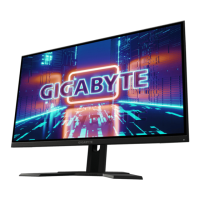

 To Next Page