Need help?
Do you have a question about the Perfect Prime IR202 and is the answer not in the manual?
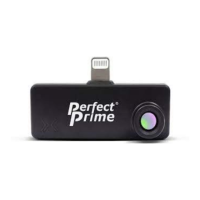
The PerfectPrime IR202 Thermal Camera for Android Devices is a compact and innovative tool designed to provide thermal imaging and temperature measurements, allowing users to visualize and analyze heat signatures in a new way. This device is specifically engineered to connect with Android smartphones, leveraging the phone's processing power and display to offer a portable and accessible thermal imaging solution.
The primary function of the IR202 is to capture thermal images and provide temperature measurements. It senses long-wave infrared radiation emitted by objects and converts this data into a visual representation, known as a thermal image. This allows users to "see" heat, making invisible temperature differences apparent. The device is capable of detecting a wide range of temperatures, making it suitable for various applications, from identifying heat leaks in buildings to monitoring equipment temperatures.
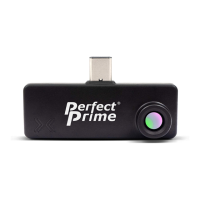
The IR202 operates by connecting directly to an Android host device via a USB-C connector. It draws power from the host device, eliminating the need for an internal battery or separate charging. Once connected and the dedicated "IR202 Thermal Camera Viewer" application is installed and launched, the device streams real-time thermal data to the phone's screen.
A key aspect of its functionality is the ability to display minimum and maximum temperatures within the detected area, as well as the temperature at the center point of the thermal image. This provides immediate quantitative data alongside the visual thermal representation.
The IR202 is designed for ease of use, with a user-friendly interface provided by the accompanying Android application.
App Download and Connection: Users begin by downloading the "IR202 Thermal Camera Viewer" app from the Google Play Store. After installation, ensuring the Android device supports USB OTG (On-The-Go) in its settings is crucial. Once plugged in, the application is designed to open automatically within 10 seconds, ready for operation.
Real-time Thermal Imaging: The device provides a live thermal feed on the Android phone's screen, allowing for immediate observation of temperature patterns.
Image and Video Capture: Users can easily take photos and record videos of the thermal feed directly from the application. This feature is invaluable for documentation, analysis, and sharing findings. Captured images and videos can be reviewed within the app.
Mirroring Function: A mirroring option allows users to flip the image horizontally, which can be useful depending on the orientation of the device or the viewing preference.
Dynamic Range Control: The application includes a "Dynamic Range" feature that can be toggled on or off. This likely helps in optimizing the visualization of temperature differences across varying thermal scenes.
Image Filtering: To enhance the clarity and accuracy of temperature data, the IR202 app offers image filtering capabilities. Users can turn filters on or off and adjust them by dragging corresponding bars, which helps reduce noise levels in the temperature data and improve performance.
Color Palettes: The device offers a selection of 16 preset color palettes (e.g., Heatiron, BlackBody, CoolWarm, GrayScale, IronGlow, Rainbow, Autumn, Bone, Ocean, Cool, Hot, Magma, Inferno, Plasma). These palettes are for visualization purposes only and do not affect the actual temperature data. Users can select different palettes to highlight specific temperature ranges or patterns, making thermal anomalies more apparent.
Temperature Display Units: Users have the flexibility to choose their preferred temperature display unit from Kelvin, Celsius, or Fahrenheit, catering to different regional standards and application requirements.
Over and Under Temperature Alarms: A significant feature for monitoring and safety, the IR202 allows users to set customizable over-temperature and under-temperature alarms. When the detected temperature exceeds the set upper limit, an alarm is triggered, and the relevant part of the display turns red. Conversely, if the temperature falls below the set lower limit, an alarm is triggered, and the display turns blue. This provides immediate visual alerts for critical temperature conditions.
Switching Thermal and Visible Camera Images: The application provides a button to switch the position of the thermal image and the visible camera image (if the host device has a visible camera that can be integrated), potentially allowing for an overlay or side-by-side comparison of thermal and real-world views.
While the IR202 itself is a robust, no-maintenance device (as it has no battery), the software aspect offers features that contribute to its ongoing usability and performance.
Software Version Display: The application displays the current software version, which is useful for troubleshooting and ensuring the device is running the latest updates. Regular software updates can introduce new features, improve performance, and address any bugs.
Emissivity Adjustment: A crucial setting for accurate temperature measurement, the IR202 allows users to adjust the emissivity value. Emissivity quantifies an object's ability to emit long-wave infrared radiation and significantly impacts the temperature readout. The app provides preset options like Glossy, Semi-Glossy, Semi-Matt, Matt, and Human Skin, with typical values for matt surfaces and human skin being around 0.95-0.97. Metals, with their dramatically lower emissivity (sometimes as low as 0.1), require specific adjustment for accurate readings. This feature ensures that the temperature measurements are as precise as possible for various materials and surfaces.
Settings Management: The application provides a comprehensive settings menu where users can adjust various parameters, including color palette, temperature display unit, emissivity, and alarm thresholds. This centralized control allows for easy customization and optimization of the thermal camera's operation for specific tasks.
The PerfectPrime IR202 is designed to be a versatile and powerful thermal imaging accessory for Android users, offering a blend of real-time visualization, precise measurement, and customizable features for a wide range of applications.
 General
| Temperature Range | -20°C to 300°C (-4°F to 572°F) |
|---|---|
| Battery Life | 4 hours |
| Thermal Sensitivity | 0.15°C |
| Weight | 0.25 kg |
| Accuracy | ±2°C or ±2% |
| Emissivity | Adjustable 0.1 to 1.0 |
| Focus | Fixed |
| Power Supply | Rechargeable Li-ion battery |
| Operating Temperature | 0°C to 45°C (32°F to 113°F) |
| Storage Temperature | -20°C to 60°C |
| Spectral Range | 8μm to 14μm |

 To Next Page