Need help?
Do you have a question about the Perfect Prime IR203 and is the answer not in the manual?
Details on resolution, frame rate, temperature range, NETD, and accuracy.
Operating and storage temperature ranges for the device.
Information on power consumption and connector type.
Details regarding the physical dimensions and weight.
Reduces temporal fluctuation of detector pixels for cleaner thermal frames.
Reduces noise within an individual frame by analyzing pixel relations.
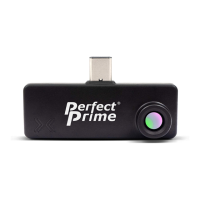
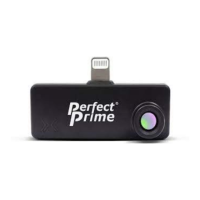
The PerfectPrime IR203 is a thermal camera designed for Apple iOS devices, offering a new way to sense, measure, and analyze thermal images and temperature. It connects directly to an iOS device via a Lightning connector and is powered by the host device, eliminating the need for separate charging or batteries.
To operate the IR203, users need to download and install the "SenXorProViewer" application from the Apple App Store. This application is specifically designed for iOS Phone systems and serves as the primary interface for controlling the thermal camera and viewing its output.
One of the core functionalities of the IR203, in conjunction with the SenXorProViewer App, is the ability to get the temperature of a specific point within the thermal image. Users can simply touch a location on the thermal picture displayed on their screen, and a crosshair will indicate the selected X-Y coordinates. The corresponding temperature at that point will then be shown on the screen, providing precise temperature measurements.
The IR203 also offers extensive customization for visualizing thermal data through its color palette feature. The SenXorProViewer App provides 16 preset color palettes that map temperature values to different colors. These palettes include options like grayscale, various color combinations, and specialized palettes such as "HEATED IRON," "BLACK BODY," "COOLWARM," "GRAYSCALE," "IRON GLOW," and "RAINBOW." Users can select any of these palettes from a drop-down list, and the chosen palette will be applied to the thermal image, enhancing visualization without affecting the underlying temperature data.
To improve the intrinsic noise of the detector and enhance picture quality, the SenXorProViewer App supports several image filtering options. These filters are categorized into temporal filters and spatial filters. Temporal filters are designed to reduce the temporal fluctuation of individual detector pixels from one thermal frame to the next. This category includes a "Simple rolling average," accessible via the "Averaging" button, with recommended values of 2 or 4 frames over which the averaging is performed. Another temporal filter is the "Predictive temporal filter," accessed through the "Temporal Filter" option. Its strength can be adjusted between low and high, depending on the dynamics of the scene. For static scenes, a high strength is recommended, while for scenes with motion, a low strength is advised to prevent ghosting artifacts in the video.
In addition to temporal filters, the IR203 system incorporates a "Spatial filter," which is accessed via the "AI Pre-trained Filter." This filter works by reducing noise within an individual frame by considering the relationship between the values of individual pixels within that frame. It is enabled by default and is most effective when used in conjunction with the temporal filters.
An experimental feature of the IR203 is "Contour Detection," which is explicitly stated as being for DEMO purposes only and not for medical advice or usage. This feature, supported by the SenXorProViewer App, provides an indicative contour detection based on identifying the hottest region within the captured image. It then displays the mean temperature of this hottest region. The app automatically detects the contour of the hottest spot, and users have control over certain parameters to fine-tune the threshold, allowing for a more stable readout. This model is designed for use when the distance between the camera and the subject is in the range of 0.7 to 2 meters.
The IR203 system also includes comprehensive menu settings for various parameters. These settings, which include Filters, Contour Detection, Temperature Unit, Emissivity, and Language Selection, are saved after any changes and persist even if the SenXorProViewer App is restarted.
Emissivity is a crucial setting that quantifies an object's ability to emit long-wave infrared radiation and significantly impacts the temperature readings from the IR203. By default, the emissivity is set to 0.95, a representative value for many common objects with a matte surface, as well as human skin (which typically ranges from 0.95 to 0.97). It's important to note that metals often have a dramatically lower emissivity, sometimes as low as 0.1, and this value can vary based on their surface processing. The user can adjust the emissivity setting to match the specific object being observed, ensuring more accurate temperature measurements.
The IR203 also supports recording functions, allowing users to store thermal video and photos. Thermal videos can be saved to the camera roll of the iOS device by pressing the save button on the video streaming screen. To capture thermal photos, users switch to photo mode within the app and then press the camera button. The captured photos are also stored in the device's camera roll. It's important to note that the SenXorProViewer App does not automatically collect or save any thermal images or videos; this action only occurs when the user explicitly selects to save a picture or video to their device.
For maintenance and support, PerfectPrime provides customer service inquiries via email, with a commitment to respond within 24 hours, or longer in exceptional cases. Specific email addresses are provided for general inquiries (cs@perfectprime.com) and for B2B or project-based applications (sales@perfectprime.com). Additional information, including video manuals, product manual pages in multiple languages, and product registration for a 1-year warranty, can be accessed via QR codes. The device is manufactured by Meridian Innovation Limited and distributed by Tyche Smart Limited, with contact information including an email address and telephone number provided. The device also carries CE and RoHS certifications.
 General
| Temperature Range | -20°C to 300°C |
|---|---|
| Accuracy | ±2°C or ±2% |
| Thermal Sensitivity | 0.15°C |
| Frame Rate | 9 Hz |
| Emissivity | Adjustable from 0.1 to 1.0 |
| Power Supply | Rechargeable lithium-ion battery |
| Spectral Range | 8-14μm |
| Battery | Li-ion battery |
| Optical Resolution | No |

 To Next Page