6 | PETTYDRIVE USER MANUAL
PETTYJOHNELECTRONICS.COM
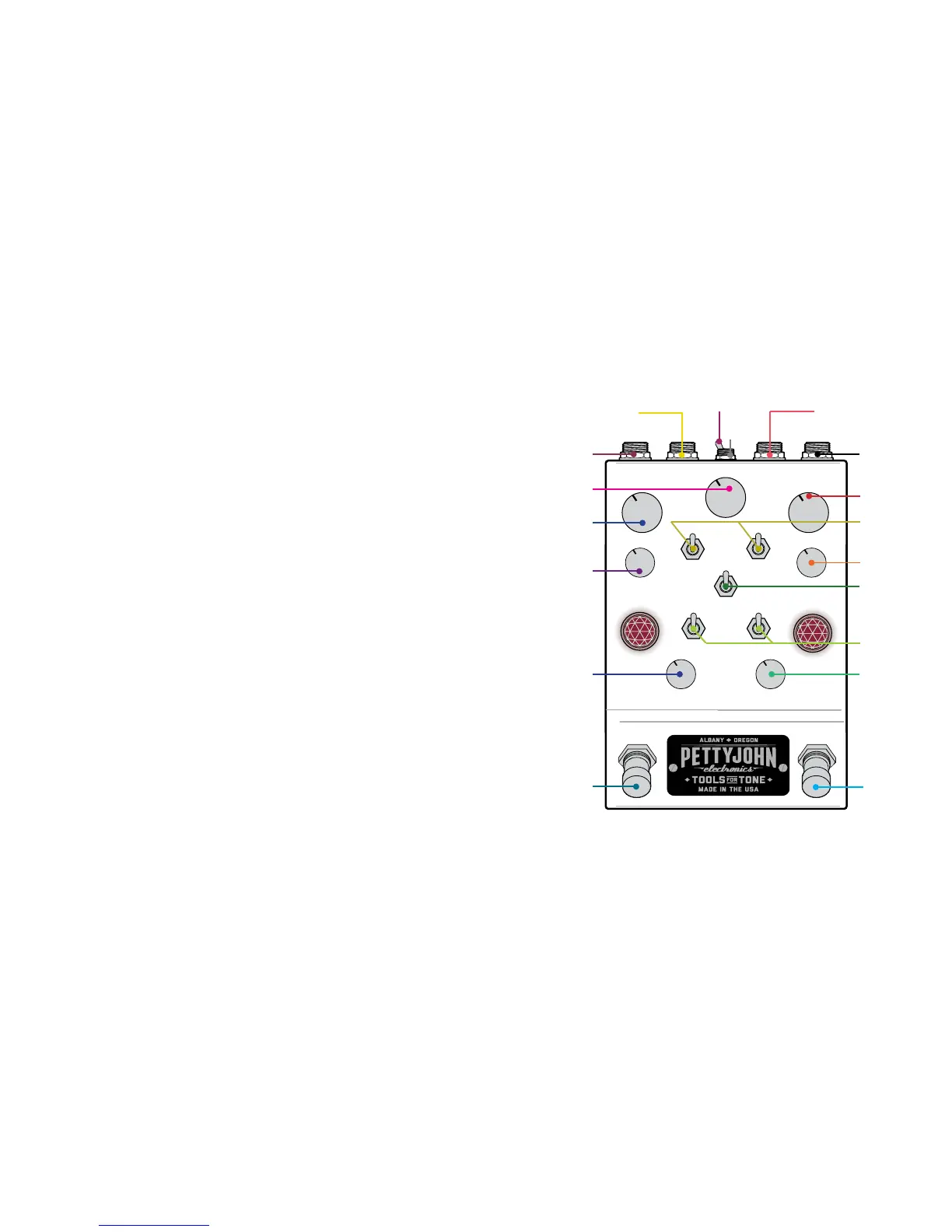
KNOB & SWITCH IDENTIFICATION
The controls on the PettyDrive may look a bit confusing at
rst glance but rest assured that much eort has gone into
orientating them in an intuitive way. The main controls are
fully symmetrical between the sides, mirrored in their posi-
tion and general function.
Clipping Mini Toggle Convention:
Up: Soft Clipping with a middle amount of headroom
Center: LED clipping with the most headroom
Down: Hard clipping with the least headroom but most “grit”
Low Cut Mini Toggle Convention:
Up: Middle amount of Low End
Center: Least amount of Low End
Down: Most Amount of Low End
Order Flip Switch Convention: The switch points at the
side that comes rst in the chain. Flipping the order changes
the way the circuit interact and load each other for totally
dierent tones when stacked. Be sure to experiment with
the controls each time you ip the order while both are on to
nd the new “sweet spot”.
Bypass Footswtiches: The PettyDrive is congured with
two True Bypass foot switches for engaging/bypassing each
channel independently. The PettyDrive is also equipped with
a extremely high quality always on input buer, which has
been designed to the highest standard and often greatly
improves the bypassed tone quality.
Power Requirements: 9-15V DC center tip negative, at least
100mA
GAIN CH 1
GAIN CH 2
OUTPUT
3 WAY
CLIPPING
DRIVE ON/OFF
OUT LEVEL
CH 2
DRIVE ON/OFF
OUT LEVEL
CH 1
ORDER FLIP
CH 2 CLEAN
MIX/PARALLEL
LOOP MIX
INPUT
CH 2
ON/
BYPASS
CH 1
ON/
BYPASS
3 WAY LOW
CUT
TONE CH 1
TILT EQ
TONE CH 2
HIGH CUT
PARALLEL
EFFECTS LOOP
RETURN
PARALLEL
EFFECTS LOOP
SEND
PARALLEL EFFECTS LOOP
ON/OFF SWITCH
9-15V
(-)


 To Next Page