EasyManua.ls Logo

PEUGEOT RT6 - Page 14

PEUGEOT RT6
73 pages
Print Icon
To Next Page IconTo Next Page
To Previous Page IconTo Previous Page
Loading...
04
192
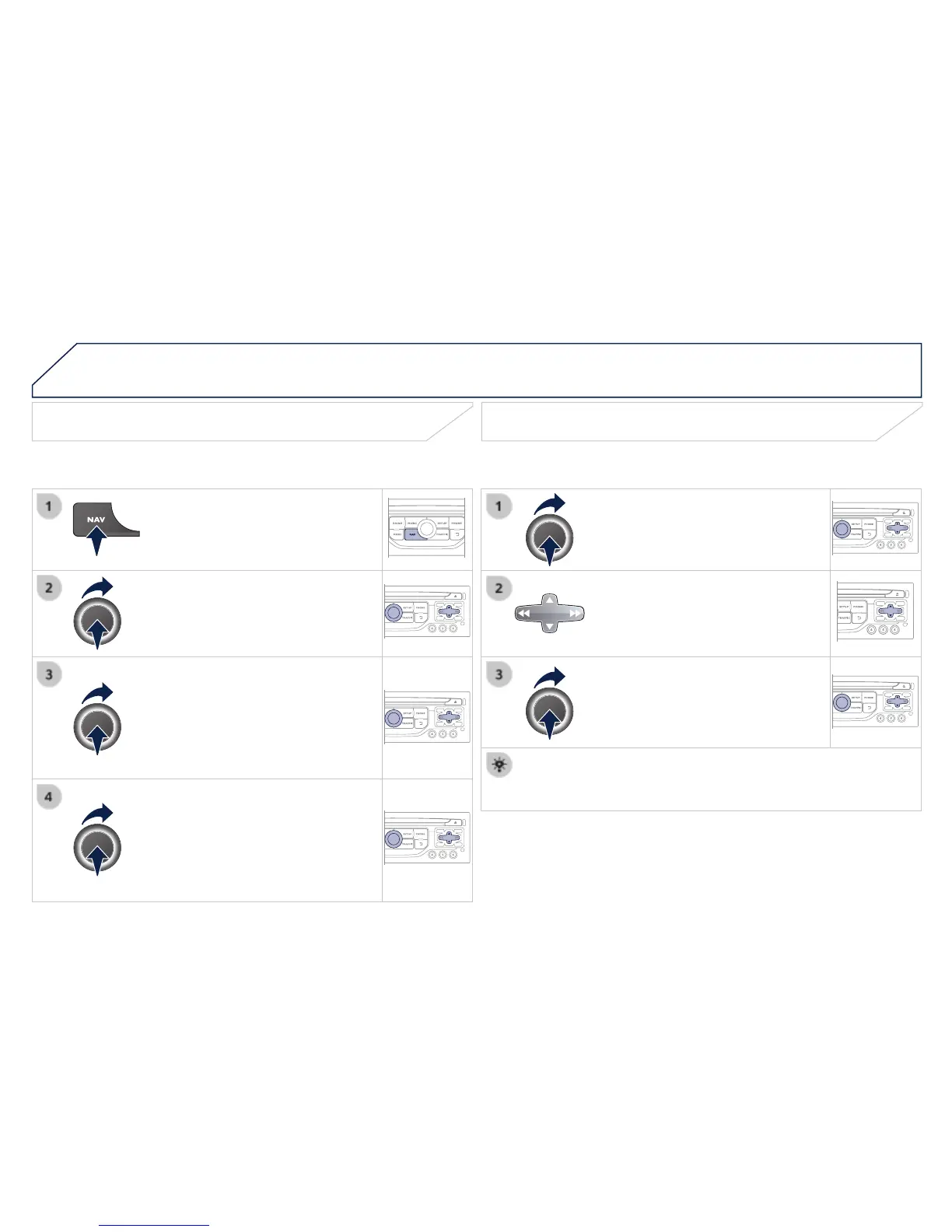
Adding a stage
Press
NAV
to display the
"
Navigation - guidance
" menu.
Select "
Journey leg and route
" then
confi rm.
Select "
Close to
" a route passing
close to the stage or "
Strict
" for a route
passing through the stage.
Confi rm "
OK
" to start the guidance, and
give a general indication of the guidance
route.
Select "
Add a stage
" then confi rm
The address of the stage is entered as
a destination, by "
Enter an address
",
a contact in "
Directory
", or "
Previous
destinations
".
Organising stages
To organise stages, carry out operations 1
to 2 again, then select "
Order/delete
journey legs
" and confi rm.
Select and confi rm to save the
modifi cations.
Select the stage that you want to move
in the order.
Select "
Delete
" to delete the stage.
NAVIGATION - GUIDANCE