EasyManua.ls Logo

PEUGEOT RT6 - Using the Telephone

PEUGEOT RT6
73 pages
Print Icon
To Next Page IconTo Next Page
To Previous Page IconTo Previous Page
Loading...
06
201
Access to the "
TELEPHONE
" menu
"
"
"
"
"
"
"
"
"
"
"
"
"
"
"
"
"
"
Telephone
Telephone
Telephone
Telephone
Telephone
Telephone
Telephone
Telephone
Telephone
Telephone
Telephone
Telephone
Telephone
Telephone
Telephone
Telephone
Telephone
Telephone
Telephone
Telephone
Telephone
Telephone
Telephone
"
"
"
"
"
"
"
"
"
"
"
"
"
"
"
"
"
"
"
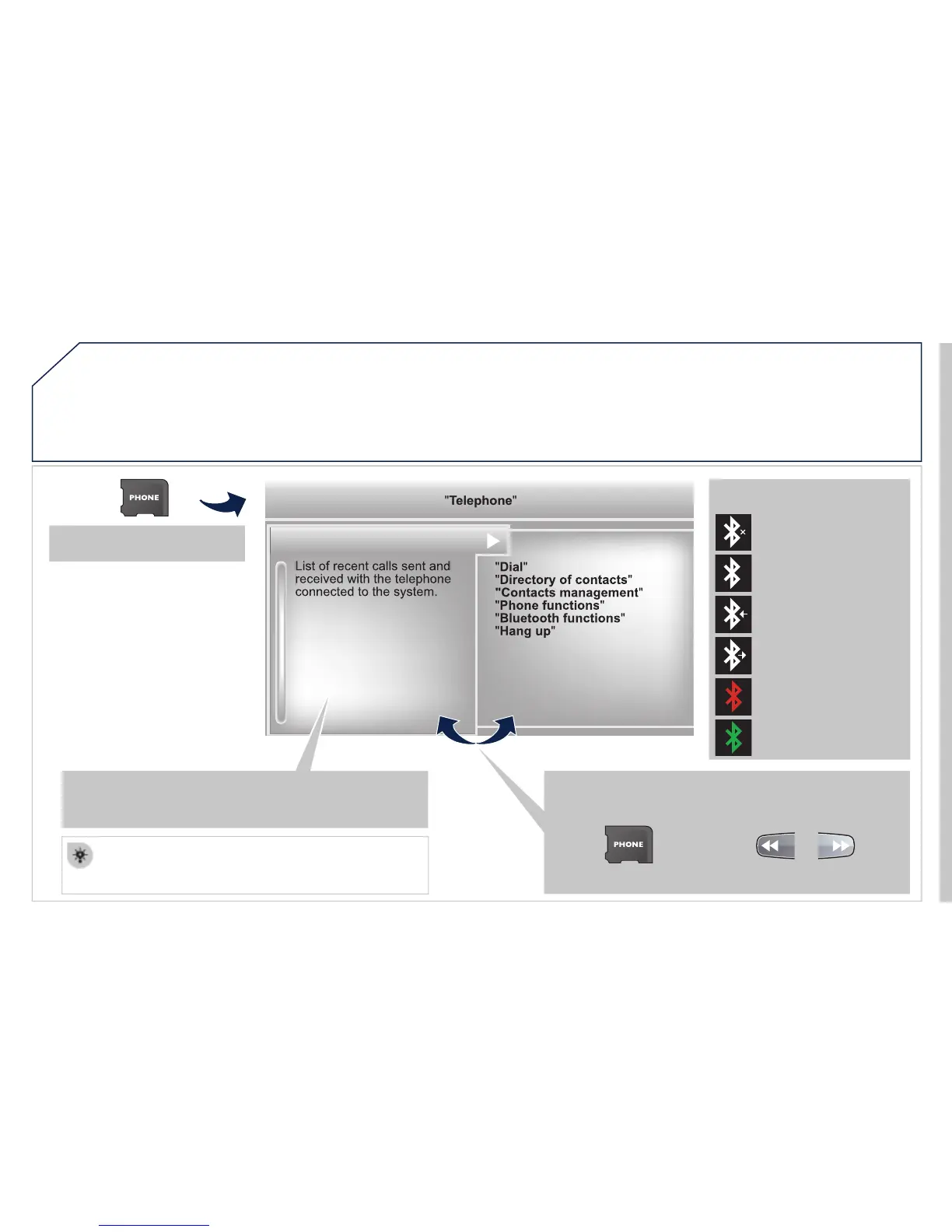
Dial
"
"
Directory of contacts
"
"Contacts management
"
"
Phone functions
"
"
Bluetooth functions
"
"
Hang up
"
Go from the list to the menu (left/right).
or
List of recent calls sent and
received with the telephone
connected to the system.
Press this button.
To make a call, select a number in the list and confi rm "
OK
"
to start the call.
Connecting a different telephone deletes the list of
recent calls.
No telephone connected.
Telephone connected.
Incoming call.
Outgoing call.
Synchronisation of
contacts in progress.
Telephone call in
progress.
In the top bar of the permanent
display
USING THE TELEPHONE