4
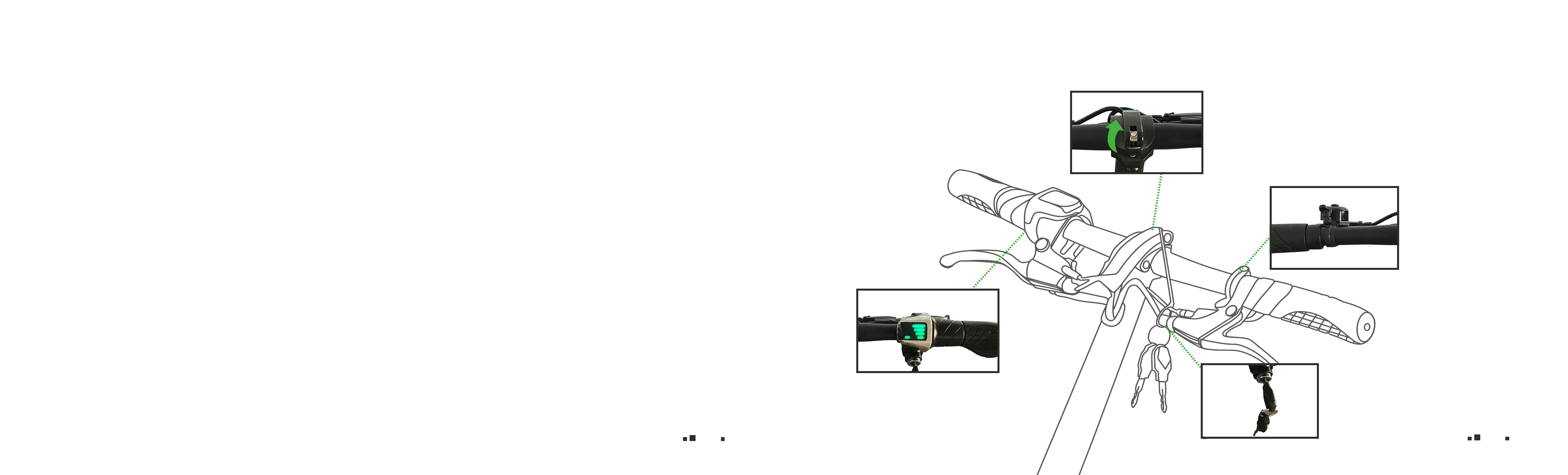
Controller Set Up
11
Do not use your mobile phone when riding – this can cause you to be distracted – stay alert!
Make Sure Your Scooter is Well-Maintained
Follow the inspection and maintenance guidelines. Check critical safety equipment before every ride.
Know the Law
Cyclists are required to follow the rules of the road. Additionally, some communities regulate the use of motorized vehicles with
minimum age, requirements and necessary equipment. Check with your local police department for specic details.
O-road Riding
O-road riding is not recommended as the scooter tires are for street-use only. Dust and extreme impacts from o-road riding can
cause electrical system problems.
Ride Within Your Limits!
Take it slow until you are familiar with your local riding conditions. Be especially careful in wet conditions as traction can be greatly
reduced and brakes become less eective. Never ride faster than conditions warrant or beyond your riding abilities. Remember that
alcohol, drugs, fatigue, and distractions can signicantly reduce your ability to make good judgments and ride safely.
Analog Bell
Battery Display
Shows the battery strength
illuminated by green colored
bars.
Key Port
Turn right to power
onscooter.
Clamp
Pull up the clamp, then loos-
en the screw to twist/adjust
the handlebar.


 To Next Page