7
Charging
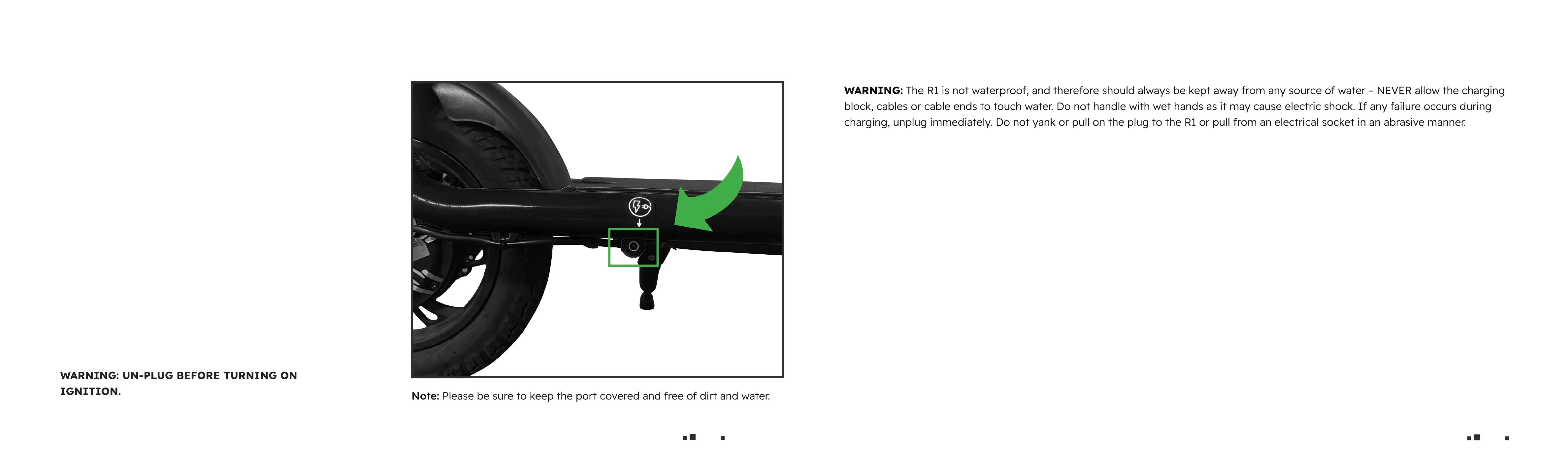
• The charging port is located under the R1 baseboard.
• Plug the charging cable into the charging port.
(Make sure the connection is dry)
• The indicator LED of the charging adapter turns red
when charging and turns green when the battery is
full. Please stop charging when it is full to prevent
battery life from deteriorating. Please use the
batteries, chargers and cables supplied by the
original manufacturer to prevent the battery from
being overcharged.
• When nished charging, close the charging ap to
prevent any damage to the port.
8
Charging & Battery Safety tips
• Check battery level before the rst use.
• It is recommended that the battery be recharged after each use.
• To maximize the battery life, please charge once per month or after at least 2 days of operation.
• Recharge the battery pack at least once per month as all batteries of every type will slowly discharge energy when left idle for extend
ed periods of time.
Try to keep the battery from being exposed to excessive heat or very hot temperatures.
• Please use the batteries, chargers and cables supplied by the original manufacturer to prevent the battery from being overcharged.
• Do not allow the charger or cable to contact sharp or hot items.
• Perform a visual inspection of the charger and charging cables regularly.
• If the charging cable has obvious damage – do not use the charger to avoid injury or electrical damage.
• Please do not repair the battery, the charger, or the cable independently.
• Please ensure that the charger and charging cables are connected correctly and are free of dust, dirt, and water.
• Prolonged exposure to UV rays, rain and elements may damage the encloseure materials, store indoors when not in use.
• The charging range and use range are 0º - 40ºC.
• Please do not disassemble parts by yourself.
Please contact us if you experience any problems or issues.



 To Previous Page