5
*Consult a licensed electrician.
If the above solutions do not solve the problem, contact Glentronics customer service 800-991-0466.
Pump is not plugged in
Water is not high enough to activate the pump
Open circuit
Poor power source
Low voltage
Bad power cable
Locked impeller
Defective float switch
Defective pump
Locked impeller
Incorrect power supply
Overburdened due to heavy sand content in the water
Pump running continuously with no water present
Float switch or sensor is mounted too low
Water flowing back from pipe
Malfunctioning float switch
Clogged or frozen discharge
Blocked intake
Float switch is obstructed and can not drop down
Defective float switch
Check valve installed with no air bleed hole in
pipe or pump
Check valve is stuck or installed upside down
Worn impeller
Partially blocked impeller
Clogged or frozen discharge
Broken or leaking pipe
Low power voltage
Check valve installed with no air bleed hole in
pipe or pump
Check valve is stuck or installed upside down
Pump is air locked
Check valve on secondary pump will not close
and water re-circulates within the system
Blocked intake
Broken impeller
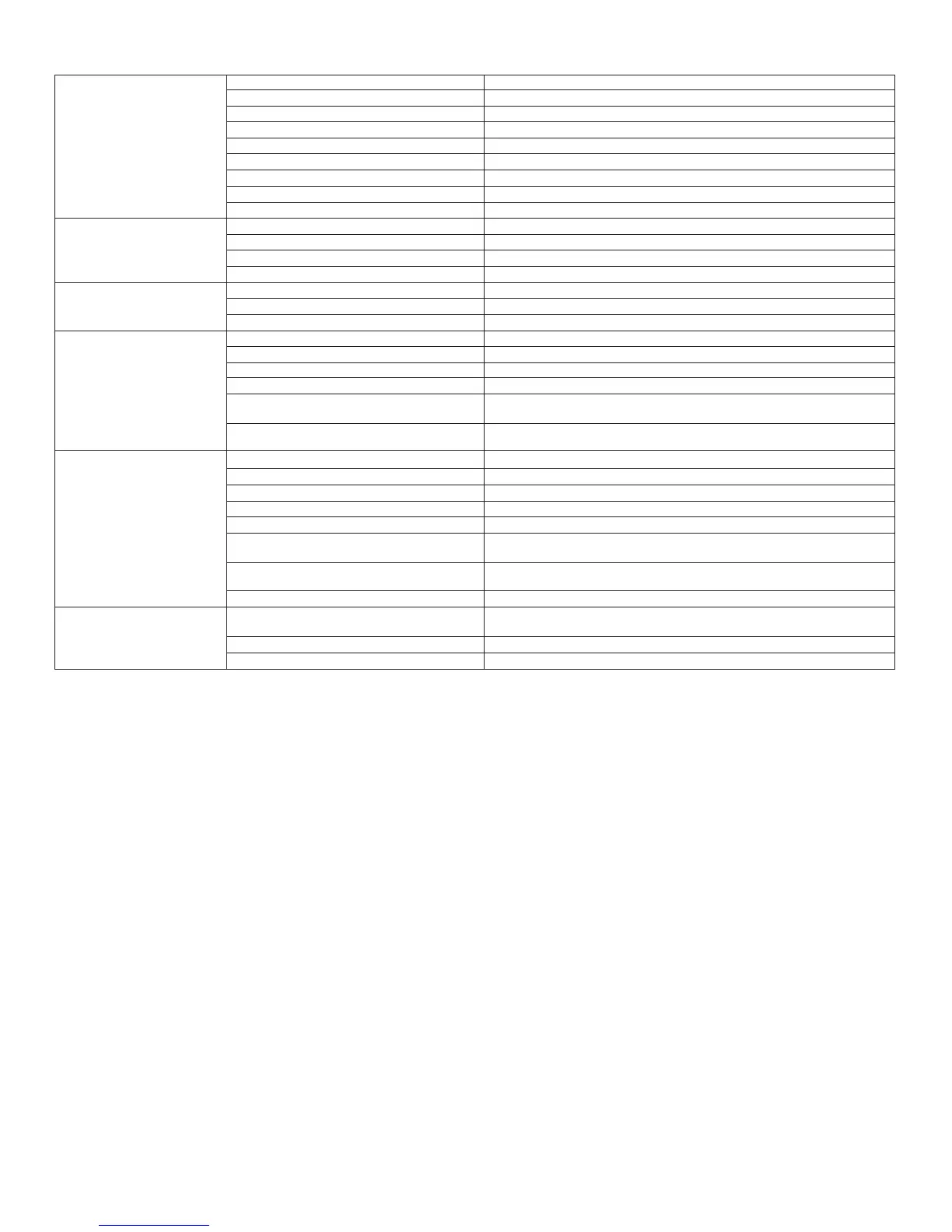
The pump will not start or run
Thermal protector tripping or
not functioning
Pump starts and stops too
frequently
Pump will not shut off
Insufficient or no water
volume
Abnormal sound or vibration
Plug pump in properly (see instructions)
Make sure float switch is positioned properly
Check circuit breaker or fuse
Check circuit line wires and cable*
Check line wires and source voltage*
Replace with new cable*
Remove strainer and clear obstruction
Replace float switch with new float switch
Replace pump with new pump
Remove strainer and clear obstruction
Check power supply source and voltage
Use water filter or replace with a higher wattage pump
Check float switch
Raise float switch or adjust timer (Enhanced or Deluxe Controller)
Install or replace check valve
Replace float switch with new float switch
Clear blockage or thaw frozen line
Clear debris from intake
Clear obstruction from float switch
Replace float switch with new float switch
Drill a bleed hole in the discharge pipe, or clean debris from the existing hole
in the pipe or pump
Reverse or replace check valve. Make sure the check valve is installed with the
flow arrow pointing up and out of the pit.
Replace impeller & adjust spacing between impeller and cover
Remove strainer and clear obstruction
Clear blockage or thaw frozen line
Repair piping
Check power voltage, wires and cable condition
Drill a bleed hole in the discharge pipe, or clean debris from the existing hole
in the pipe or pump
Reverse or replace the check valve. Be sure check valve is installed with flow
arrow pointing up and out of the pit.
Remove debris from the air bleed hole
Replace the check valve on the secondary pump
Clear debris from intake
Replace impeller with new one
Troubleshooting
(Always unplug the pump from the controller before performing any maintenance)



 To Next Page
 Loading...