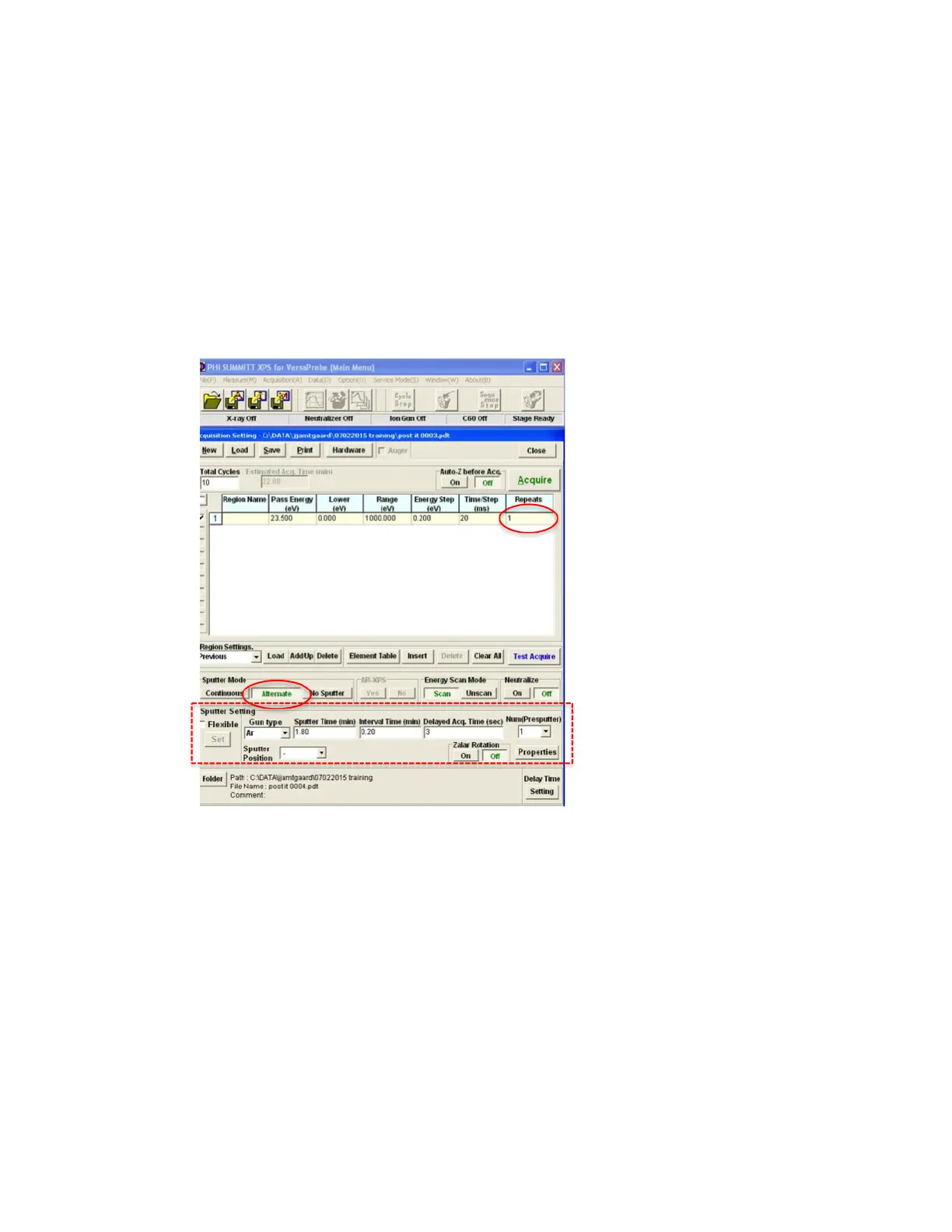
• Interval Time (min)= sputter increments, in
units of .5min.
• Delayed Acq. Time (sec) = Delay before
acquisition to allow count rate to stabilize. 3s is
typical.
• Num(Presputter) = How many scans to take
before 1
st
sputter. 1 is typical.
o Now, number of cycles is determined by sputter settings. Add
“repeats” to increase signal for some acquisitions.
o Push ACQUIRE to begin depth profile.
o The charge neutralizer can be used during depth profiling.
5. To Shut Down Sputtering/Neutralizer
a. Summitt-> Acquisition Setting window (LHS)-> Choose No Sputter
in “Sputter Mode” category (FIG 9).
b. Summitt-> Acquisition Setting window (LHS)-> Choose Off in
“Neutralize” category (FIG 9).
c. Summitt-> “Image” Window (RHS) -> “Ion Gun” Tab: Push Off (FIG
6).
d. On Pfeiffer RVG050 box (FIG 7), toggle white switch to Limit.
Never turn off power to Pfeiffer RVG050!
e. Summitt-> “Image” Window -> Push Off in Neutralizer Tab (FIG 8).


 To Next Page
 Loading...