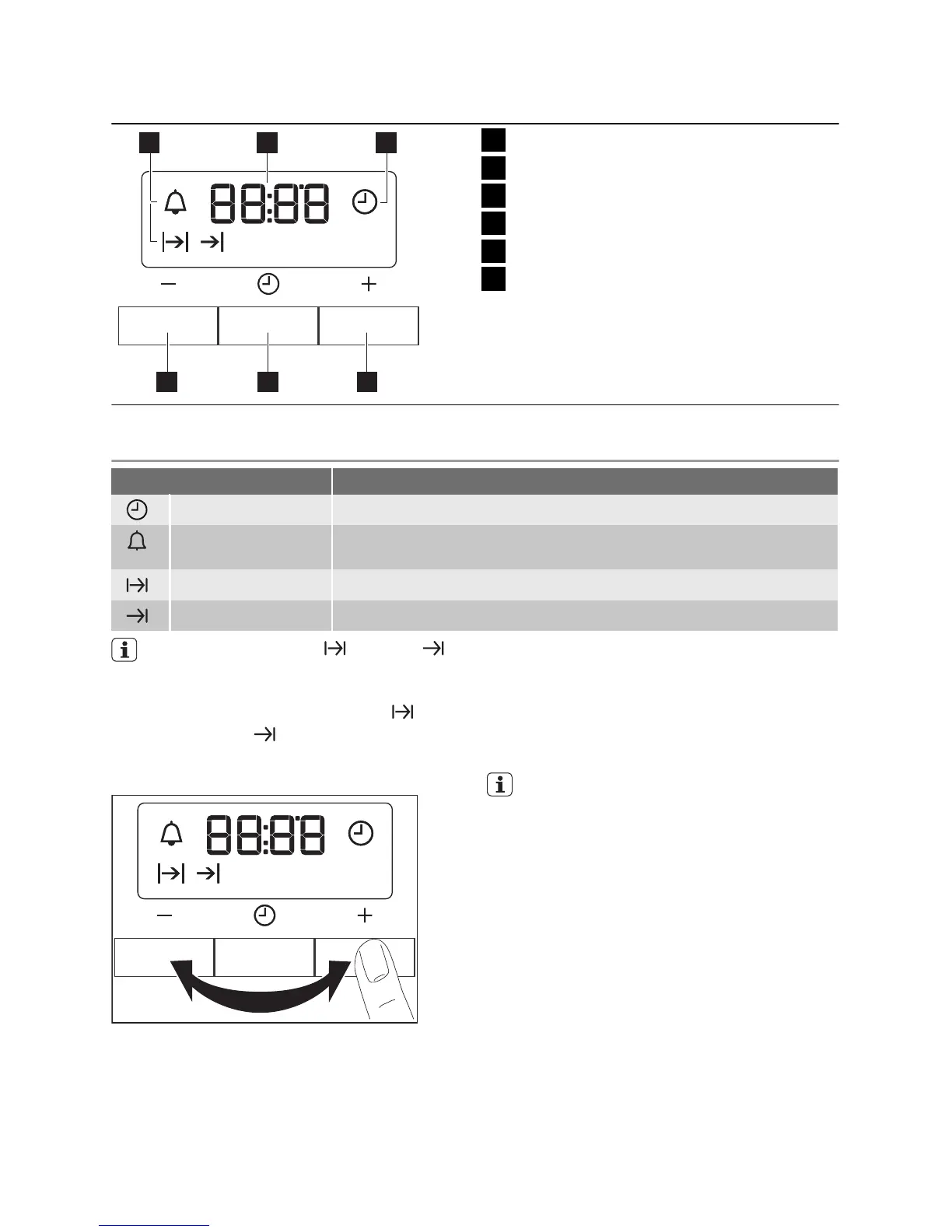
Electronic programmer
hr min
1 2 3
456
1
Function indicators
2
Time display
3
Function indicator
4
Button +
5
Selection button
6
Button -
CLOCK FUNCTIONS
Clock function Application
Time of day To show, set, or change the time.
Minute minder To set a countdown time. This function has no effect on the op-
eration of the oven.
Duration To set the length of an oven operation.
End To set the switch-off time for an oven function.
You can use Duration and End
at the same time if you want the appli-
ance to activate and deactivate auto-
matically: first set the Duration
and
then the End
.
Setting the clock functions
hr minhr min
1.
For Duration and End, set an oven
function and temperature. This is not
necessary for the Minute Minder.
2. Press the Selection button again and
again until the indicator for the neces-
sary clock function flashes.
3. Press + or - to set the necessary clock
function.
The display shows the indicator for the
clock function you set. When the set
time ends, the indicator flashes and an
acoustic signal sounds for two minutes.
With the Duration and End functions,
the appliance deactivates automatical-
ly.
4. Press a button to stop the signal.
5.
Turn the knob for the oven functions
and the knob for the temperature to the
off position.
Cancelling the clock functions
1. Push the Selection button again and
again until the necessary function indi-
cator flashes.
2.
Push and hold the button -.
After some seconds the clock function
goes out.
7


 To Next Page