Product Manual
© Philips Ledalite 2011 Page 15
19.0 Transceiver Configuration Instructions
19.1 Understanding and Navigating in Configuration Mode
TableAbelowoutlinestheCongurationMenuthroughwhichthesettingsofthetransceivercanbeadjustedanddevicescanbelinkedorunlinked.
When using configuration mode note the following important points:
•CongurationofaTransceiverrequiresanAirwaveSwitchtobelinkedtotheAirwaveTransceiver.
•TheTransceivermustbeconnectedtoalampedlightxture.
•ThecongurationsettingswillbeindicatedbythenumberofblinksontheTransceiver’slightxture/circuit.
•ConguretheballasttypeFIRSTtoensuretheblinkcodeswillbevisible(indimmingballastmode,theTransceiverusesdimmingtodisplaythecodesinsteadofON/OFFblinking).
•ClickingtheSwitchON/OFFwillnavigateyouup/downthecongurationtable.
•Toselectacongurationmodetoedit,pressandholdtheSwitchONforapproximately3secondsuntilthelightxture/circuitSwitchesandstopsthepriorblinkingsequence.
•MakeeditstothecongurationbyclickingONorOFFtotheappropriatesetting.
•PressandholdtheSwitchONforapproximately3secondstotemporarilysavethecongurationsettingandreturntothecongurationtable.
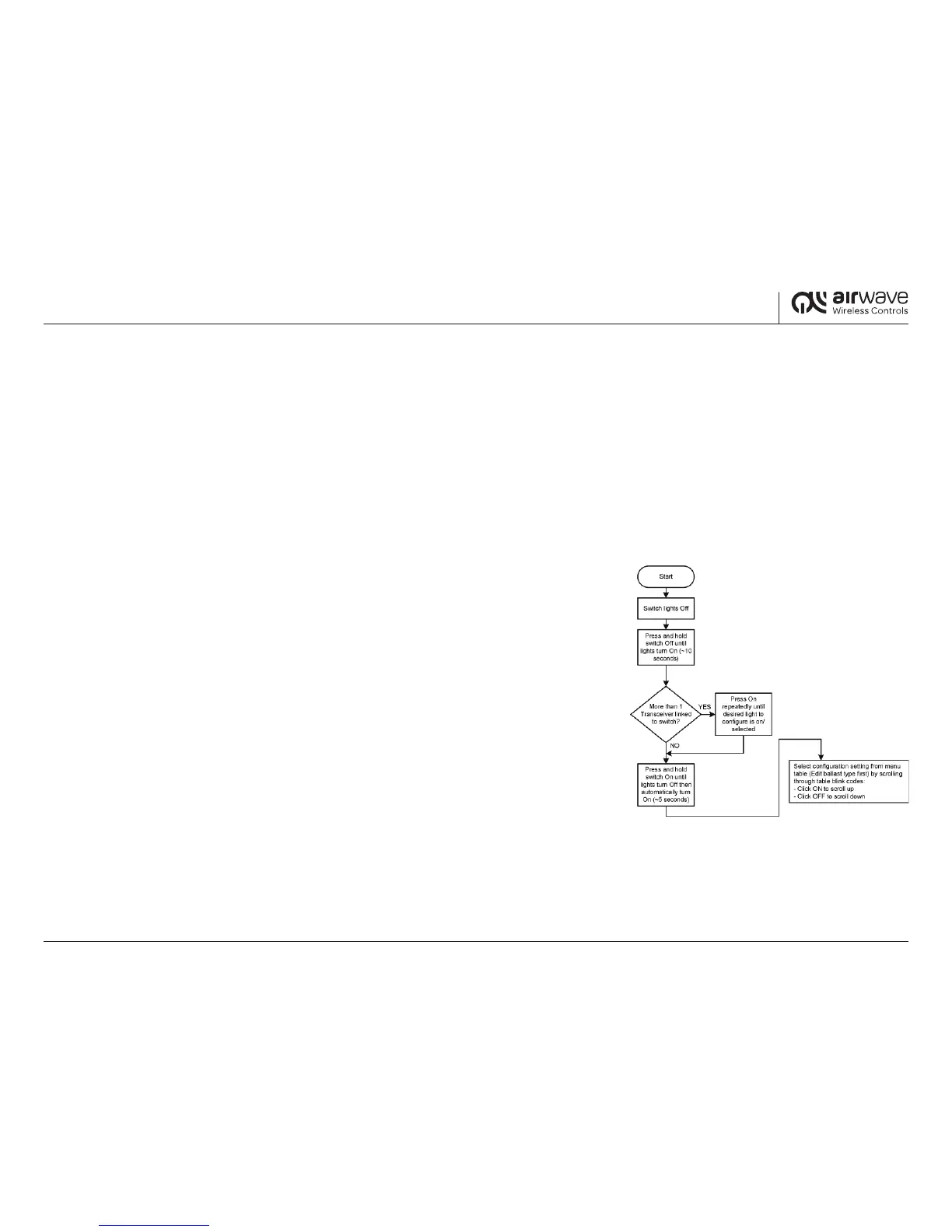
19.2 Steps to Enter Configuration Mode
Step 1: TurnthelightxturesOFFusingAirwaveSwitch.
Step 2: PressandholdtheSwitchOFFuntilthelightxturesturnON(approximately10seconds).
This indicates that the Airwave Transceiver is now in configuration mode.
Step 3: SelectaTransceivertocongure:
3.1 SelectingasingleTransceiverlinkedtoaSwitch:PressandholdtheSwitchONfor
approximately5secondsuntiltheTransceiverlightxtureturnsOFFthenturns
ONagainautomatically.
3.2 SelectingoneofmultipleTransceiverslinkedtoaSwitch:ClicktheSwitchON
tocyclethroughthelinkedTransceiversuntilthextureyouwanttocongureturns
ON.PressingOffinthisstagewillexitcongurationmode.
Step 4: PressandholdtheSwitchONforapproximately5secondsuntiltheTransceiverlightxture/
circuitturnsOFFthenturnsONagainautomatically.


 To Next Page
 Loading...