17” CDT Color Monitor 107E7
67
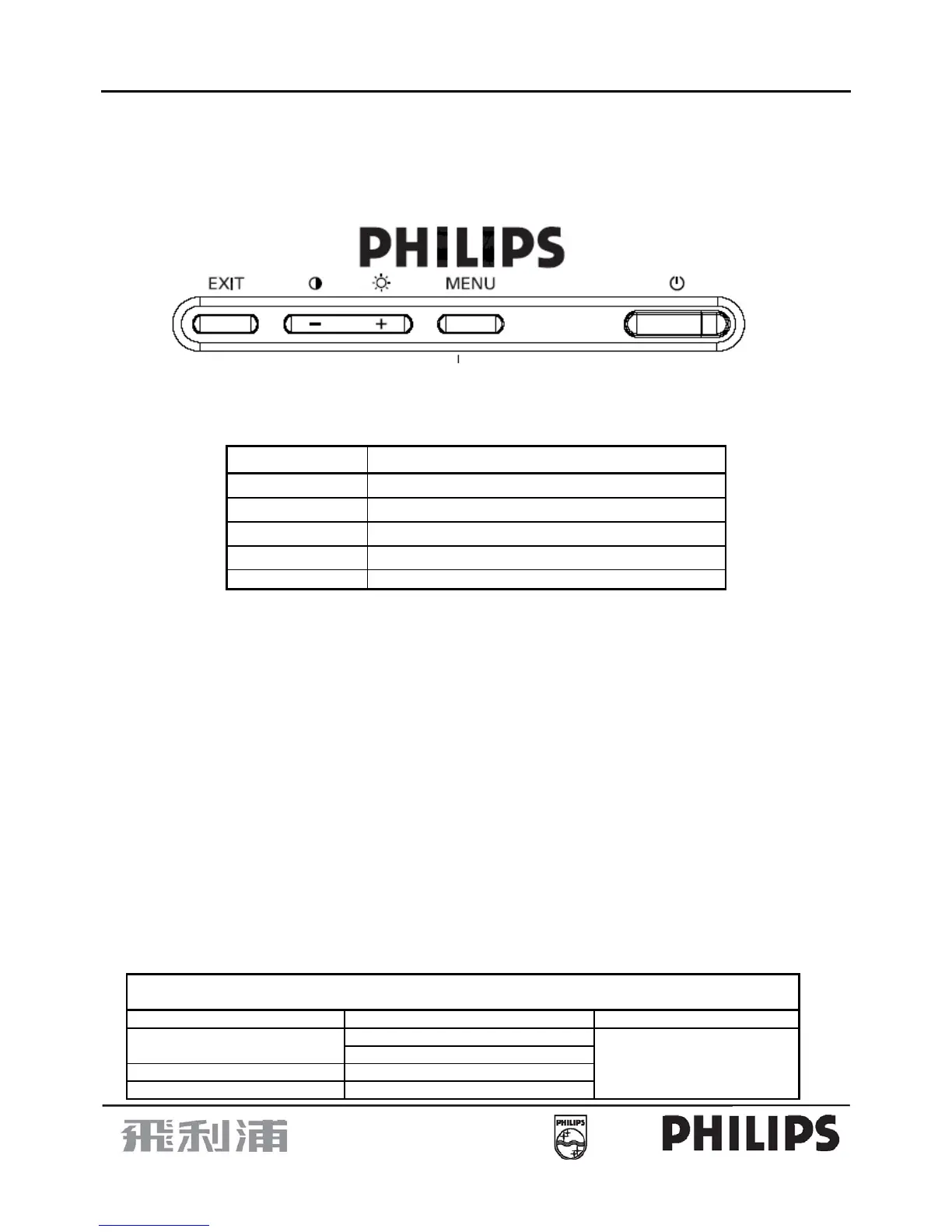
2.7 User Controls / Indicators / Connectors
2.7.1 Front controls
• OSD menu is accessed by the keypad.
Key (R to L) Function
Power Tact DC switch
Menu OSD Menu
“ + ” Brightness/Adjust increase/Menu selection
“ - ” Contrast/Adjust decrease/Menu selection
Exit OSD menu exit
•
Access main menu by pressing “MENU” key.
•
Select function via “+/-” & “MENU” keys, increase/decrease via “+/-” keys.
• Brightness control - Direct access only by hotkey.
• Contrast control - Direct access only by hotkey.
• Exit - Exit OSD menu
2.7.2 OSD Menu
•
Languages (per region) - 8 languages (English, French, German, Italian, Spanish,
Portuguese, Korean,
Simplified Chinese
).
9 languages (English, French, German, Italian, Spanish,
Portuguese, Korean, Turkish, Russian).
• OSD tree - As shown below.
OSD tree / English
1
st
level 2
nd
level 3
rd
level
8 LANGUAGES LANGUAGE (per region)
9 LANGUAGES
ZOOM
ADJUST HORIZONTAL POSITION


 To Next Page