Result.Comments.
Result.Comments.
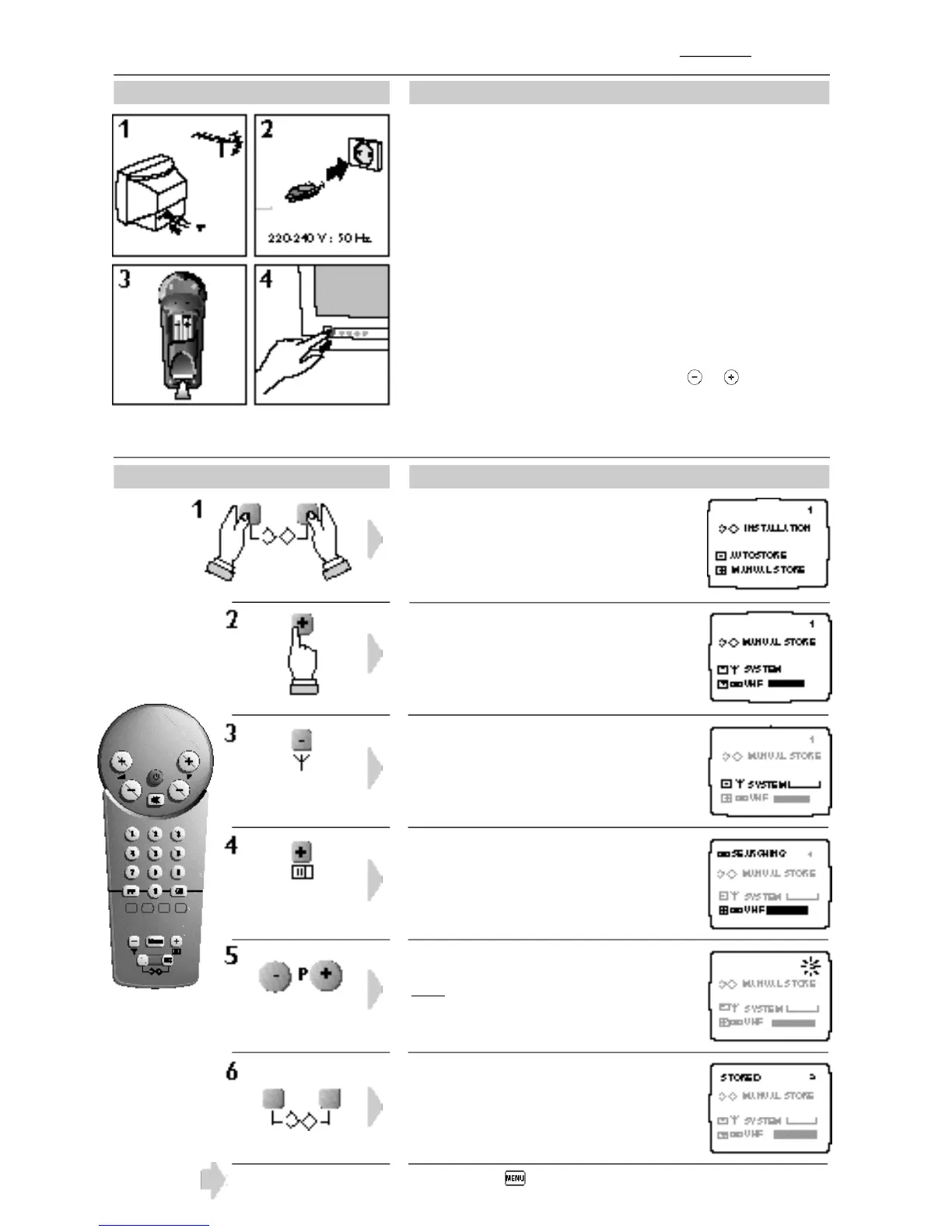
Insert the two LR03 type batteries (supplied) making sure
that they are the right way round.
Small-screen TV sets are supplied with an indoor antenna,
which under certain reception conditions may not be
acceptable. You may be able to improve reception by rotating
the antenna or if reception remains poor the use of an
external antenna.
1
2
3
4
Plug your television into the mains supply
(220-240 V / 50 Hz).
To switch on the TV set, press the on/off button. If the TV
set remains in standby mode : press the P keys on the
remote control.
Action :
The INSTALLATION menu is displayed
on the screen.
Option only available on certain versions.
Press key until required system appears :
WEST . EUR (PAL BG, SECAM BG) or
EAST . EUR (PAL DK, SECAM DK).
SEARCHING appears, the search bar
shows progress.
When a programme is found, the number
flashes.
Enter the programme number you want.
Note: Programme number 0 cannot be used.
STORED appears, the programme is
stored.
Repeat steps 4 to 6 to store each
programme.
To leave the INSTALLATION menu press twice.
5
System selection.
Channel search.
Choose the
Programme No.
Channel search : Manual Stor e
English
Installation
The MANUAL STORE menu appears.
Action :








 To Next Page