4
44
n
VIDEO AUDIO
˙
˝
˚
¸
VOLUME CHANNEL
LK
˚
¸
INSTALL /
MENU
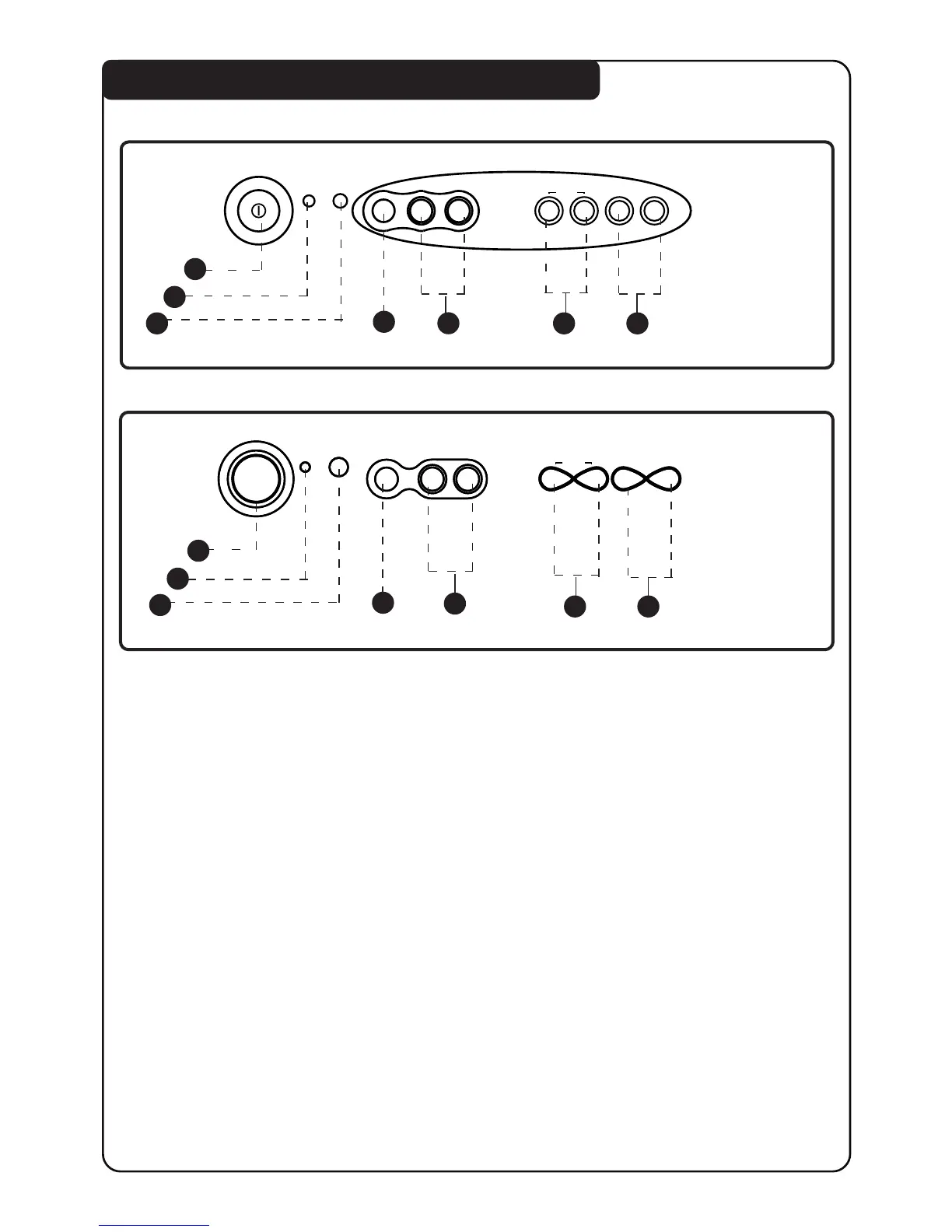
FUNCTIONS OF TV FRONT CONTROLS/SOCKETS
14PT1582
20PT1582
1. Mains Power button Switch mains power on or off.
2. Standby light indicator Indicate red light when standby mode is activated.
3. Remote Sensor Aim remote control handset at remote sensor when
operating the TV.
4. Headphone socket Connect headphone jack to socket for personal listening.
5. AV “in” sockets Connect to Video “out” and Audio “out” sockets of VCR
laser disc player, etc.
6. Volume
˝ ˝
˝ ˝
˝ /
˙˙
˙˙
˙ button Adjust sound volume louder/softer.
7. Channel
¸ ¸
¸ ¸
¸ /
˚˚
˚˚
˚ button Select channel in ascending/descending order.
Note : You can enter the main menu by pressing both
the Volume
˝˝
˝˝
˝ /
˙˙
˙˙
˙ buttons at the same time.
Press Channel
¸¸
¸¸
¸ /
˚˚
˚˚
˚ button to select items on the menu.
Press Volume
˝˝
˝˝
˝ /
˙˙
˙˙
˙ button to activate sub-menu.
1
3
4
5
2
6 7
n
VIDEO AUDIO
VOLUME
LK
˙
˝
˚
¸
CHANNEL
˚
¸
INSTALL /
MENU
3
n
VIDEO AUDIO
VOLUME
LK
˙
˝
˚
¸
CHANNEL
˚
¸
INSTALL /
MENU
3
21PT1582
1
3
4
5
2
6 7



 To Next Page