your home's signal it_put might come from
sin_e (75 ohm) round cable, a
Converter Box, or from an anteana_ In either
case the connec_onto the TV is very easy.
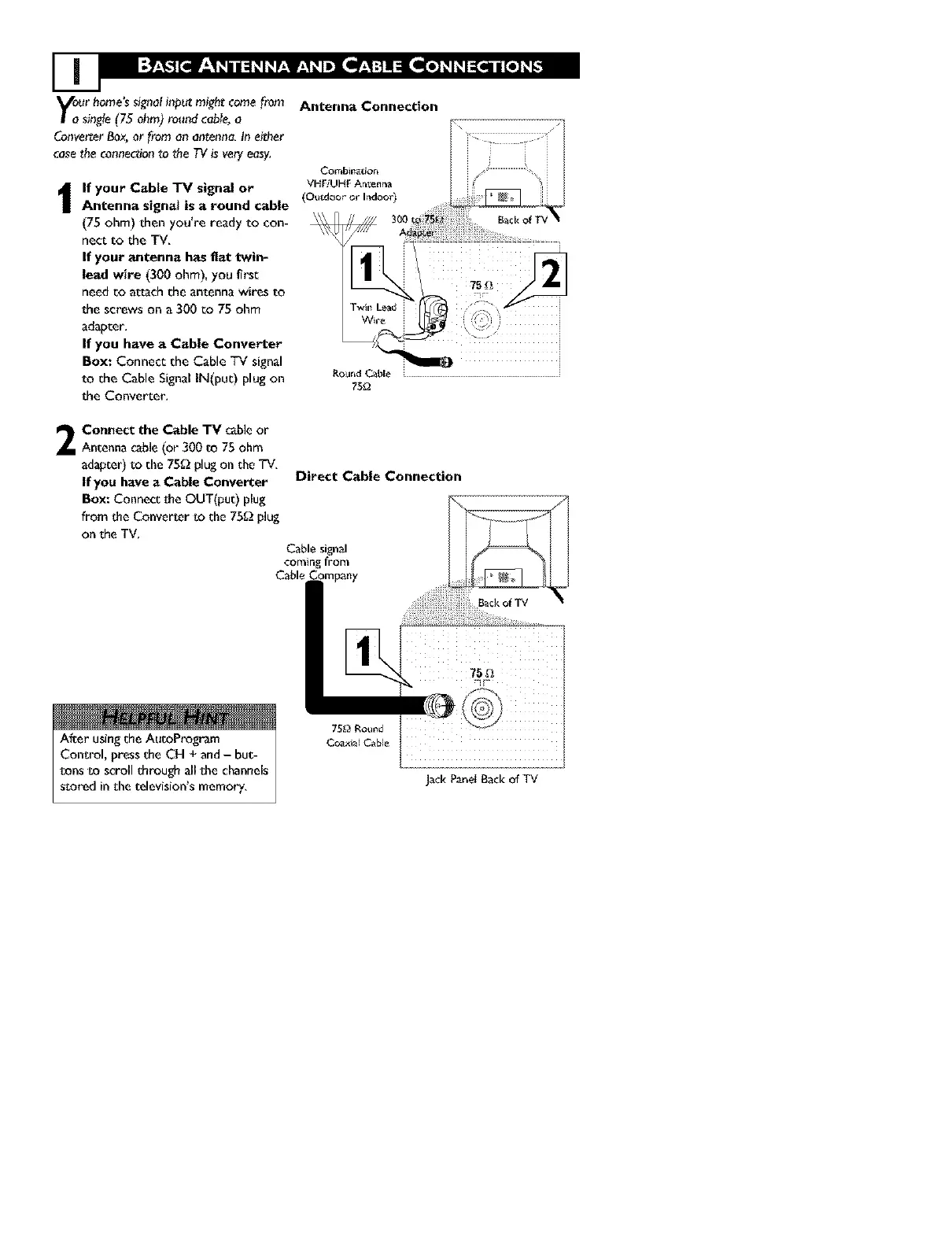
If your Cable "IV signal or
Antenna signal is a round cable
(75 ohm) then you're ready to con-
nect to the TV.
If your antenna has flat twin-
lead wire (300 ohm), you first
need co attach the antenna wires to
the screws on a 300 co 75 ohm
adapter,
If yOU have a Cable Converter
Box: Connect the Cable TV signal
to the Cable Signal IN(put) plug on
the Converter,
2
Connect the Cable "rv cableor
Antenna cable (or 300 to 75 ohm
adapter) to the 75_ plug on the TV.
If you have a Cable Converter
BOX: Connect the OUT(put) plug
from the Conver_er to the 75g_ plug
on the TV,
Antenna Connection
Ro_J_d Cable . J
75_
Direct Cable Connection
Cable signal
coming from
Cable Company
After usingthe AutoPt'ogram
Control, pressthe CH + and- but-
tens te scroll through all the channels
s_oredin the television'smemory,
Jack PanetBack of TV



 To Next Page