If youcablesignalusesa cableboxor
decoder,followthe easystepsbelowto
completethe cannectlon,
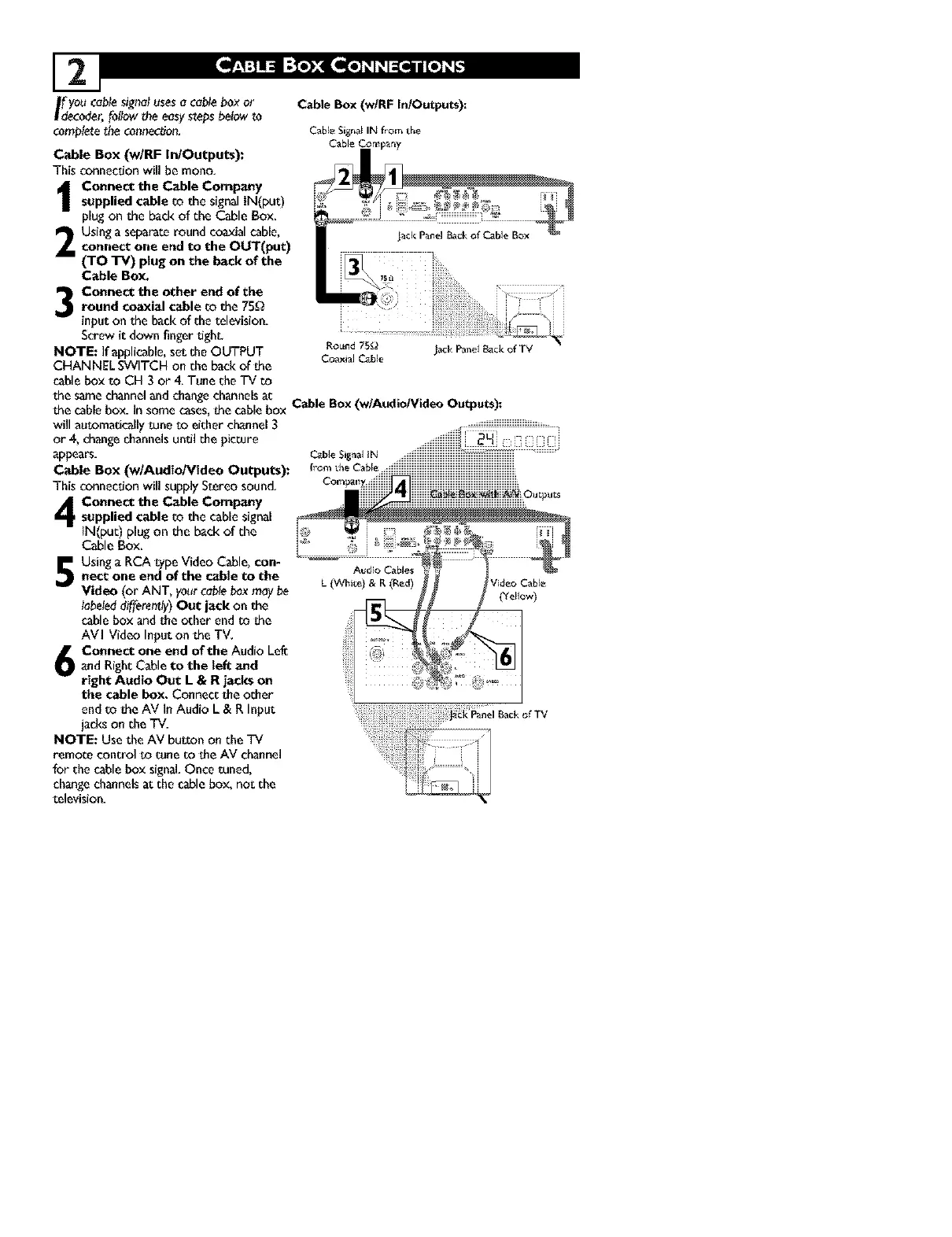
Cable Box (w/RF In/Outputs):
This connection will be mono,
Connect the Cable Company
supplied cable _o the signal IN(put)
plug on the back of the Cable Box.
Using a separate round coaxial cable,
connect one end to the OUT(put)
(TO TV) plug on the back of the
Cable Box.
Connect the other end of theround coaxial cable to the 75_
input on the back of the television.
Screw it down finger tight.
NOTE: If applicable, set the OUTPUT
CHANNEL SWITCH on the back of the
cable box to CH 3 or 4. Tune the TV co
Cable Box (w/RF In/Outputs):
Cable Signal IN f_om the
Cable Company
Audio Cables
L (White) & R (Red)
will a_tomadcal_y tune to either channel 3
or 4, change channelsuntil the picture
appears.
Cable BOX (w/Audio/Video Outputs):
This connection will supply Stereo sound.
Connect the Cable Company
supplied cable to the cable signal
iN(put) plug on the back of the
Cable Box.
Using a RCA type Video Cable, con-
nect one end of the cable to the
Video (or ANT, your cable box may be
labeled differently) Out jack on the
cable box and the other end m _he
AVI Video Input on the TV,
Connect one end of the Audio Lef_
t and Right Cable to the tef_ and
right Audio Out L & R jacks on
the cable box. Connect the other
end to die AV In Audio L & R Input
jacks on the mv.
NOTE: Use the AV bu_on on the TV
remo_e control _o tune to the AV channel
for the cable box signal. Once tuned,
change channels at the cable box, not the
television.
CableS,_oa__N ......
fromthe Cable _iiiiiiiiiiiiiiiiiiiiiiiiiiiiiiiiiiiiiiiiiiiiiiiiiiiiiiiiiiiiiiiiiiiiiiiiiiiiiiiiiiiiiiiiiiiiiiiiiiiiiiiiiiiii
the samechannelandchangechannelsat Cable Box(w/Audio/Video Outputs):
the cablebox. In somecases,_hecablebox



 To Next Page