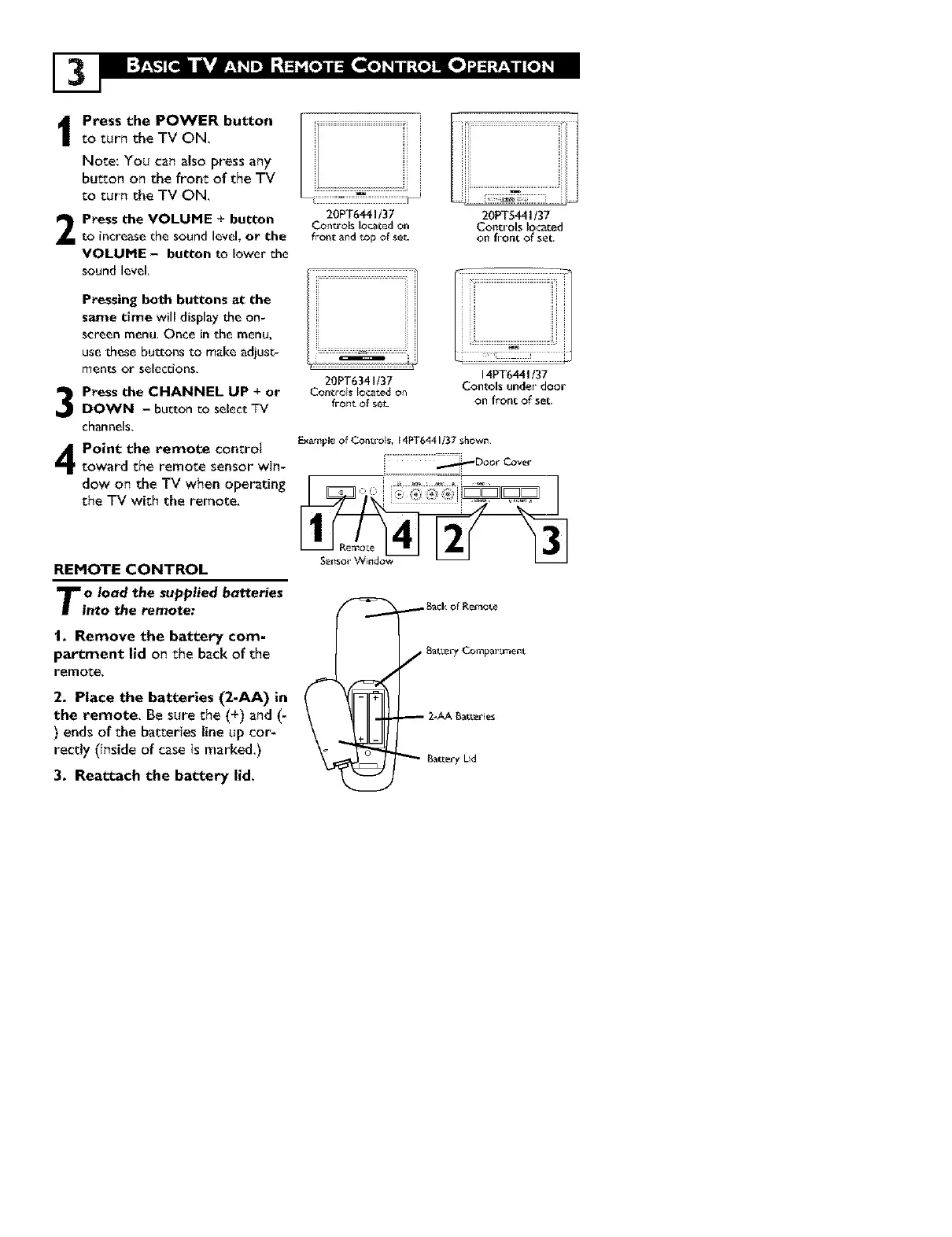
I ress the POWER button
to turn the TV ON.
Note: You can also press any
button on the front of the TV
Eo turn the TV ON.
Press the VOLUME + button
to increase the sound level, or the
VOLUME - button to lower the
sound level,
3
4
Pressing both buttons at the
saJTle time will display the on-
screen menu, Once in the menu,
use these buttons to make adiusc-
ments or selections,
Press the CHANNEL UP + or
DOWN - button co select TV
channels,
Point the remote control
toward the remote sensor win-
dow on the TV when operating
the TV with the remote.
REMOTE CONTROL
To Iood the supplied botteries
into the remote:
!. Remove the battery com-
partment lid on the back of the
remote,
2. Place the batteries (2-AA) in
the remote. Be sure the (+) and (-
) ends of the baEeries line up cor-
rectly (inside of case is marked.)
3. Reattach the battery lid,
i ..................................................................
20PT6441t37
Conu'ols located on
frontand topofse_-
20PT6341/37
Controls located on
front of set_
20PT5441/37
Controls located
on front of set.
14PT6441/37
Contols under door
on front of set.
ExampleofControls, 14PT6441i37 shovcn.
::::::::_Door Cover
_BackofRefaote
f BatLery Compartment
2-AABatLeries
Bat_er_ Lid



 To Next Page