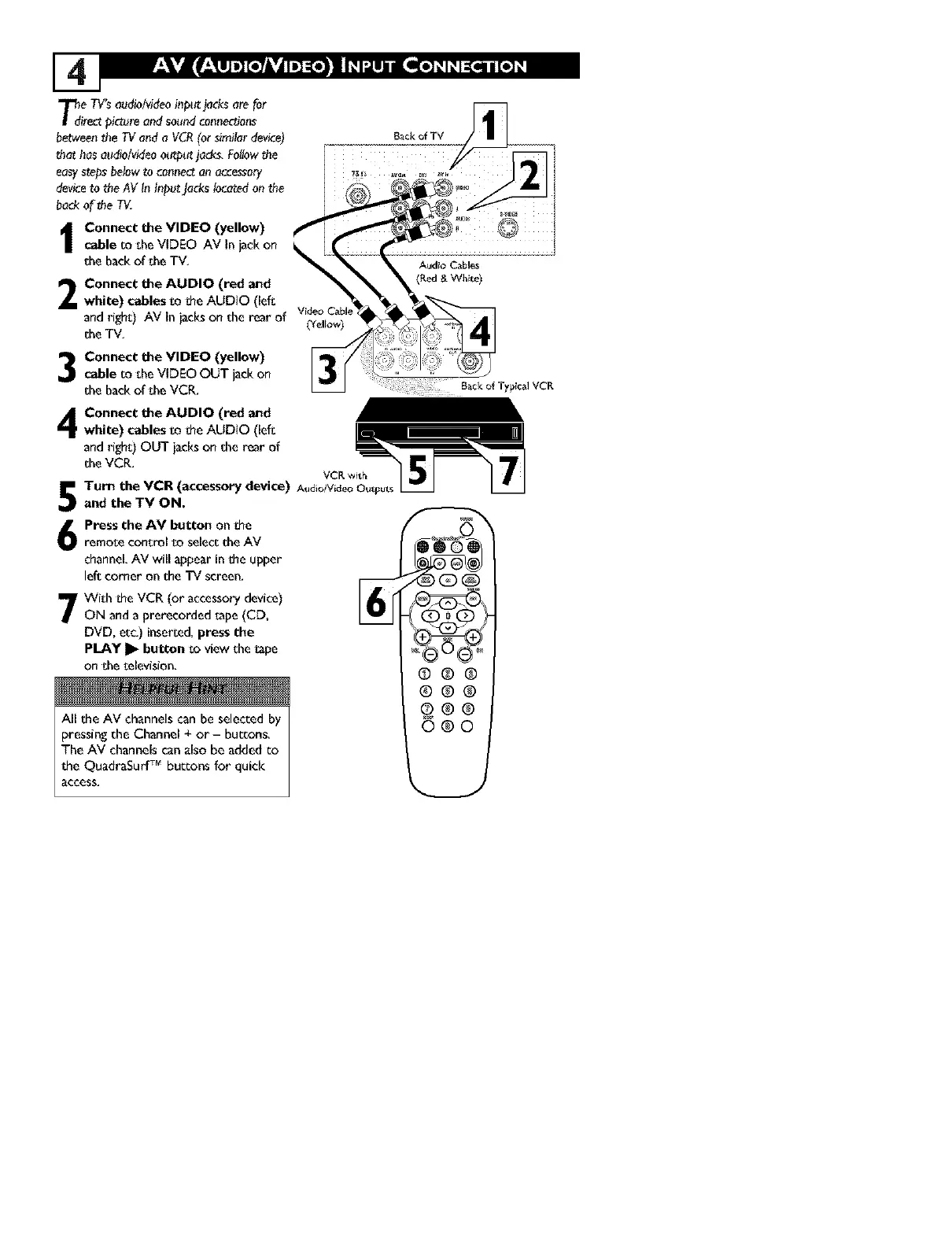
T_de TV'saudio/videoi_p_ jacksare for
irectp!ctureoadsoundco_mectio_
betwee_the TVa_d a VCR(or similardevice) BackofTV
that hasaudio/videoot_ut jade, Fol!owthe
easystepsbelowto co_mec_onocee_ory
deviceto theAV In InputJackslocatedonthe
bad<of _heTV.
Connect the VIDEO (yellow)
cable m sheVIDEO AV In_ck on
the backof the TV, Audio Cabl_s
2
Connect the AUDIO (red and
white) cables ro the AUDIO (lefs
_nd right:) AV in iacks on the rear _f videoCabl_
she TV,
Connect the VIDEO (yellow)
cable r_ sheVIDEO OUT jack on
shebackof sheVCR,
B_ck of Typical VCR
Connect the AUDIO (red and
white) cables _o the AUDIO (lefs
and righs) OUT jacks on she r_r of
she VCR,
VCK _it_
Turn the VCR (accessory device) At_dioiVideoO_st
and the TV ON.
Press the AV button on the
i romose consrol r_ selecs she AV
channel,AV will appear in the upper
left corner on she TV screen,
7With the VCR (or accessorydevice)
ON anda prerecorded _ape(CD,
DVD, ere,) inserced,press the
pLAY I_ button so view she_ape
on sheselevision,
All the AV channels can be selected by
pressing the Channel + or- buttons,
The AV channels can also be added co
the QuadraSurf TM buttons for quick
access,



 To Next Page