10
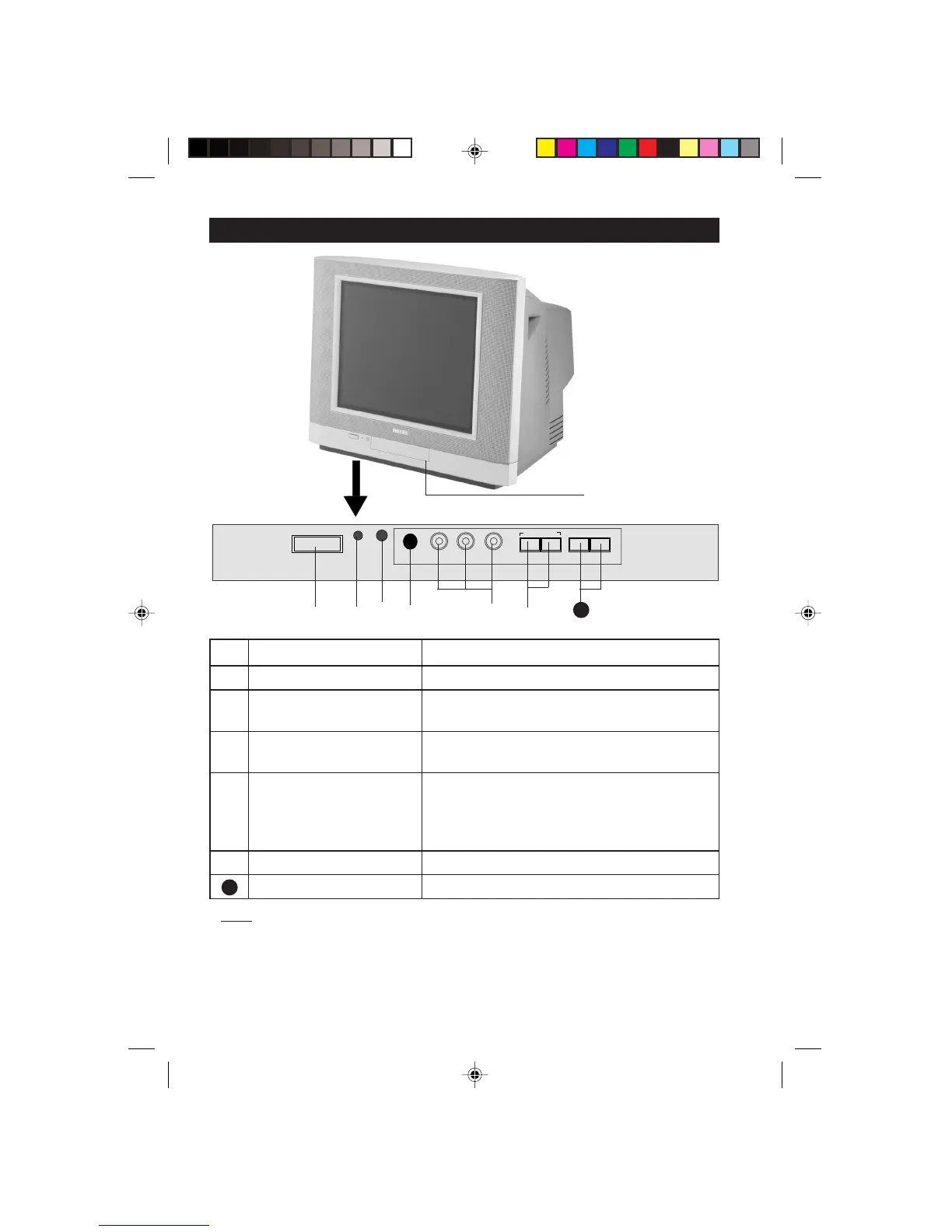
& Mains Power button Switch mains power on or off.
é Standby light indicator Indicate red light when standby mode is activated.
“ Remote Sensor Acts as a sensor for activating the controls of the
TV when remote control handset is aimed at it.
‘ Headphone socket Connect headphone jack to socket for personal
listening.
( AV “in” sockets Connect to Video “out” and Audio “sockets”
to VCR, VCD, etc. (For more details on
connection, refer to section “Connecting the
Audio/Video Sockets”).
§ Volume – /
+ buttons Adjust sound volume softer/louder.
Channel
¸/ ˚ buttons Select channel in ascending/descending order.
Note
• You can enter the main menu by pressing both the Volume – and + buttons
at the same time.
• Press the Channel
¸¸
¸¸
¸/
˚˚
˚˚
˚ button to select the next item on the menu.
• Press Volume – / + button to access sub-menu and adjust the settings.
FUNCTIONS OF TV CONTROLS
Push catch of lid
upwards to open
front controls cover
7
3
¸ CHANNEL ˚
– VOLUME
+
;
VIDEO
L AUDIO R
INSTALL MENU
& é
‘(“ §
7
15PT2302/p5-10 7/6/01, 11:37 AM10



 To Next Page