EasyManua.ls Logo

Philips 15PT2302 - Select Channel

Philips 15PT2302
35 pages
Print Icon
To Next Page IconTo Next Page
To Previous Page IconTo Previous Page
Loading...
14
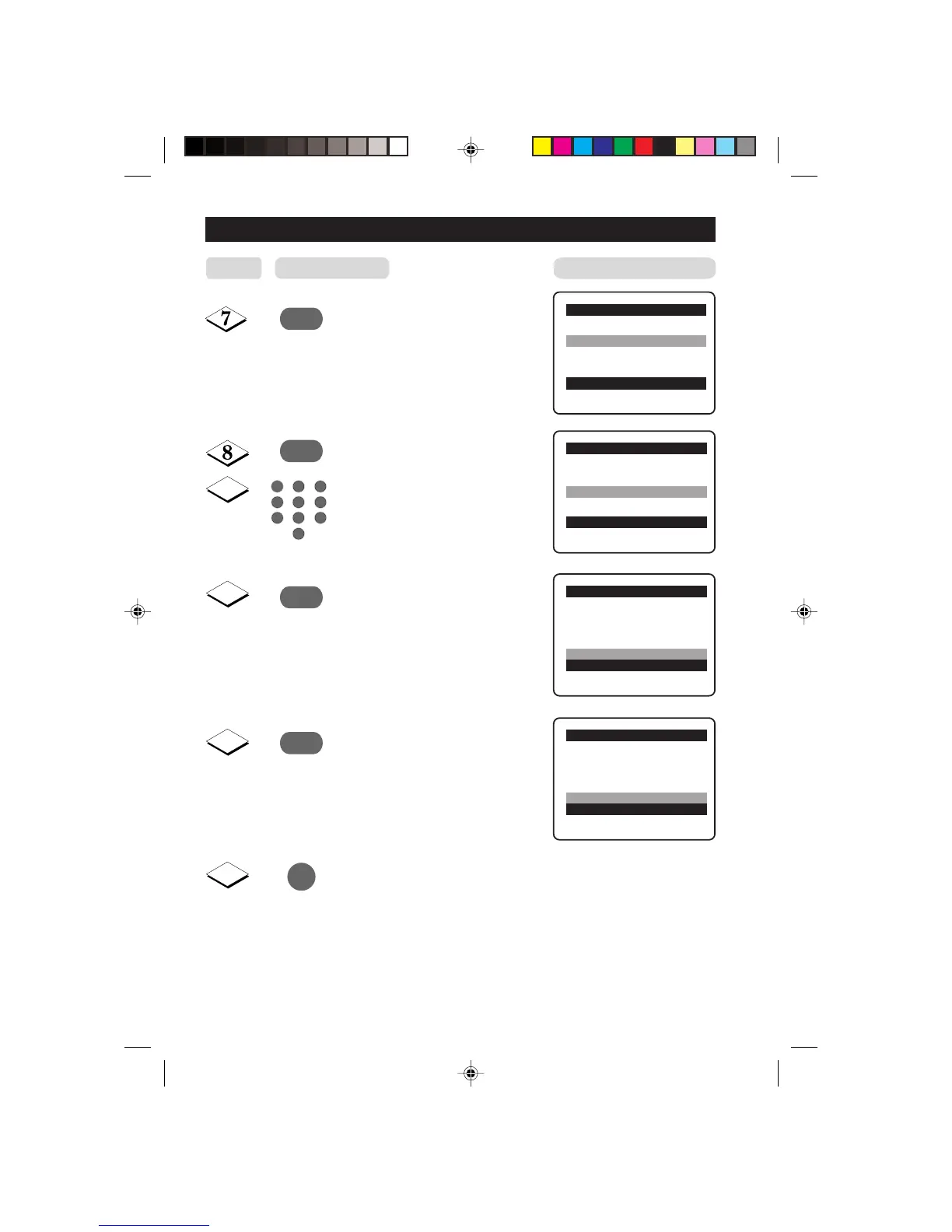
CHANNELSMANUAL T UNING OF CHANNELS
¸
Manual Store o
Colour System
Sound System
Search
Channel 2 π
Fine Tune
Store
œ
Manual Storeo
Colour System
Sound System
Search
Channel
Fine Tune
Store Store?π
œ
˙
¸
9
10
11
Manual Storeo
Colour System
Sound System
Search
Channel
Fine Tune
Store Stored
œ
12
˙
Start manual searching. Searching
stops once a transmitting signal is
found.
Select Channel.
Key in the channel number.
Press button repeatedly until
Store is selected.
Store tuned channel.
Note : If you want to
continue searching for
another transmitting
channel, repeat steps
7 to 11.
Exit menu from screen.
Manual Store o
Colour System
Sound System
Search 128 MHz π
Channel
Fine Tune
Store
œ
Step
Result on TV Screen
Press button
5
1
3
2
4
6
7
9
8
0
m
15PT2302/p11-19 7/6/01, 1:31 PM14

Related product manuals