8
3
Resolution notication
This monitor is designed for optimal
performance at its native resolution,
1920 x 1080. When the monitor is
powered on at a dierent resolution, an
alert is displayed on screen: Use 1920 x
1080 for best results.
Display of the native resolution alert can
be switched o from Setup in the OSD
(On Screen Display) menu.
4
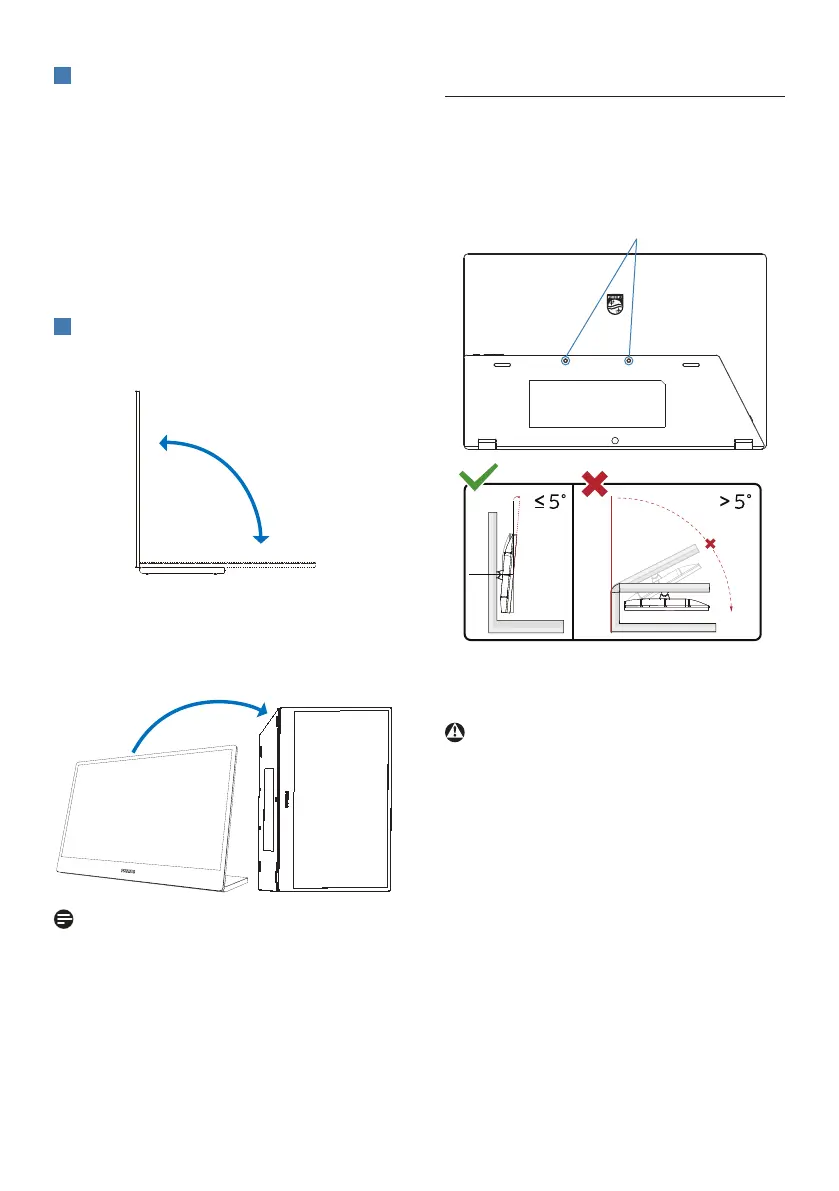
Physical Function
Tilt
90°
0°
Pivot
Note
The monitor can be used in portrait
mode by placing it on its right side to
allow access to the controls and ports.
Please choose extended mode on the
setting of your laptop/PC when you
use portrait mode for the rst time on
the monitor.
2.3 VESA Mounting
This monitor accepts a 75mm
VESA-Compliant mounting interface.
VESA Mounting Screw M4 (VESA
Mounting depth 7.0mm). Always contact
manufacturer for wall-mount installation.
75mm
2 screws (M4)
-5°
0° 90°
* Display design may dier from those
illustrated.
Warning
• To avoid potential screen damage,
such as panel peeling, ensure that the
monitor does not tilt downward by
more than -5 degrees.
• Do not press the screen while
adjusting the angle of the monitor.
Grasp only the bezel.



 To Next Page