6
4
Power Delivery
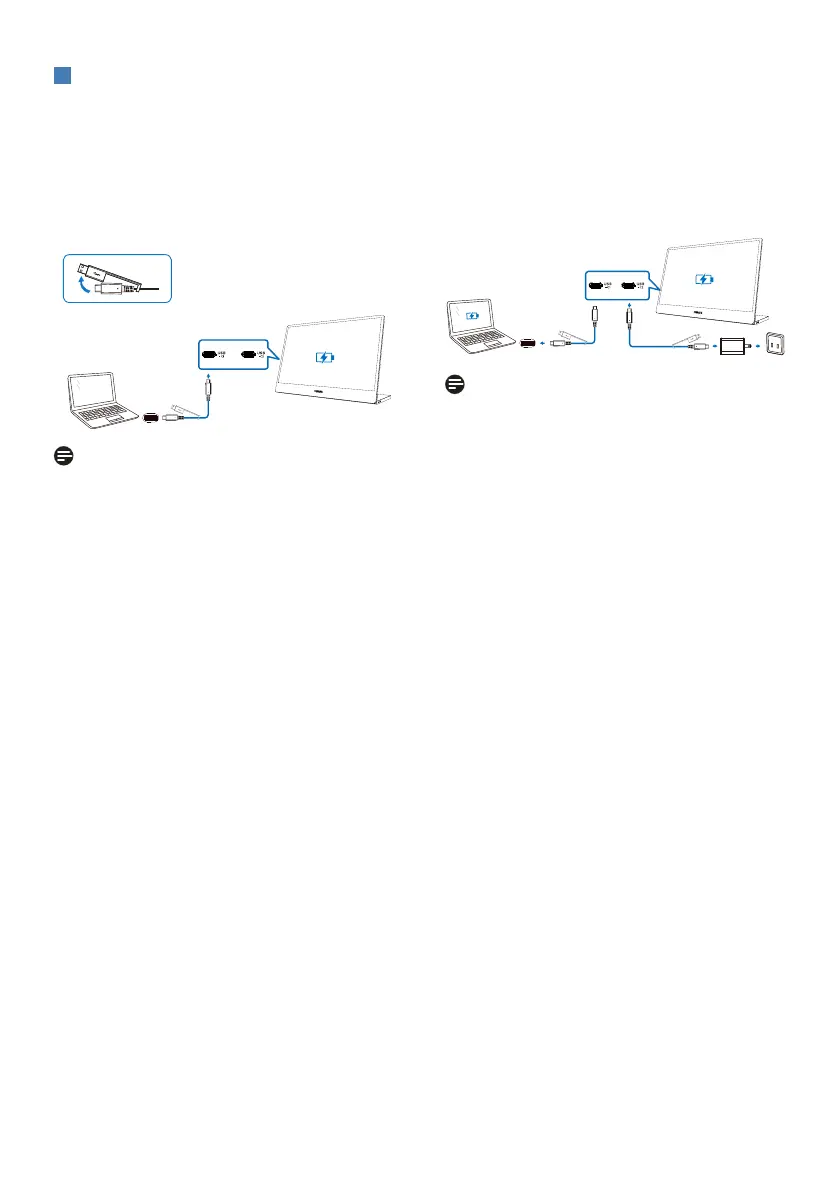
This monitor is powered through the USB port. There are four kinds of connections to
turn on this monitor.
2. Power the laptop up to 65W
Connect one of the USB-C ports with the
PD adapter and then connect the other
USB-C port to your laptop.
Note
• For this model, the only supported
adapter is the PD adapter. If the
maximum capacity of the PD adapter
is 90W, the monitor can power the
laptop up to 65W.
• PD adapters are not included and
must be purchased separately.
1. Power the monitor from laptop
Connect the laptop with a USB type-C
cable. (Electronically marked cable,
current rating: 5A)
Note
• The laptop needs to support video
signal and power output of at least
15 W (5V/3A).
• If there is insufficient power
from your laptop, it is highly
recommended that 15W (5V/3A) of
power be provided to the monitor.
Otherwise, the brightness level of
this monitor will be reduced and
the maximum brightness will not be
adjustable beyond that level.


 To Next Page
 Loading...