9
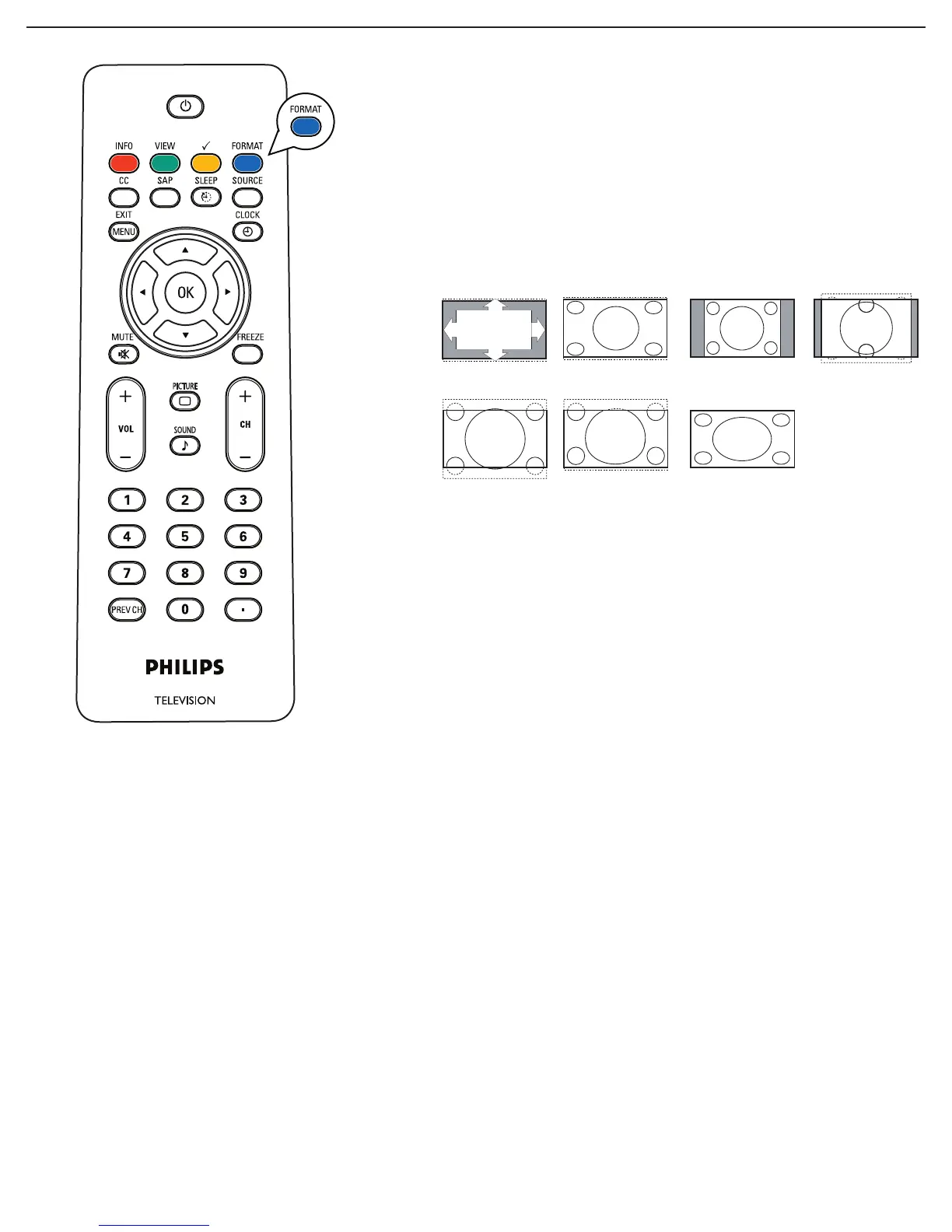
Press this button to display a list of available display formats.
Available display formats are determined by the type of signal you
are receiving.
To choose the display format you prefer, press the FORMAT
button repeatedly:
Super Zoom, Movie expand 14:9, Movie expand 16:9 and 16:9
Subtitle makes the picture fill the screen as much as possible. It
is recommended to press the cursor up/down key to adjust the
picture position on the screen.
Super zoom removes the black bars on the sides of 4:3
programs with minimal distortion. When in the Movie expand 14:9,
Movie expand 16:9 or Super zoom picture format, you can make
subtitles visible with the cursor up/down.
Note: Not all screen formats are available when displaying HD sources.
Automatic
Super zoom 4:3 Movie expand 14:9
Movie expand 16:9 16:9 subtitle
Widescreen
FORMAT
For 19PFL5402D/19PFL5422D
Automatic, Super Zoom, 4:3, Movie expand 14:9,
Movie expand 16:9, 16:9 subtitle and Widescreen.




 To Next Page