Many of the DVD Player's fi, atures can be set
to suit your personal prefi, rence. Let's start by
looking at the PICTURE features.
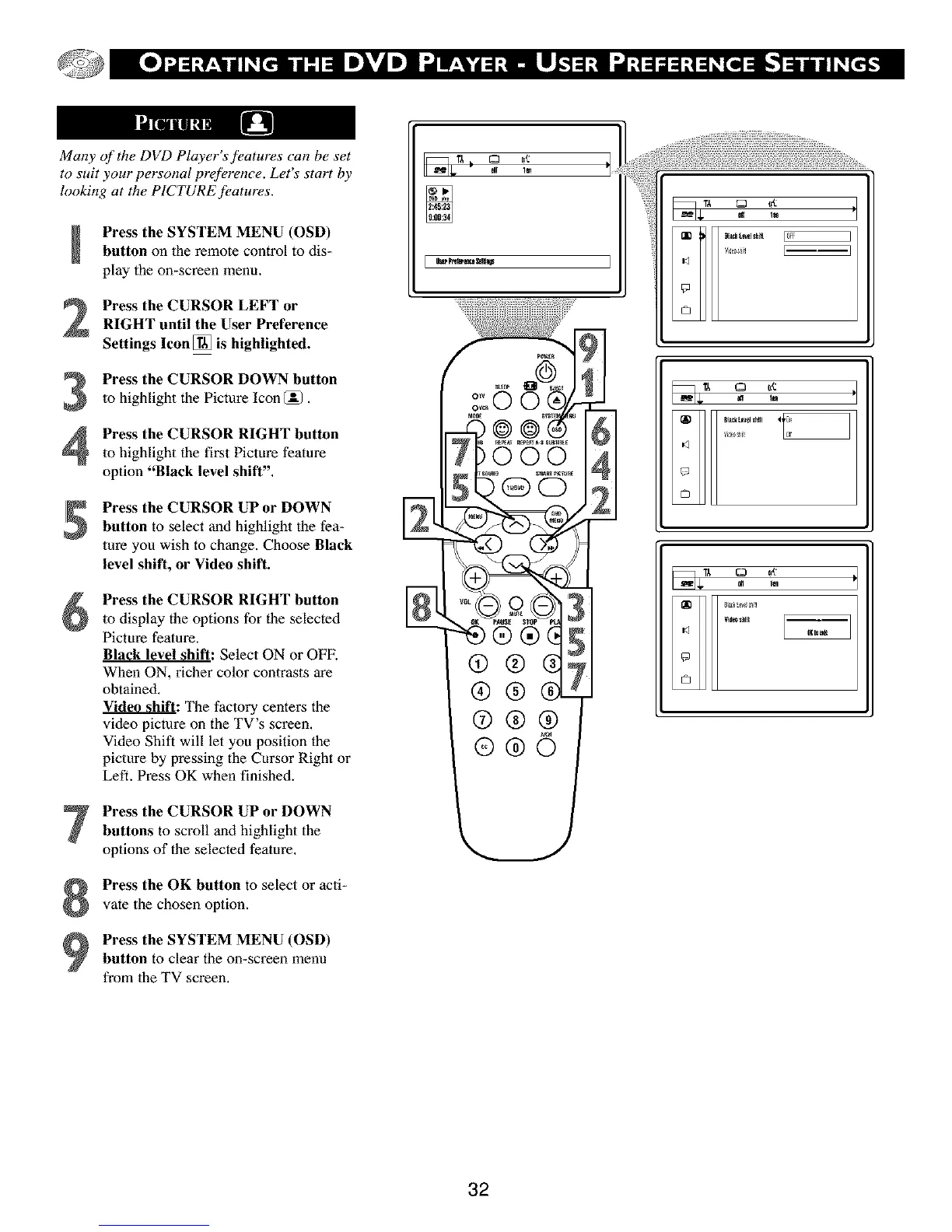
Press the SYSTEM MENU (OSD)button on the remote control to dis-
play the on-screen menu.
2
3
4
Press the CURSOR LEFT or
RIGHT until the User Preference
Settings Icon [] is highlighted.
Press the CURSOR DOWN button
to highlight the Picture Icon (_.
Press the CURSOR RIGHT button
to highlight the first Picture feature
option "Black level shift",
Press the CURSOR UP or DOWN
button to select and highlight the fea-
ture you wish to change. Choose Black
level shift, or Video shift.
Press the CURSOR RIGHT button
to display the options for the selected
Picture feature.
Black level shift: Select ON or OFF.
When ON, richer color contrasts are
obtained.
_: The factory centers the
video picture on the TV's screen.
Video Shift will let you position the
picture by pressing the Cursor Right or
Left. Press OK when finished.
Press the CURSOR UP or DOWN
buttons to scroll andhighlight the
options of the selected feature,
Press the OK button to select or acti-
vate the chosen option.
Press the SYSTEM MENU (OSD)
button to clear the on-screen menu
from the TV screen,
I_r_ _ o €,t I
ell 1_ P
[
32



 To Next Page