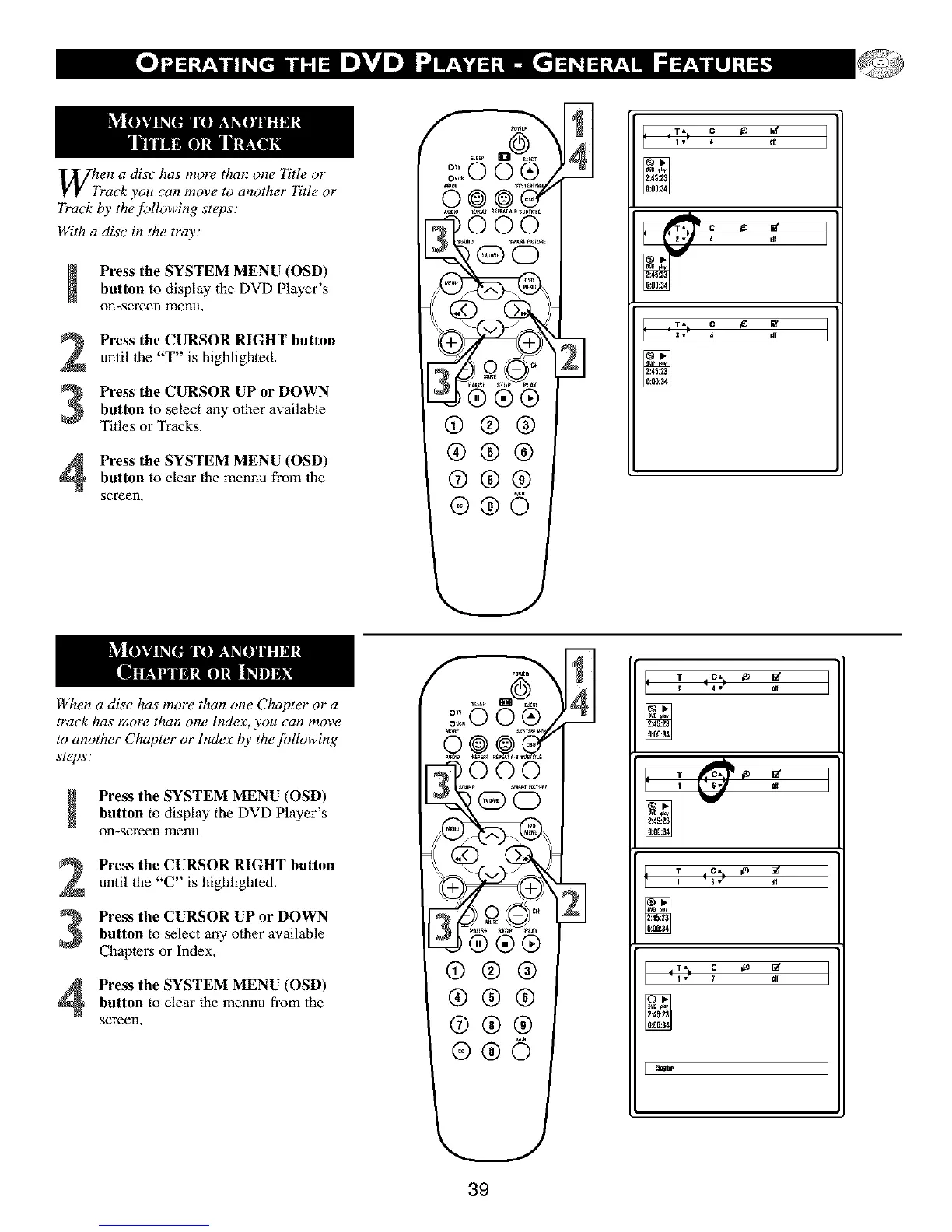
When a disc has more than one Title or
"ack you can move to another Title or
7)'ack by the following steps:
With a disc in the tray;
Press the SYSTEM MENU (OSD)
button to display the DVD Player's
on-screen menu,
Press the CURSOR RIGHT button
until the "T" is highlighted,
Press the CURSOR UP or DOWNbutton to select any other available
Titles or Tracks.
Press the SYSTEM MENU (OSD)
button to clear the mennu from the
screen,
qcc
®®®
®®®
®®@
2
I 4 iv_ 4
I I _v I 4
When a disc has more than one Chapter or a
track has more than one Index, you can move
to another Chapter or Index by the fi)lh)wing
steps:
Press the SYSTEM MENU (OSD)button to display the DVD Player's
on-screen menu,
Press the CURSOR RIGHT button
until the "C" is highlighted.
Press the CURSOR UP or DOWNbutton to select any other available
Chapters or Index.
Press the SYSTEM MENU (OSD)
button to clear the mennu from the
screen,
ooo
®®®
®®®
®®®
®®©
U
T C, _
14v)
A
t T C_ _ _'
I _,' I
39



 To Next Page