When a disc has more than one Title or
"ack you can move to another Title or
7)'ack by the following steps:
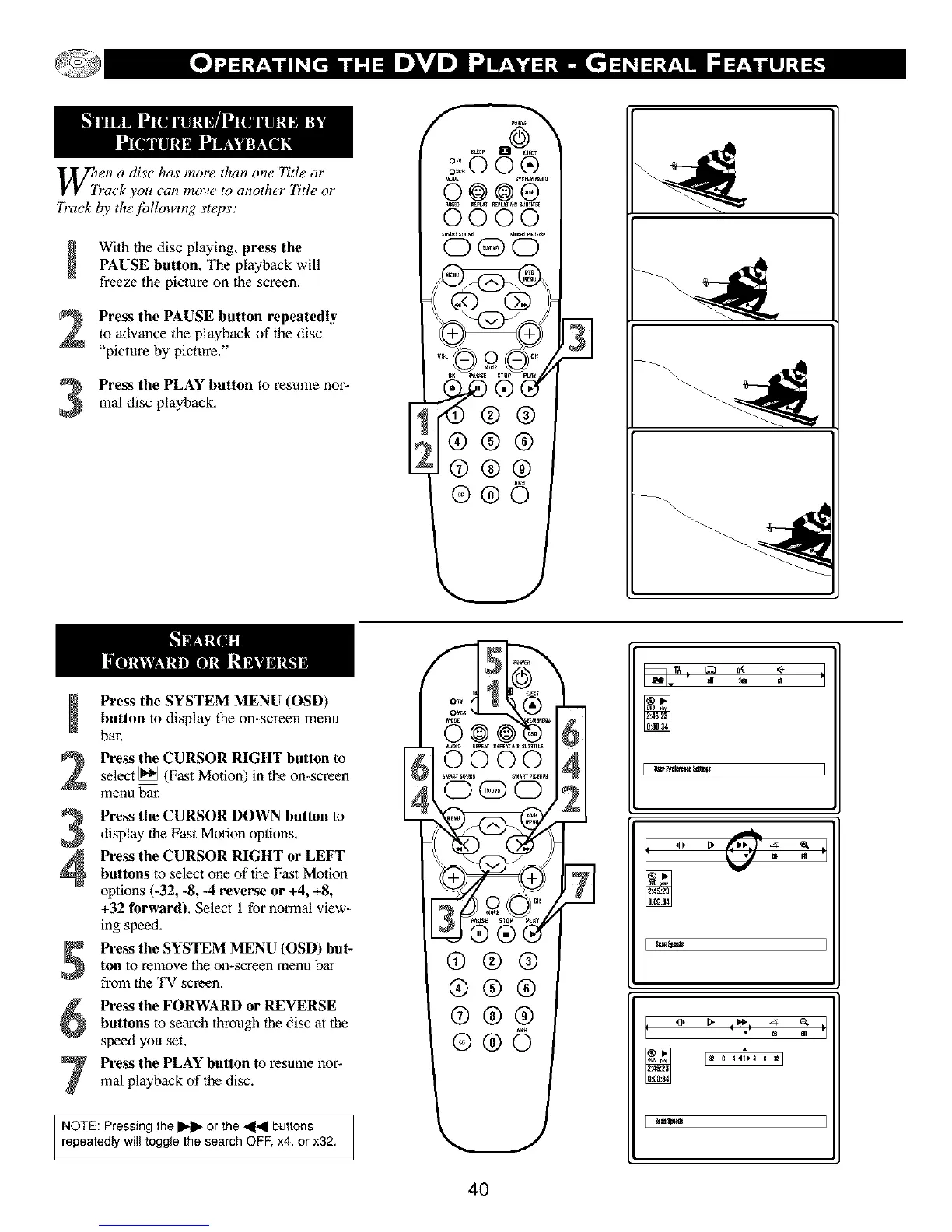
With the disc playing, press thePAUSE button. The playback will
freeze the picture on the screen,
Press the PAUSE button repeatedlyto advance the playback of the disc
"picture by picture,"
Press the PLAY button to resume nor-real disc playback,
131
Press the SYSTEM MENU (OSD)button to display the on-screen menu
bar,
Press the CURSOR RIGHT button toselect _ (Fast Motion) in the on-screen
menu bar,
Press the CURSOR DOWN button todisplay the Fast Motion options,
Pre_ the CURSOR RIGHT or LEFT
buttons to select one of the Fast Motion
options (-32, -8, -4 reverse or +4, +8,
+32 forward), Select 1 for normal view-
ing speed,
Press the SYSTEM MENU (OSD) but-
ton to remove the on-screen menu bar
from the TV screen.
Pre_ the FORWARD or REVERSE
buttons to search through the disc at the
speed you set,
Press the PLAY button to resume nor-real playback of the disc.
NOTE: Pressing the I1_- or the _ buttons
repeatedly wilt toggle the search OFF, x4, or x32,
4O



 To Next Page