T_e FTS-Video control also allows you to
ustomize o1"erase programming set up in
the Favorite 7?ack Selection memory of the
TV/DVD Playel:
Erasing a FTS-Video Program:
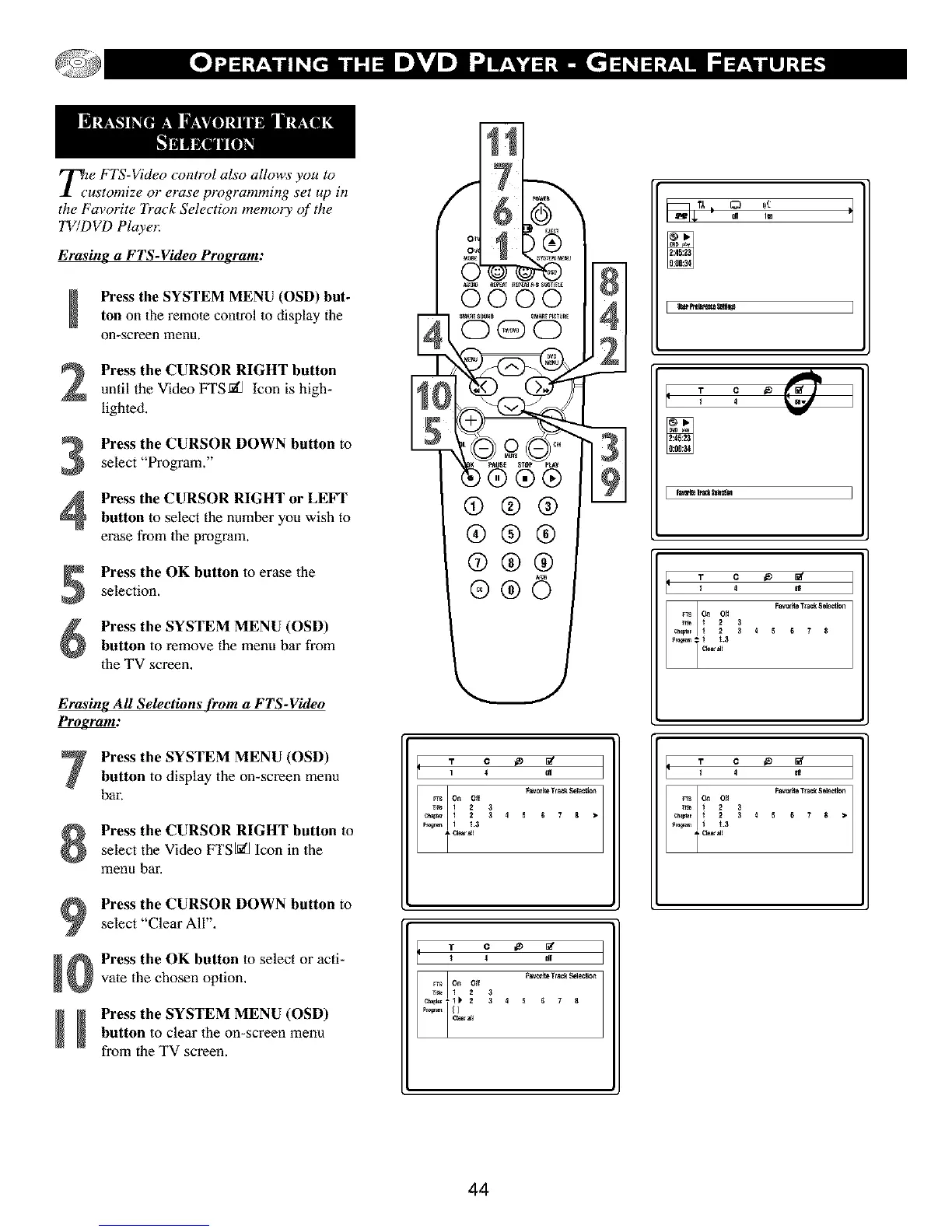
Press the SYSTEM MENU (OSD) but-
ton on the remote control to display the
on-screen mena,
Press the CURSOR RIGHT button
until the Video FTSfi_ Icon is high-
lighted,
3
4
Pre_ the CURSOR DOWN button to
select "Program."
Pre_ the CURSOR RIGHT or LEFT
button to select the number you wish to
erase from the program.
Pre_ the OK button to erase the
selection.
Press the SYSTEM MENU (OSD)
button to remove the menu bar from
the TV screen.
Erasing All Selections from a FTS-Video
P_:
Press the SYSTEM MENU (OSD)
button to display the on-screen menu
bar.
Pre_ the CURSOR RIGHT button to
select the Video FTSI_] Icon in the
menu bar,
Pre_ the CURSOR DOWN button to
select "Clear All",
Pre_ the OK button to select or acti-
vate the chosen option.
_ Press the SYSTEM MENU (OSD)
button to clear the on-screen menu
from the TV screen.
T C _e _"
T C _ [_
1 4 gl
Favcr_teTrackS_ec_on
_s On Off
r_ 1 2 3
_ 1_ 2 3 4 5 _ 7 8
? ;: '1
T°°{ff I
I 4
T C _
¢_rr_s O_11 Off _ 4 5FaY°rite TISCkSsie_t_67 8
T C _
_¢_;_r_s O_11122_.3Off33 4 5Fav°dt_ TISCkS_i_6 7 8
44



 To Next Page