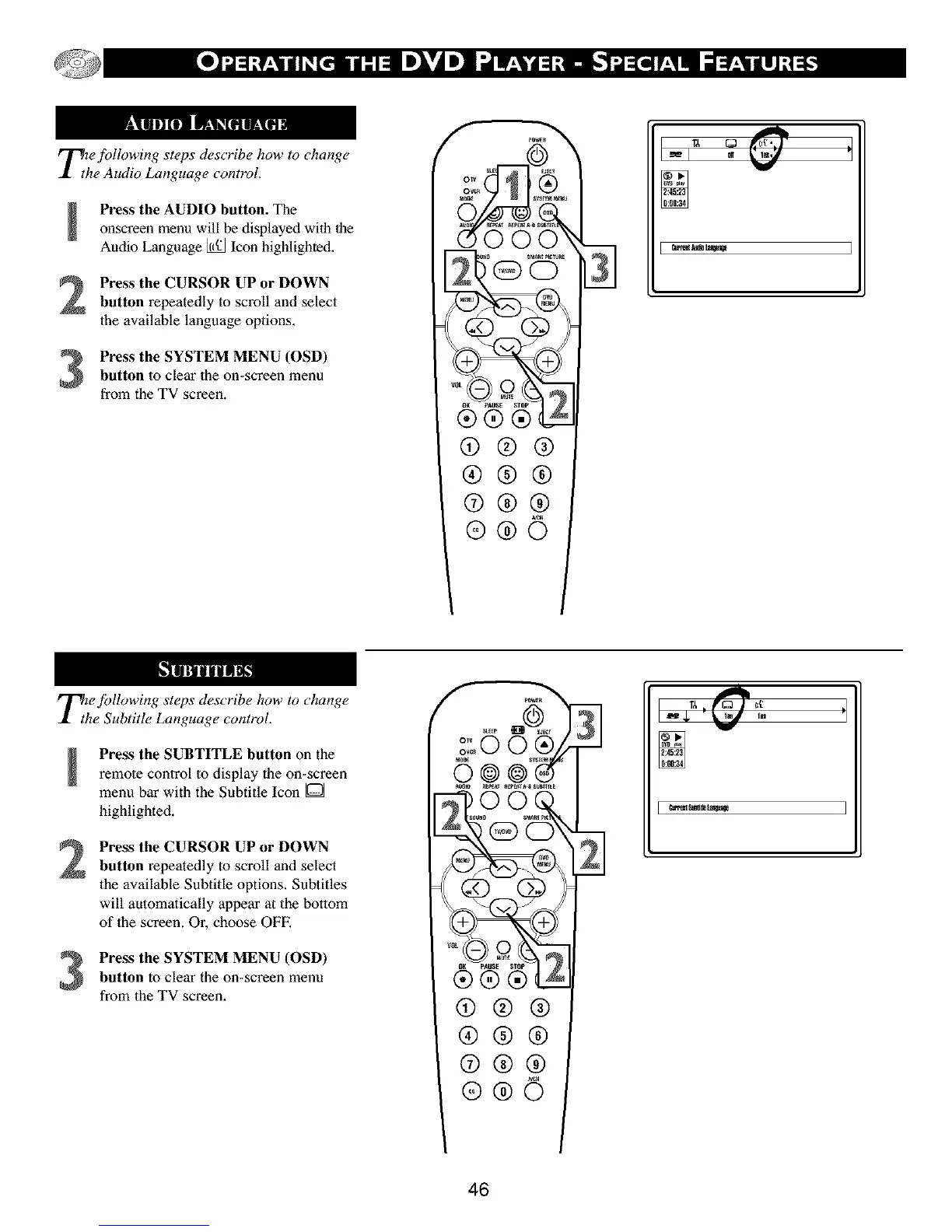
_Tthe following steps describe how to change
e Audio Language control.
Press the AUDIO button. The
onscreen menu will be displayed will] lhe
Audio Language I_ Icon highlighted.
Press the CURSOR UP or DOWN
button repeatedly to scroll and select
the available language options.
Press the SYSTEM MENU (OSD)
button to clear the on-screen menu
from the TV screen.
@®®
®®®
@®®
@@6
31
A
Tihe fidlowing steps describe how to change
e Subtitle Language control.
Press the SUBTITLE button on the
remote control to display the on-screen
menu bar with the Subtitle Icon [O]
highlighted.
2
Press the CURSOR UP or DOWN
button repeatedly to scroll and select
the available Subtitle options. Subtitles
will automalically appear at the bottom
of lhe screen. Or, choose OFE
Press the SYSTEM MENU (OSD)
button to clear the on-screen menu
from the TV screen.
slxEP _c_
(9®®
®®®
@®®
®®©
46



 To Next Page