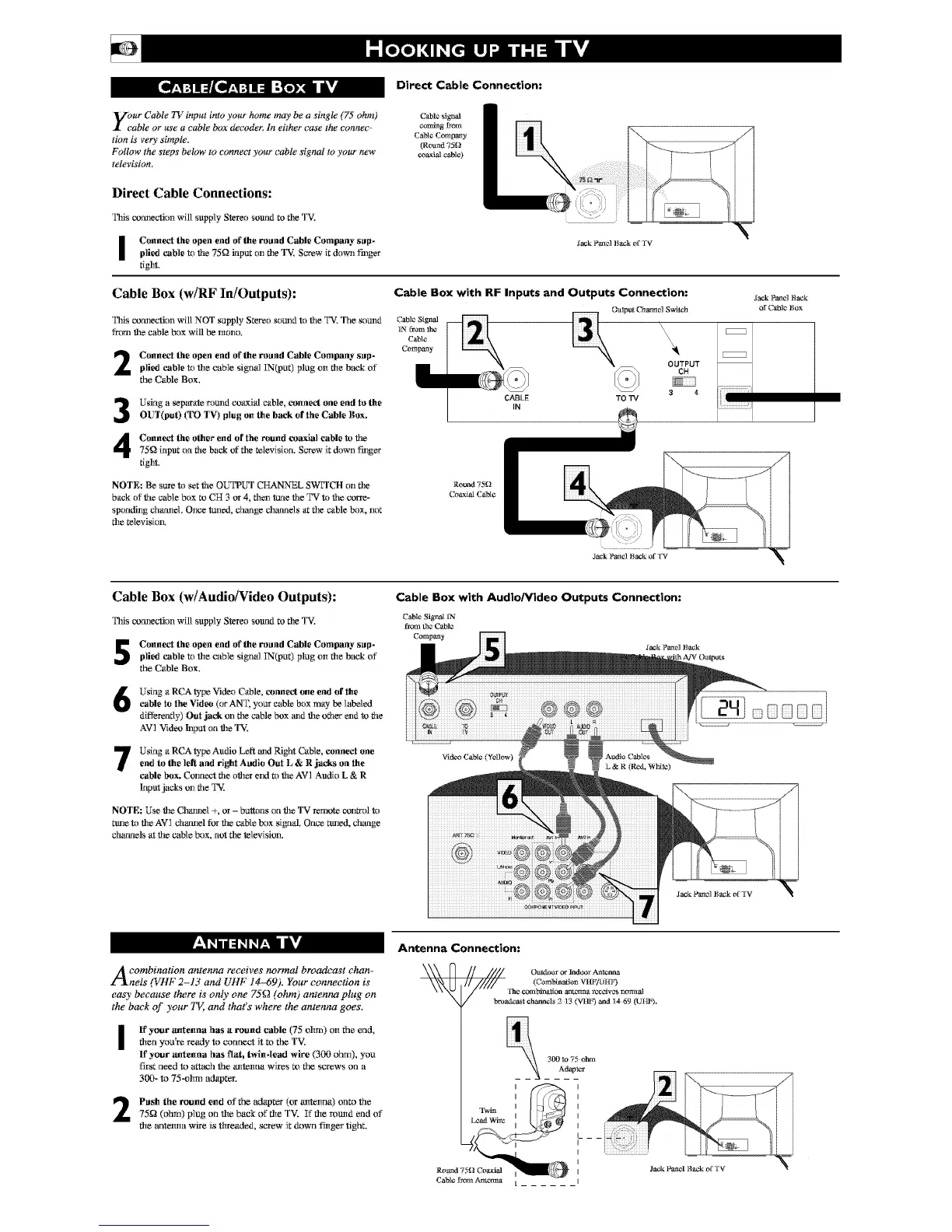
Direct Cable Connection:
Vour Cable TV input into your home may be a single (75 ohm)
X cable or use a cable box decoder; In either case the eonna>
lion is very simple.
Follow the steps below to connect your cable signal to your new
television.
Direct Cable Connections:
Tiffs com_ecfion will supply Stereo sotmd to tile TV,
C_blordby_l
comi_gDom
Cable Company
(Round 7511
coa.6alcable)
I Connect the open end of the roand Cable Company sap-
plied cable to the 75Q input on file TV, Screw it down finger
fight.
lack Panel Back ol' TV
Cable Box (w/RF In/Outputs):
Tiffs cormection will NOT supply Stereo sound to the TV. The sound
fr_l file cable box will be mono,
2
3
Connect the open end of the roand Cable Company sap-
plied cable to rite cable signal IN(put) plug on fire b_vzkof
the Cable Box.
Using a _parate round coaxial cable, conne_ one end to the
OUT(put) (TO TV) plug on the back of the Cable Box.
Cable Box with RF Inputs and Outputs Connection:
Cable Signal
]N fi-am the
Cable
Company
O_lput Charmel S,_Stch
%',
\\\
OUTPUT
CH
3 4
CABLE TO TV
Connect the other end of the round coaxial cable to the
75_ input on tile back of file _levision. Screw it down finger
fight,
NOTE: Be sure to set the OUTPUT CHANNEL SWITCH on file
back of the cable box to CH 3 or 4, thezl ttmethe TV to the corre-
spondhlg chamlel, Once tmled, clumge cl_umels at file cable box, not
file televisior_
Round 75(.1
Coaxial Cable
Jack Panel Back
of CaBle Box
Cable Box (w/Audio/Video Outputs):
Tiffs comlecfion will supply Stereo sound to file TV.
Connect the open end of the roand Cable Company sap-
plied cable to rite cable signal IN(put) plug on fire b_vzkof
the Cable Box.
Using a RCA _'pe Video Cable, totaled one end of the
cable to the Video (or ANT, your cable box may be labeled
differently) Out .jack on file cable box and file other end to the
A`V']"videoh_puton file TV,
Using a RCA _'pe Audio Left andRight Cable, connect oneend to the ]eft and right Aadio Out L & R jacks on the
cable box. Conrlect the other el_d to the AV] Audio L & R
Inputjacks on the TV,
NOTE: Use file Clmlmel +, or - buttons on file T`V"re,mote control to
ttale to file AV] charnel for the cable box si_r,d, Once ttaled, chaqge
ch_utaels at the cable box, not file television,
Cable Box with Audio/Video Outputs Connection:
video Cable (Yenow)
A combination antenna receives normal broadcast chan-
l'lnels (1,,HF 2-1: and blgF 14-69_, Your connectmn ts
eao' because there is only one 75_ (ohm) antenna plug on
7
the back of your TL and that s where the antenna goes,
I
ff your autenna has a round cable (75 ohm) on the end,
flten you're, ready to connect it m the TV.
If your autenna has flat, twin-lead wire (3(}(}ohm), you
first need to attach the antonna wire,s Rl the screws on a
300- to 75-ohm adapter.
Push file round end of the adapter (or antenna) onto the
75_ (ohm) plug on rite back of rite TV. If rite round end of
rite antelma wire is threaded, screw it down filtger tighL
Antenna Connection:
Ontt_ or lndoo_ A_lcnna
\_%N_X / Ihe conthi_lionantc_'m_t*cczivz_normal
broat_l channels2 13 (VHF)and1469 (UHF).
Twin
Lead Wiye
300 lo 75 ohn'L
Adapl_r


 To Next Page
 Loading...









