A utoChFon _an automatt_ally set the TVs
l_Xonscreen clock, Because the time is
re_eived ti"om a broadcast signal, you must be
surc_ that a cable TV o1"antenna signal is prc_s-
ent betbre you attempt to use the AutoChron TM
f_J_IIH1Y_,
2
3
4
5
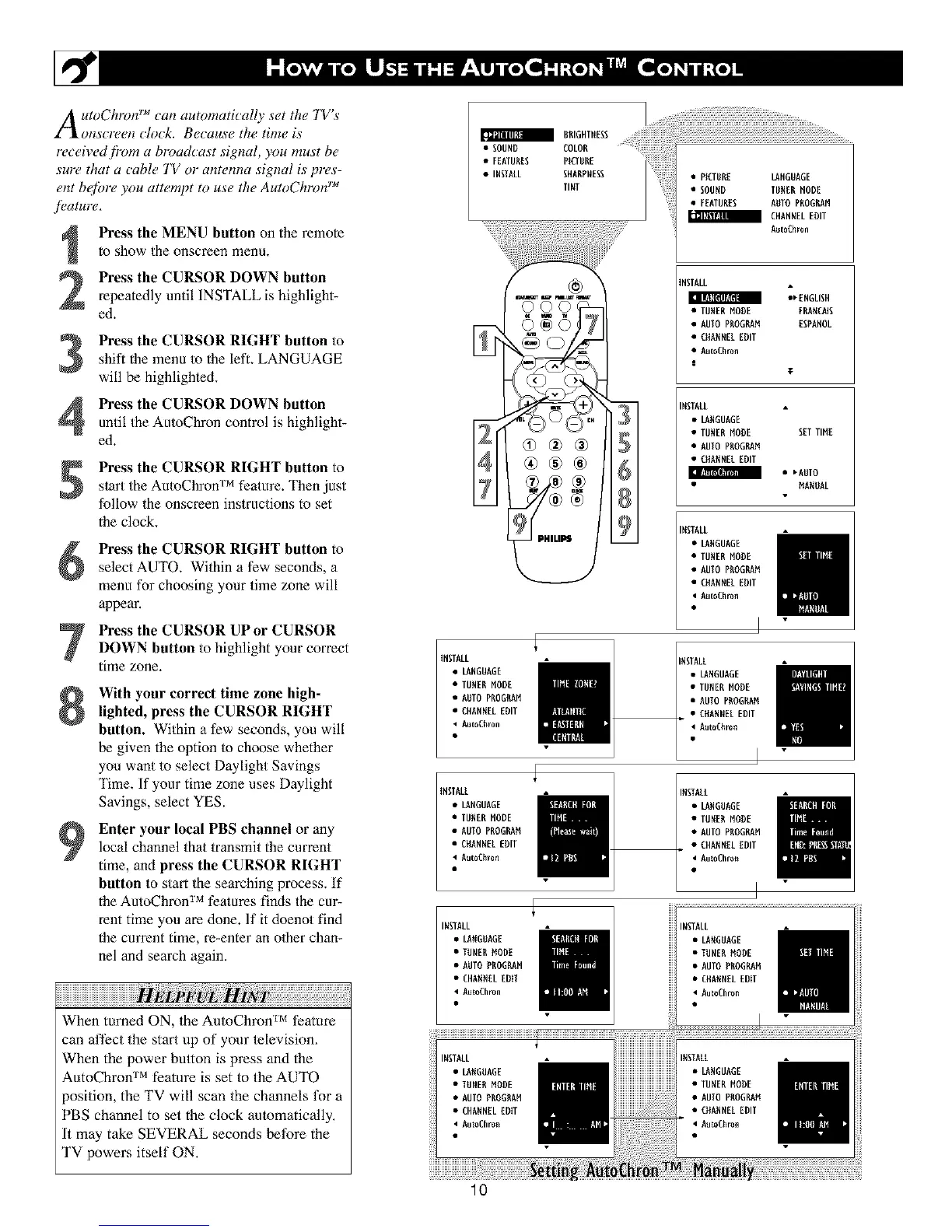
Press the MENU button on the remote
to show the onscreen menu.
Press the CURSOR DOWN button
repeatedly until INSTALL is highlight-
ed.
Press the CURSOR RIGHT button to
shift the lnenu to the left. LANGUAGE
will be highlighted.
Press the CURSOR DOWN button
until the AutoChron control is highlight-
ed.
Press the CURSOR RIGHT button to
s/art the AutoChron TM feature. Then just
follow the onscreen instructions to set
the clock.
Press the CURSOR RIGHT button toselect AUTO. Within a few seconds, a
menu for choosing your time zone will
appear.
Press the CURSOR UPor CURSORDOWN button to highlight your correct
time zone.
9
With your correct time zone high-
lighted, press the CURSOR RIGHT
button. Within a few seconds, you will
be given the option to choose whether
you want to select Daylight Savings
Time. If your time zone uses Daylight
Savings, select YES.
Enter your local PBS channel or any
local channel that transmitthe current
time, andpress the CURSOR RIGHT
button to start the searching process. If
the AutoChron TM features finds the cur-
rent time you are done. If it doenot find
the current time, re-enter an o/her chan-
nel and search again.
w
When tinned ON, the AutoChron TM feature
can affect the start up of your lelevision,
When the power button is press and the
AutoChron TM feature is set to the AUTO
position, the TV will scan the channels tk)r a
PBS channel to set the clock automatically,
It may take SEVERAL seconds betbre the
TV Ix)wers itself ON,
• SOUND COLON
• FEATURES PKTUUE
• INSTALL SUNUPNESS
TINT
3
@®®
• PICTURE LANGUAGE
• SOUND TUNER NODE
• FEATURES NDTO PROGILAN
m CHANNEL EDIT
Nut0Chr0n
NSTALL
_[NGLISH
Ilgl|:II[_IF_NI
• TUNER NODE FUANCNIS
• AUTO PUOGI_N ESPANOL
• CNANNELEDIT
• AutoCNron
|
T
NSTNLL
• LANGUAGE
• TUNER NODE SEI TIME
• AUIO PUOGI_N
• CNANNEL EDIT
II_I_T!T_IIIT?II1
• _NDTO
NANDAL
NSTNLL
• LANGUAGE
• TUNER NODE
• AUTO PUOGI_N
• CNANNEL EDIT
• AutoCNron
iNSTALL
• LANGUAGE
• TUNER NODE
• AUTO PROGILAN
• CHANNELEDIT
• NutoCNron
NSTALL
• LANGUAGE
• TUNERNODE
• AUTO PUOGUAN
• CNANNELEDIT
• AutoCNron
INSTALL
• LANGUAGE
• TUNER NODE
• NUIO PfiOGl_N
• CHANNEL EDIT
• NutoCNron
INSTALL
• LANOUNGE
• TUNER NODE
• AUTO PNOGRAN
• CHANNEL EDIT
• AutoChro_
INSTALL
• LANGDAO[
• TUNEUNODE
• AUTO PUOGNNN
• CHANNELEDIT
• AutoChron
INSTALL
• LANGUAGE
• TUNERMODE
• AUTO PU06RNN
• CHANNELEDiT
AutoChro_
lO












 To Next Page