T_w channel NAME,fi>ature allows you to list
he "call" letters qf your fin,orite stations
beside their channel numbers when the)"
appear on the screen. 77w TV has its memo O, a
list of the 50 most popular channel names (fi)r
example, ABC, NBC, FOX, etc.). Ybu also can
enter a custom name (up to five characters).
Tune to a specific channel that you want to
add a label to, then;
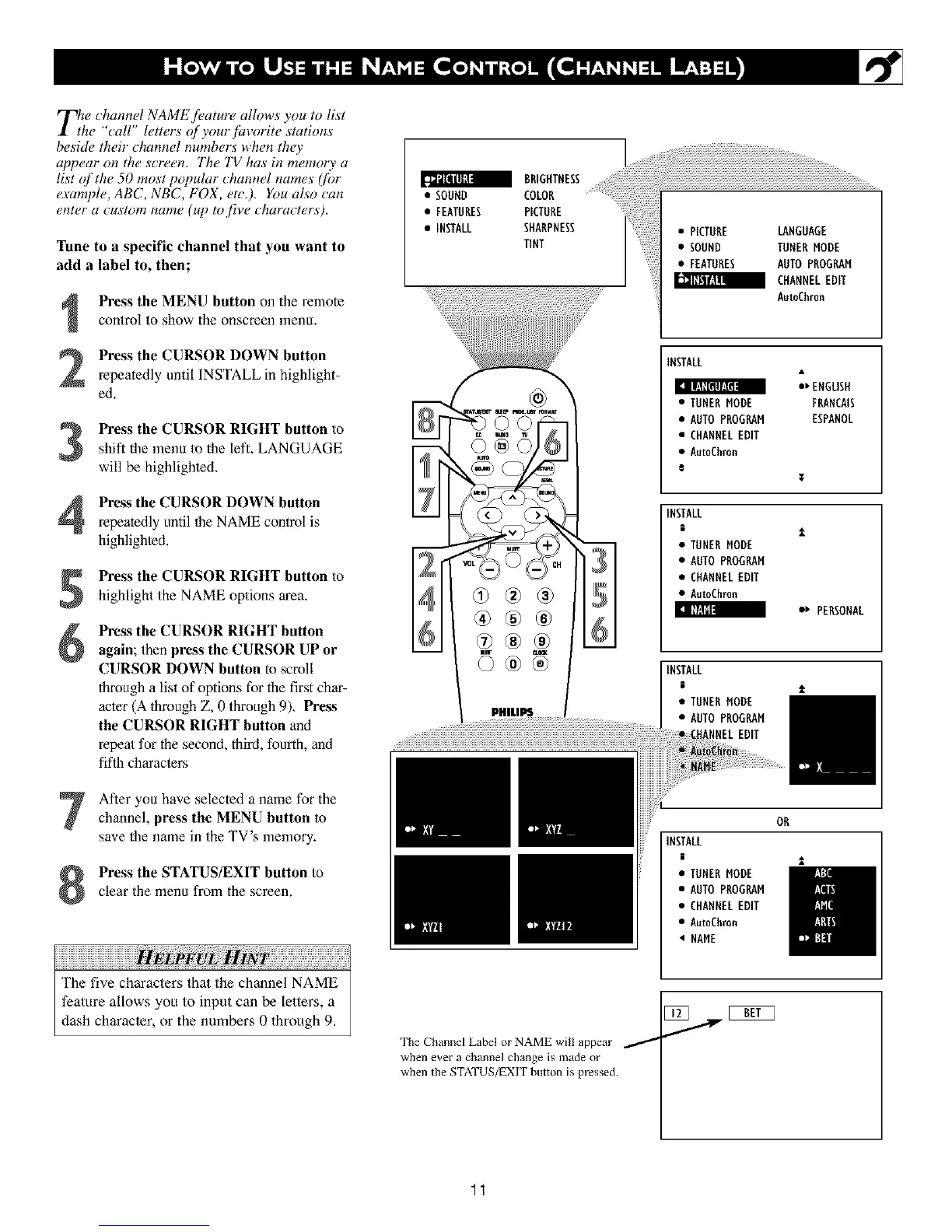
Press the MENU button on the remote
control to show the onscreen menu+
Press the CURSOR DOWN button
repeatedly until INSTALL in highlight-
ed.
Press the CURSOR RIGHT button toshift the lnenu to the left. LANGUAGE
will be highlighte&
Press the CURSOR DOWN button
repeatedly until flae NAME conlrol is
highlighted.
Press the CURSOR RIGHT button to
highlight the NAME options area.
I ill'Jill
Press the CURSOR RIGHT button
again; then press the CURSOR UP or
CURSOR DOWN button to scroll
through a list of options for the first char-
acter (A lhroagh Z, 0 through 9)+ Press
the CURSOR RIGHT button and
repeal for the second, third, fourth, and
fiflh characlers
After you have selected a name for the
channel, press the MENU button to
save the name in the TV's memory+
Press the STATUS/EXIT button to
clear the menu from the screen.
iiiiiiiiiiiiiiiiiiiiiiiiiiiiiiiiiiiiiiiiiiiiiiiiiiiiiiiiiiiiiiiiiiiiiiiiiiiiiiiiiiiiiiiiiiii ! ii i ! iiiiiiiiiiiiiiiiiiiiiiiiiiiiiiiiiiiiiiiiiiiii¸
The five characters that the channel NAME
feature allows you to input can be letters, a
dash character, or the numbers 0 through 9,
=;;;;l;;ii!!ii!!ilI ............;;;;;;;;;;;;;;;;;;;;;;;;;;;;;;;;.............
• SOUND COLOR
• FEATURES PICTURE
• INSTALL SHARPNESS
TINT
• PICTURE LANGUAGE
• SOUND TUNER MODE
• FEATURES AUTO PROGRAM
CHANNEL EDIT
AutoChron
®®®
PHItllil ..................
INSTALL
:_ ENGLISH
[ II,.ll[(tl/zl(11
• TUNERMODE FRANCAIS
• AUTOPROGRAM ESPANOL
• CHANNELEDIT
• AutoChron
g
¥
INSTALL
i
• TUNERMODE
• AUTOPROGRAM
• CHANNELEDIT
• AutoChron
e_ PERSONAL
INSTALL
• TUNERMODE
• AUTOPROGRAM
NNELEDIT
OR
INSTALL
• TUNER MODE
• AUTO PROGRAM
• CHANNELEDIT
• Au_Chron
• NAME
The Channel Label or NAME will appear /
when eve£ a channel ch_llge is n13de oF
when the STATUS/EXIT button is pressed.
1
11












 To Next Page