_r_) a4just your TV picture controls, select a
ham+el and fiJllow these stu)s.
2
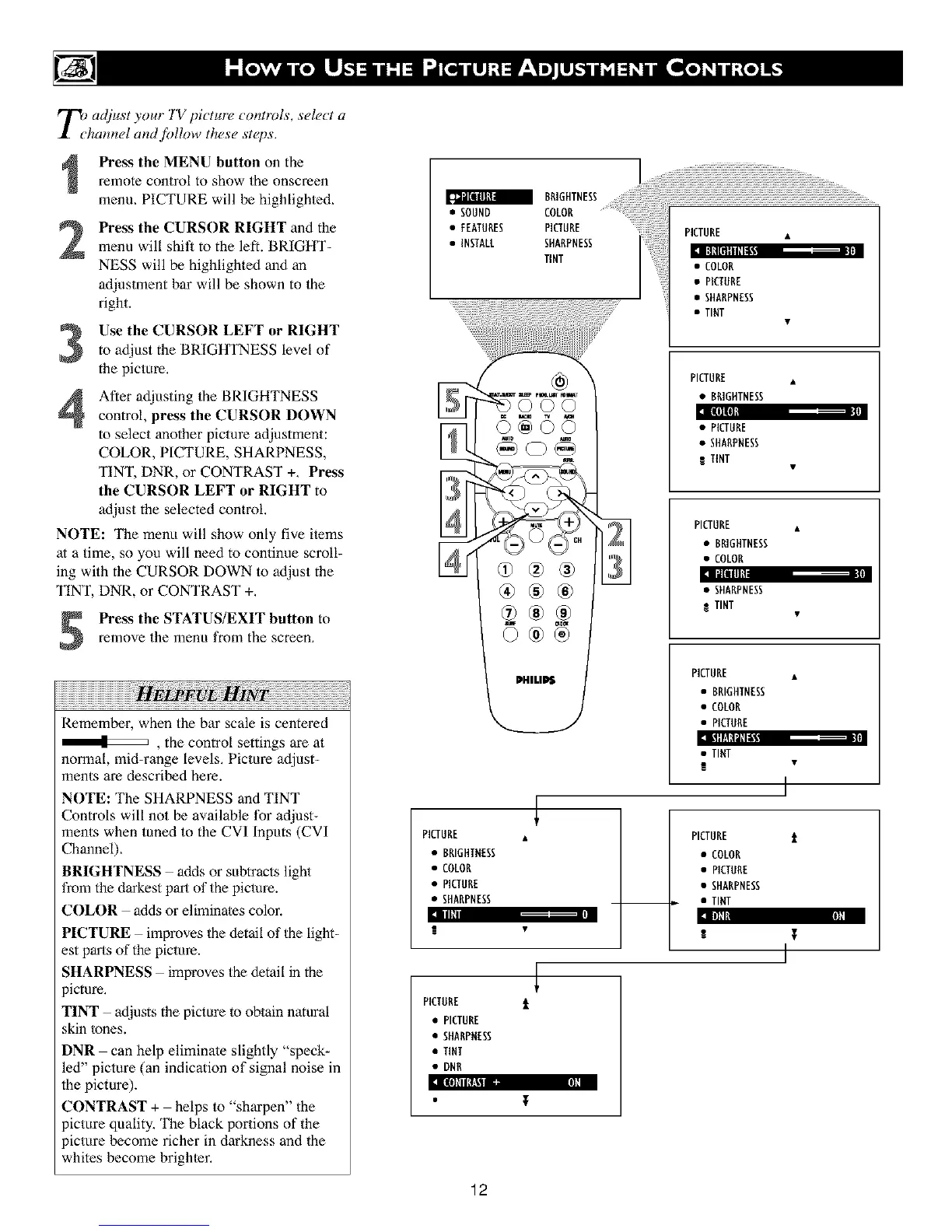
Press the MENU button on the
remote control to show the onscreen
menu, PtCTUP.E will be highlighted,
Press the CURSOR RIGHT and the
menu will shift to the left. BRIGHT-
NESS will be highlighted and an
adjustment bar will be shown to the
right.
ll|ll[ll[llilil"
Use the CURSOR LEFT or RIGHTto adjust the BRIGHTNESS level of
the picture,
After adjusting the BRIGHTNESS
control, press the CURSOR DOWN
to select another picture adjustment:
COLOR, PICTURE, SHARPNESS,
TINT, DNR, or CONTRAST +, Press
tile CURSOR LEFT or RIGHT to
adjust the selected control.
NOTE: The menu will show only five i/ems
at a time, so you will need to continue scroll-
ing with the CURSOR DOWN to adjust the
TINT, DNR, or CONTRAST +,
llllnl
]lt[lllL
Press the STATUS/EXIT button to
remove the menu from the screen,
Remember, when the bar scale is centered
, the control settings are at
normal, mid-range levels, Picture adjust-
ments are described here.
NOTE: The SHARPNESS and TINT
Controls will not be available for adjust-
ments when tuned to the CVI Inputs (CVI
Channel),
BRIGHTNESS adds or subtracts light
from the darkest part of the picture.
COLOR adds or eliminates color.
Illl
-,+DHd ll][I
PICTURE improves the detail of the light-
est parts of the picture.
SHARPNESS improves the detail in the
)icture,
TINT adjusts the picture to obtain natural
skin tones.
DNR can help eliminale slightly "speck-
led" picture (an indication of signal noise in
the picture).
CONTRAST + helps to "sharpen" the
picture quality, The black Ix)rtions of the
)icture become richer in darkness and the
whites become brighler.
a BAIGHTNESS
• SOUND COLOR ......
• FEATURES PICTURE
• INSTALL SHARPNESS
TINT
©@©©
PICTURE •
• BRIGHTNESS
• COLOR
• PICTURE
• SHARPNESS
PICTURE i
• PICTURE
• SHARPNESS
• TINT
• DNR
PICTURE •
• COLOR
• PICTURE
• SHARPNESS
• TINT
PICTURE •
• BRIGHTNESS
• PICTURE
• SHARPNESS
R TINT
PICTURE •
• BRIGHTNESS
• COLOR
• SHARPNESS
TINT
PICTURE •
• BRIGHTNESS
• COLOR
• PICTURE
• TINT
I
PICTURE t
• COLOR
• PICTURE
• SHARPNESS
• TINT
[I[(O[IItTA_II ca N]N
12












 To Next Page