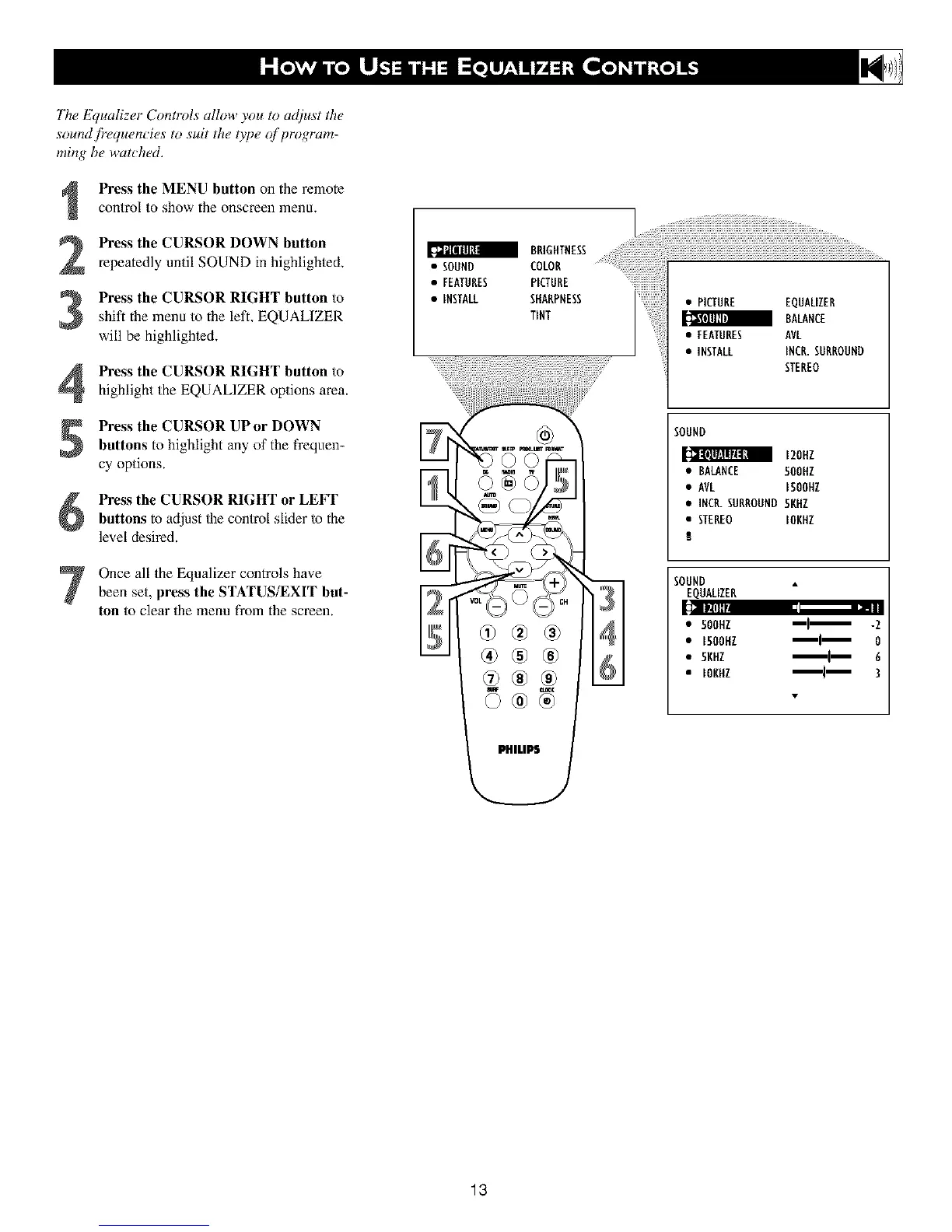
The Equalizer Contlvls allow you to adiust the
sound /?equencies to suit the type _f program-
ming be watched.
Press the MENU button on the remote
control to show the onscreen menu,
Press the CURSOR DOWN button
repeatedly until SOUND in highlighted.
S Press the CURSOR RIGHT button to
shift the menu to the left. EQUALIZER
will be highlighted.
Press the CURSOR RIGHT button to
highlight the EQUALIZER options area.
Press the CURSOR UPor DOWN
buttons to highlight any of the frequen-
cy options.
Press the CURSOR RIGHT or LEFT
buttons to adjust the control slider to the
level desired.
Once all the Equalizer controls havebeen set, press the STATUS/EXIT but-
ton to clear the menu from the screen.
• SOUND
• FEATURES
• INSTALL
I {i{i{i{i{i{i{i{iillillillillillillillillillillillillillillillillillili{
COLOR
PICTURE
• PICTURE EQUALIZER
BALANCE
• FEATURES AVL
• INSTALL INCR.SURROUND
STEREO
SOUND
120Nl
• BALANCE 500NZ
• AVL I50OHZ
• INCR.SURROUND 5NNZ
• STEREO IONHZ
SOUND
EQUALIZER
• 50OHZ _l_ -2
• 1500HZ _1_ 0
• 5KHZ '_i_ 6
• IONNZ 3
13












 To Next Page