T_/e Balance Control will allow you to adjust
he soumt levels between the right and left
speaker ou&ut.
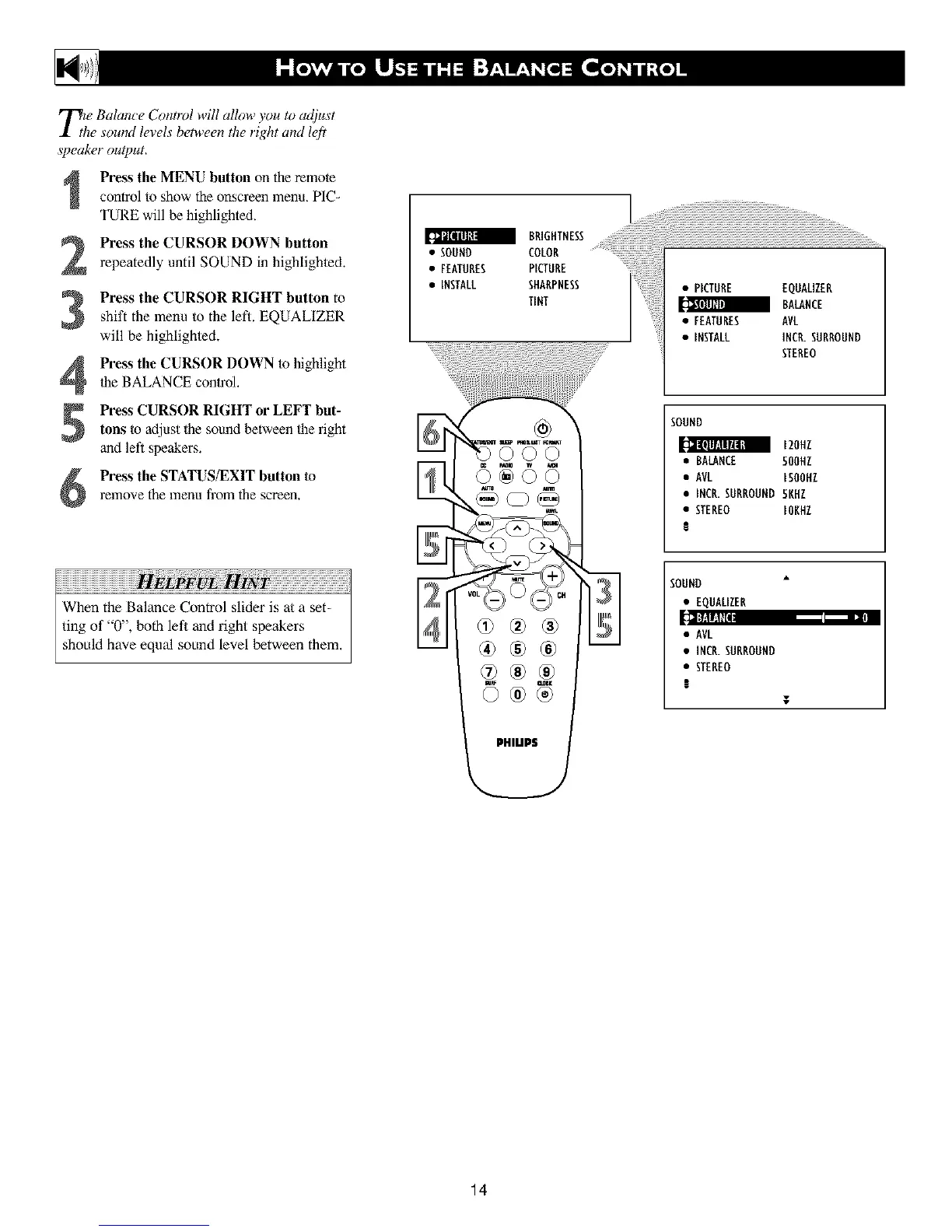
Press the MENU button on the remote
control to show the onscreen menu, PIC-
TURE will be highlighted.
Press the CURSOR DOWN button
repeatedly until SOUND in highlightecL
3
4
Press the CURSOR RIGHT button to
shift the menu to the left. EQUALIZER
will be highlighte&
Press the CURSOR DOWN to highlight
Ihe BALANCE control,
Press CURSOR RIGHT or LEFT but-
tons to adjust lhe sound between the right
and left speakers.
Press the STATUS/EXIT button to
relnove the menu from the screen,
iiiiiiiiiiiiiiiiiiiiiiiiiiiiiiiiiiiiiiiiiiiiiiiiiiiiiiiiiiiiiiiiiiiiiiiiiiiiiiiiiiiiiiiiiiiii !i !i !i
When the Balance Control slider is at a set-
ting of "0", both left and right speakers
should have equal sound level between them,
BRIGHTNESS
• SOUND COLOR ............................................
• FEATURES PICTURE
• iNSTALL SHARPNESS
TINT
<5 <5<5
®®®
<;
• PICTURE EQUALIZER
BALANCE
• FEATURES AVL
• INSTALL INCR.SURROUND
STEREO
SOUND
120HZ
• RALANCE 500HZ
• AVL ISOOHZ
• INCR.SURROUND 5KHZ
• STEREO IOKHZ
l
SOUND
• EQUALIZER
[cI];fd|dtI8 - •
• AVL
• INCR.SURROUND
• STEREO
!
T
14












 To Next Page