y_u can receive broadcast stereo TV pro-
rams, The TV has both an amplifier and
twin speakers through which the stereo sound
can be heaiJ,
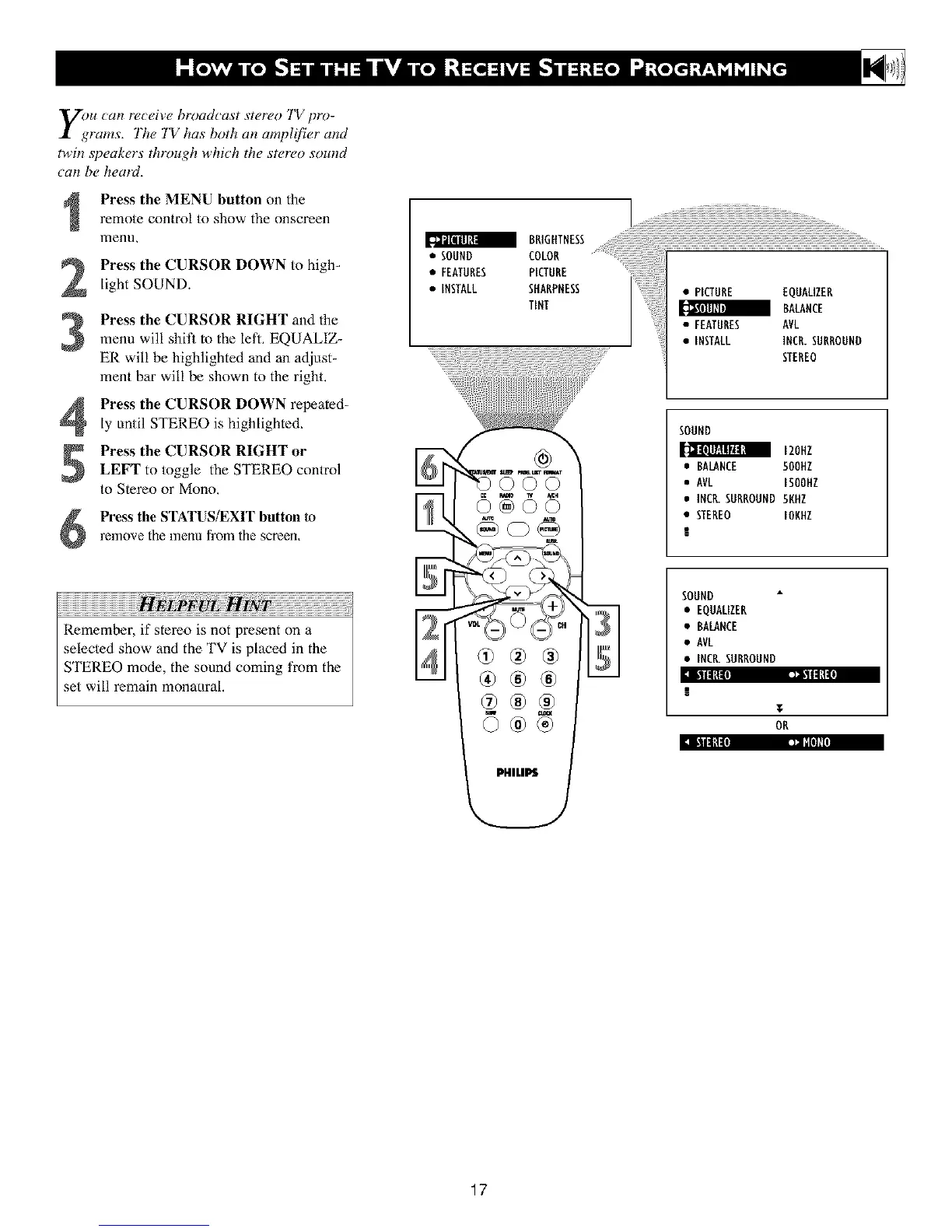
Press the MENU button on the
remote control to show the onscreen
menu,
Press the CURSOR DOWN to high-
light SOUND.
Press the CURSOR RIGHT and the
menu will shit_ to the left, EQUALIZ-
ER will be highlighted and an adjust-
ment bar will be shown to the right.
Press the CURSOR DOWN repeated-
ly until STEREO is highlighted,
Press the CURSOR RIGHT or
LEFT to toggle the STEREO control
to Stereo or Mono,
Press the STATUS/EXIT button to
relnove the menu from the screen.
Remember, if stereo is not present on a
selected show and the TV is placed in the
STEREO mode, the sound coming t¥om the
set will remain monaural.
6 68
:l E_llg1!:l _ll|lklJ
• AVL ISOOHZ
• INCR.SURROUND5KHZ
• STEREO IUNHZ
SOUND
• EQUALIZER
• BALANCE
• AVL
• INCK SURROUND
!
T
OR
17












 To Next Page