e Incredible Surround feature adds
rearer dapth and dimension to both mon-
aural (MONO) and sterao TV sound, With
the _ontrol set to INCR, SURROUND
(ln_redibh_ Surround), the TV's speak_rs can
add e_en wid_r sound separation to normal
broadcasts.
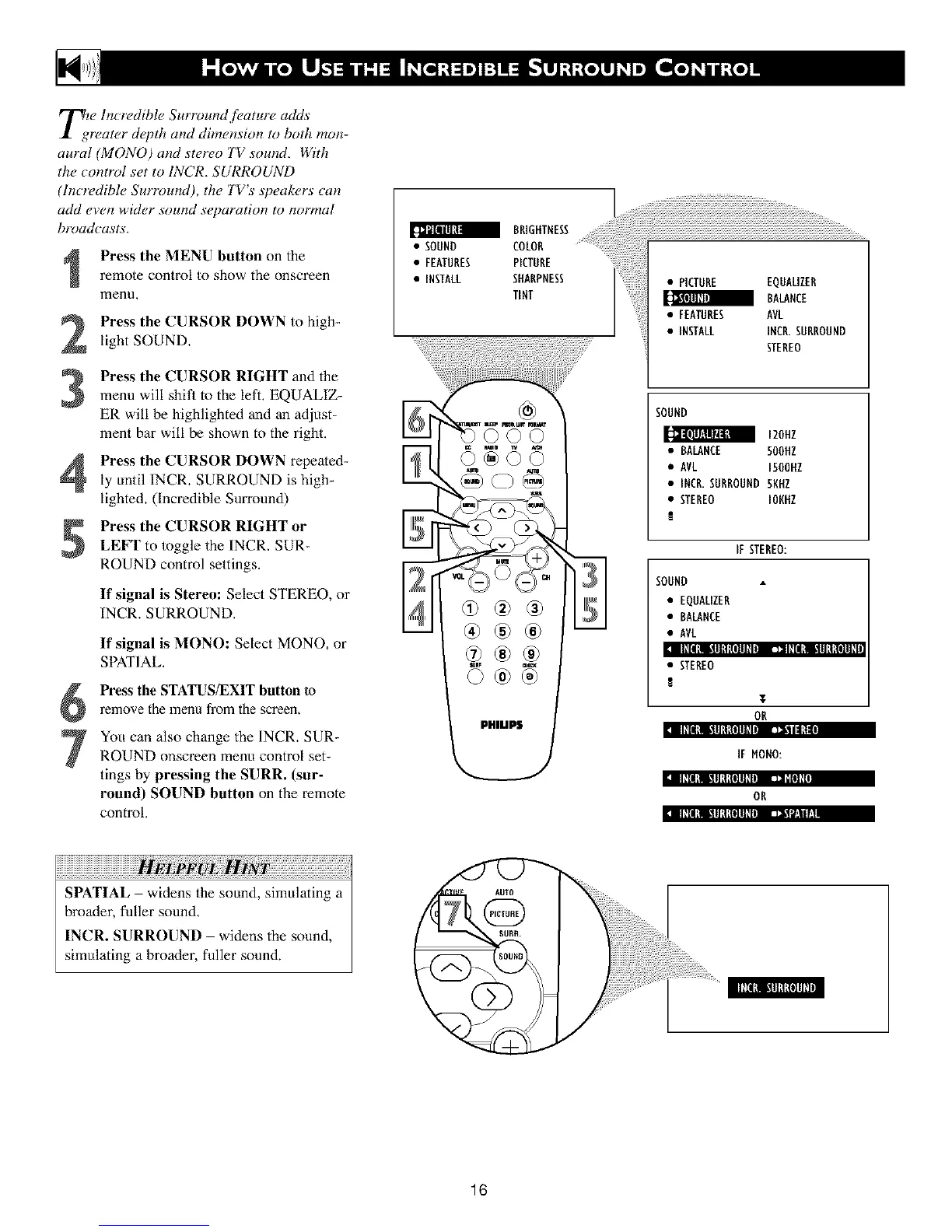
Press the MENU button on the
remote control to show the onscreen
menu,
Press the CURSOR DOWN to high-
light SOUND.
Press the CURSOR RIGHT and the
menu will shit_ to the left, EQUALIZ-
ER will be highlighted and an adjust-
ment bar will be shown to the right.
Press the CURSOR DOWN repeated-
ly until INCR. SURROUND is high_
lighted. (Incredible Surround)
Press the CURSOR RIGHT or
LEFT to toggle the INCR, SUR-
P,OUND control settings.
If signal is Stereo: Select STEREO, or
INCP,. SURP, OUND,
II1111li!ll_ll{lllhllll I:llll_II_ll.11lll_tllll
If signal is MONO: Select MONO, or
SPATIAL.
Press the STATUS/EXIT button to
relnove the menu from the screen.
IllIl_l 111111_tlllllbi La,lilllLtil
Yoll can also change the INCR. SUR-
ROUND onscreen menu control set-
tings by pressing the SURR. (sur-
round) SOUND button on the remote
control,
BRIGHTNESS
• SOUND COLOR
• FEATURES PICTURE
• INSTALL SHARPNESS
TINT
©©©
iii
• PICTURE EQUALIZER
BALANCE
• FEATURES AVL
• INSTALL INCR.SURROUND
STEREO
SOUND
IZOHZ
• BALANCE 50OHZ
• AVL 1500UZ
• INCR.SURROUND 5KHZ
• STEREO IONUZ
!
If STEREO:
SOUND
• EQUALIZER
• BALANCE
• AVL
• STEREO
!
T
OR
IF MONO:
:i IIIIILI t.IIIIILOIlIIIi _lill
OR
:i IIIIl_l t.11111_{lllllliJ Jii'ii/,.llh
17171717171717171111¸¸
SPATIAL widens the sound, simulating a
broader, fuller sound,
INCR. SURROUND widens the sound,
simulating a broader, fuller sound.
16












 To Next Page