After your personal a_ cess code has been
set (see the previous page), you are r_,ady
to select the channels or inputs you want to
block out or censo_:
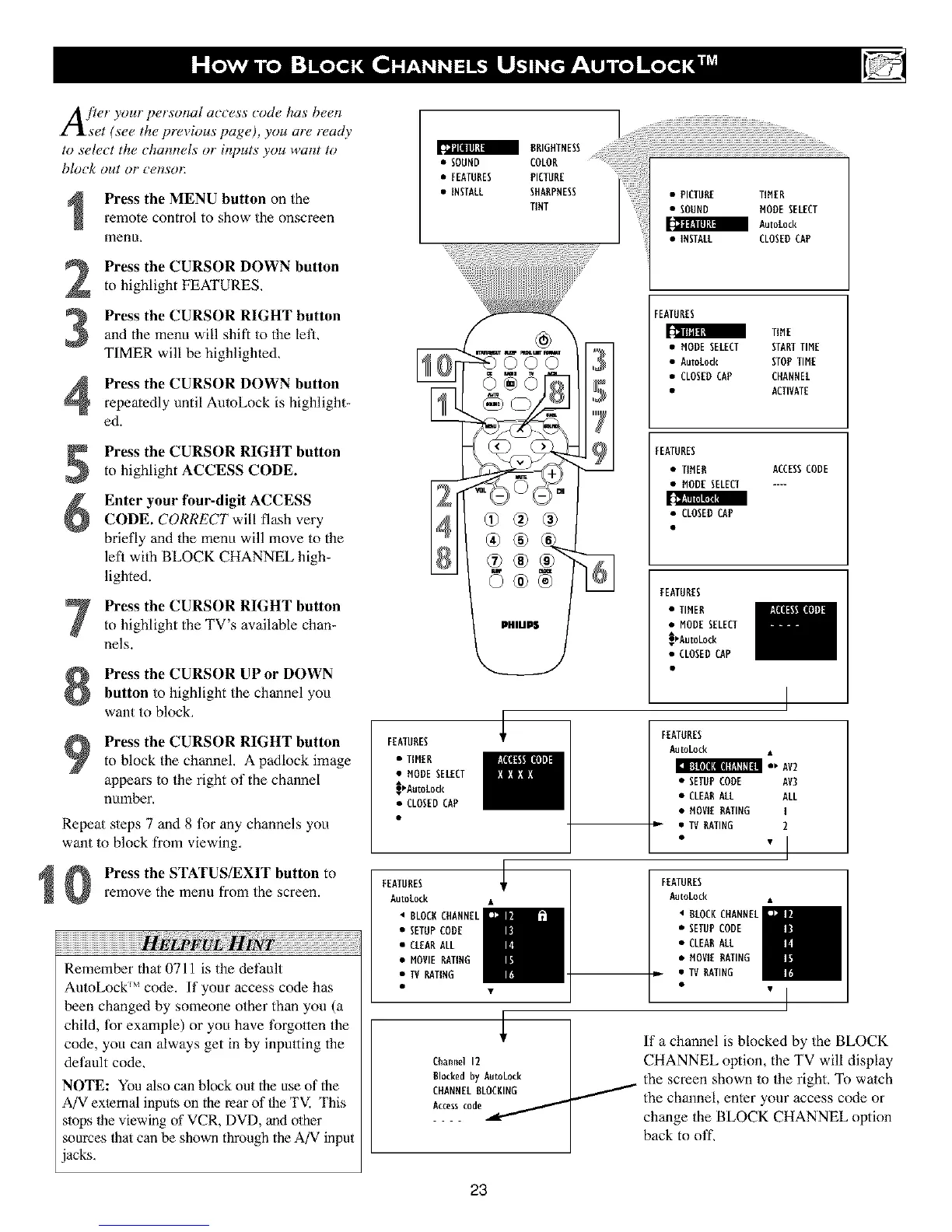
Press the MENU button on the
remote control to show the onscreen
menu,
Press the CURSOR DOWN button
to highlight FEATURES,
Press the CURSOR RIGHT button
and the menu will shifT to the letL
TIMER will be highlighted,
Press the CURSOR DOWN button
repeatedly until AutoLock is highlight-
ed.
Press the CURSOR RIGHT button
to highlight ACCESS CODE.
Enter your four-digit ACCESSCODE. CORRECT will flash very
briefly and the menu will move to the
lefl with BLOCK CHANNEL high-
lighted.
Press the CURSOR RIGHT buttonto highlight the TV's available chan-
nels.
Press the CURSOR UP or DOWN
button to highlight the channel you
want to block,
Press the CURSOR RIGHT button
to block the channel, A padlock image
appears to the right of the channel
number,
Repeat steps 7 and 8 for any channels you
want to block from viewing,
Press the STATUS/EXIT button to
remove the menu from the screen.
vL
Remember that 0711 is the det_ult
AutoLock _ code. If your access code has
been changed by someone other than you (a
child, for example) or you have forgotten the
code, you can always get in by inputting the
default code,
NOTE: You also can block out the use of the
AiV ex/emal inputs on the rear of llTeTV. This
stops 1he viewing of VCR, DVD, and other
sources llTat can be shown through the A/V input
acks,
a BRIGHTNESS
• SOUND COLOR
• FEATURES PICTURE
• INSTALL SHARPNESS
TINT
• PICTUBE TIMER
• SOUND MODESELECT
a Aut0L0ck
• INSTALL CLOSEDCAP
\
©©
525
FEATURES _"
• TIMER
• MODESELECT
_AutoLock
• CLOSEDCAP
FEATURES
AutoLock
• BLOCBCHANNEL
• SETUPCODE
• CLEARALL
• MOVIERATING
• TVRATIRG
Channel 12
Blocked by AutoLock
CHANNEL BLOCBING
Access c0d_/
FEATURES
TIME
• MODESELECT STARTTIME
• AutoLock STOPTIME
• CLOSEDCAP CHANNEL
• ACTIVATE
FEATURES
• TIMER ACCESSCODE
• MODESELECT ....
• CLOSED CAP
FEATURES
• TIMER
• MODE SELECT
_AutoLocR
• CLOSEDCAP
FEATURES
AutoLock
:.Av2
• SETUPCODE AV3
• CLEABALL ALL
• MOVIEBATING I
D " TV RATING 2
FEATURES
AutoLock
• BLOCKCHANNEL
• SETUPCODE
• CLEARALL
• MOVIEBATING
• TV RATING
If a channel is blocked by the BLOCK
CHANNEL option, the TV will display
the screen shown to the right, To watch
the channel, enter your access code or
change the BLOCK CHANNEL option
back to oil
23












 To Next Page