Various onscreen messages will appear
hen someone tries to view blocked pro-
gramming. The message is determined by how
the _urrent programming is blocked. You may
_iew the blocked programming and turn OFF
the A utoLo_k TM.f!_ature by using the Clear All
control or by entering your a_ cess _od_
[_NIIllIN
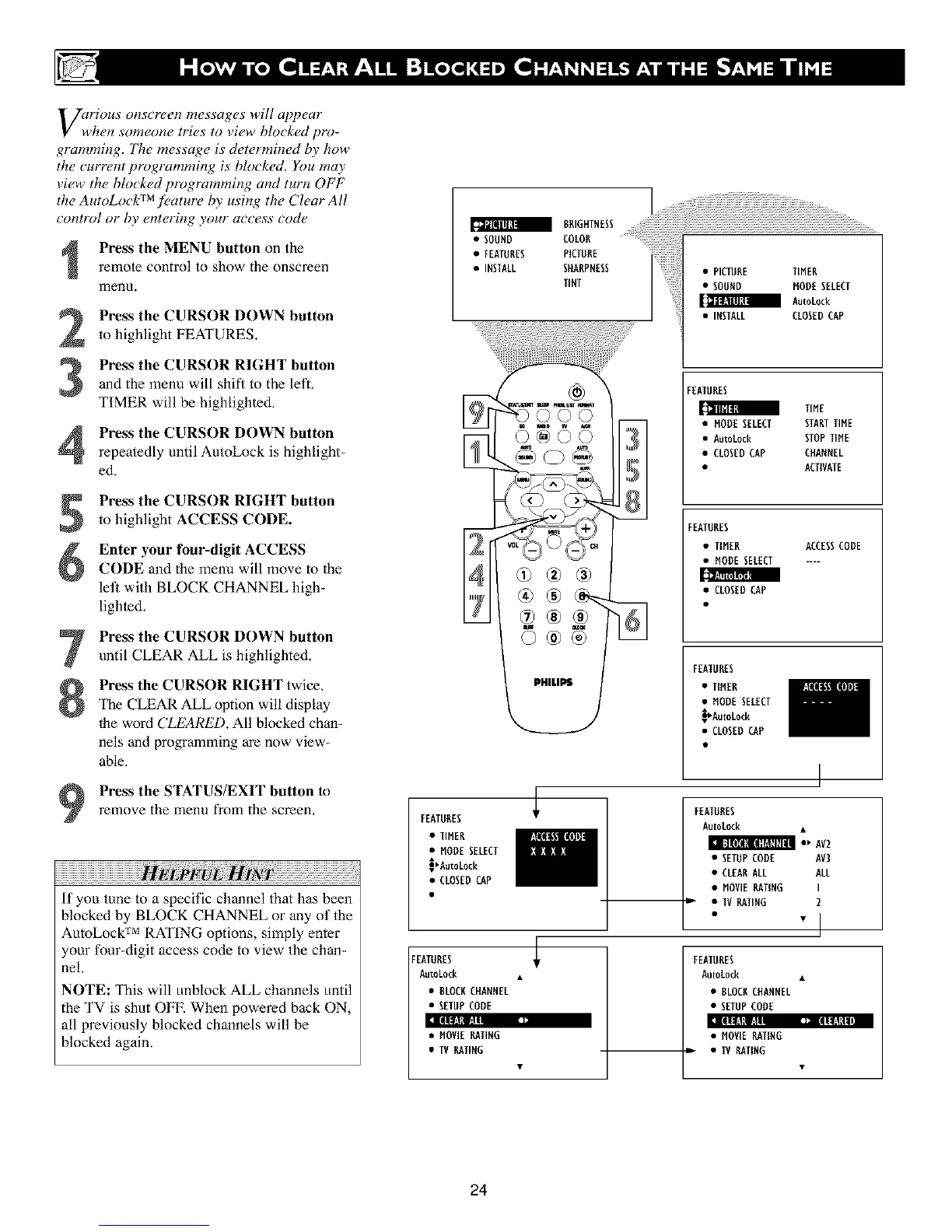
Press the MENU button on the
remote control to show the onscreen
menu.
Press the CURSOR DOWN button
to highlight FEATURES.
Pre_s the CURSOR RIGHT button
and the menu will shih to the left.
TIMER will be highlighted.
Press the CURSOR DOWN button
repeatedly until AutoLock is highlight-
ed.
Press the CURSOR RIGHT button
to highlight ACCESS CODE.
Enter your four-digit ACCESS
CODE and the menu will move to Ihe
let] with BLOCK CHANNEL high-
lighted,
Press the CURSOR DOWN button
until CLEAR ALL is highlighted.
Press the CURSOR RIGHT twice.
The CLEAR ALL option will display
1he word CLEARED. All blocked chan-
nels and programming are now view-
able.
Press the STATUS/EXIT button toremove the menu from the screen,
If you tune to a specific channel that has been
blocked by BLOCK CHANNEL or any of the
AutoLock TM RATING options, simply enter
your four-digit access code to view the chan-
nel.
NOTE: This will unblock ALL channels until
the TV is shut OFF. When powered back ON,
all previously blocked channels will be
blocked again.
FEATURES
• SOUND
• FEATURES
• INSTALL
COLOR
PICTURE
SHARPNESS
TINT
_©©©
PHILIPS
• TIHEN
• MODE SELECT
_AutoLock
• CLOSED CAP
FEATURES
AutoLock
• BLOCKCHANNEL
• SETUPCODE
]lllll l/!l[li!
:1 {llll:l_! l] liilll:l,1
• MOVE RATING
• IV RATING
81
• PICTURE TIHEN
• SOUND NODESELECT
Autokock
• INSTALL CLOSEDCAP
FEATURES
_llill;I
TIHE
• NODESELECT STARTTIHE
• AutoLock STOPTIHE
• CLOSEDCAP CHANNEL
• ACTIVATE
FEATURES
• TIMER ACCESSCODE
• HODE SELECT ....
• CLOSED CAP
FEATURES
• TlflER
• MODESELECT
_AutoEock
• CLOSEDCAP
FEATURES
AutoLock •
i_ AV2
• SETUPCODE AV3
• CLEARALL ALL
• HOVE RATING I
l • IV RATING 2
"1
FEATURES
AutoLock •
• BLOCRCHANNEL
• SETUPCODE
• HOVE RATING
• • IV RATING
24












 To Next Page