After your personal access code has been
set, you can select specifi( movie ratings
that you want to ( ensor:
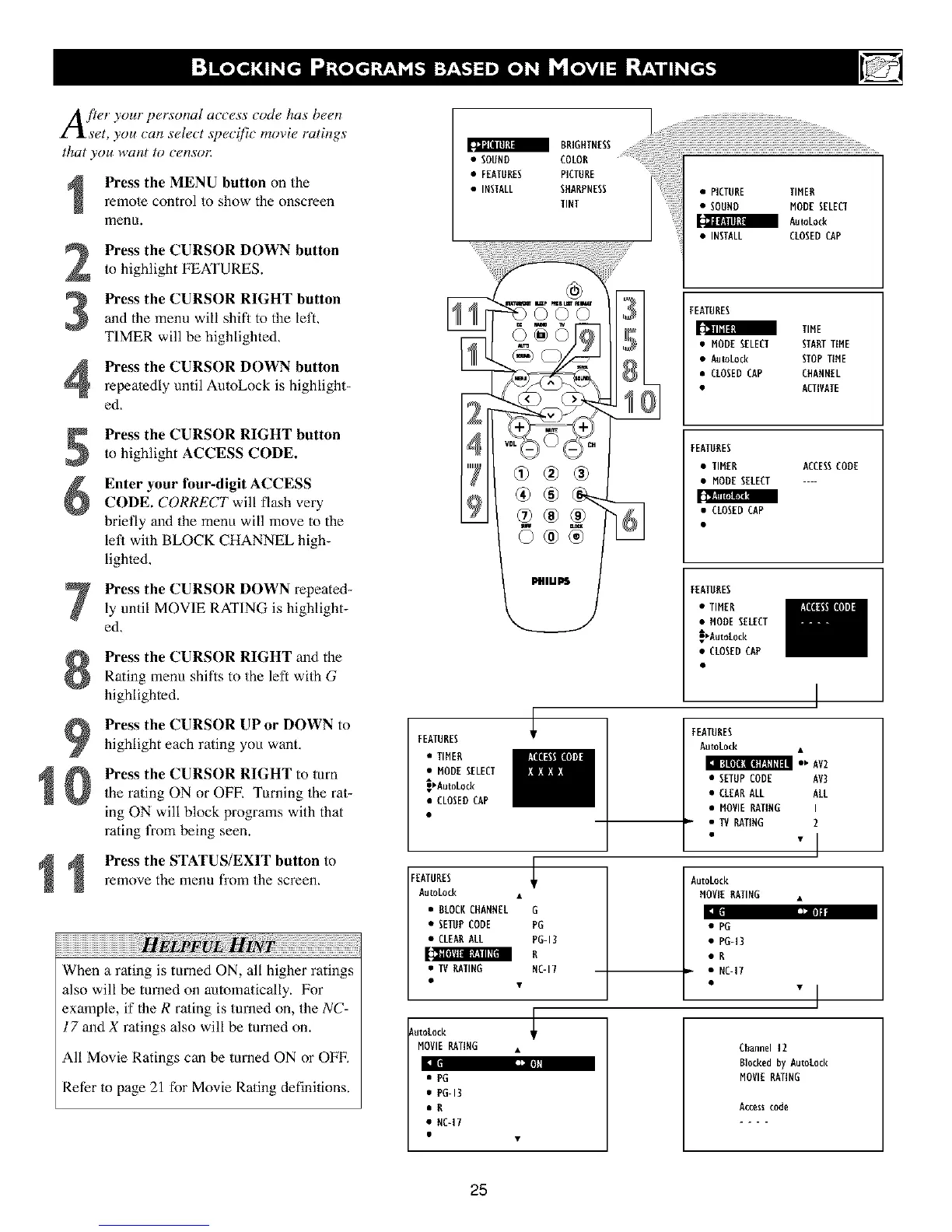
Press the MENU button on the
remote control to show the onscreen
menu.
Press the CURSOR DOWN button
to highlight FEATURES.
Pre_s the CURSOR RIGHT buttonand the menu will shill to the left,
TIMER will be highlighted,
Press the CURSOR DOWN button
repeatedly until AntoLock is highlight-
ed,
Press the CURSOR RIGHT buttonto highlight ACCESS CODE.
Enter your four-digit ACCESS
CODE. CORRECT will flash very
briefly and the menu will move to the
let_ with BLOCK CHANNEL high-
lighted,
Press the CURSOR DOWN repeated-
ly until MOVIE RATING is highlight-
ed,
Press the CURSOR RIGHT and the
Rating menu shifts to the left with G
highlighted.
Pre_s the CURSOR UP or DOWN tohighlight each rating you want,
Press the CURSOR RIGHT to mm
the rating ON or OFE Turning the rat-
ing ON will block programs with that
rating t¥om being seen.
Press the STATUS/EXIT button to
remove the menu from the screen.
When a rating is turned ON, all higher ratings
also will be turned on automatically. For
example, if the R ra/ing is turned on, the NC-
17 and X ratings also will be turned on.
All Movie Ratings can be turned ON or OFF,
Refer to page 21 for Movie Rating definitions.
FEATURES
• TIMER
• MODESELECT
_AutoLock
• CLOSEDCAP
FEATURES
AutoLock
• BLOCKCHANNEL
• SETUPCODE
• CLEARALL
• TV RATING
AutoL0ck
MOVIERATING
|
• PG
• PG-13
aB
• NC=IT
PfllLI[_
G
PG
PG-13
B
NC-17
• TIMER ACCESSCODE
• MODESELECT ....
• CLOSED CAP
FEATURES
AutoLock
LAv2
• SETUPCODE AV3
• CLEARALL ALL
• MOVIERATING I
• TVRATING 2
• "l
AutoLock
MOVIERATING •
• PO
• PO-13
•R
• NC-17
"i
Channel 12
Blockedby AutoLock
MOVIERATING
Access code
25
• TIMER
• MODE SELECT
A
_Autotock
• CLOSEDCAP
FEATURES












 To Next Page