F_u can select specific TV ratings that you
ant to censor by following these steps,
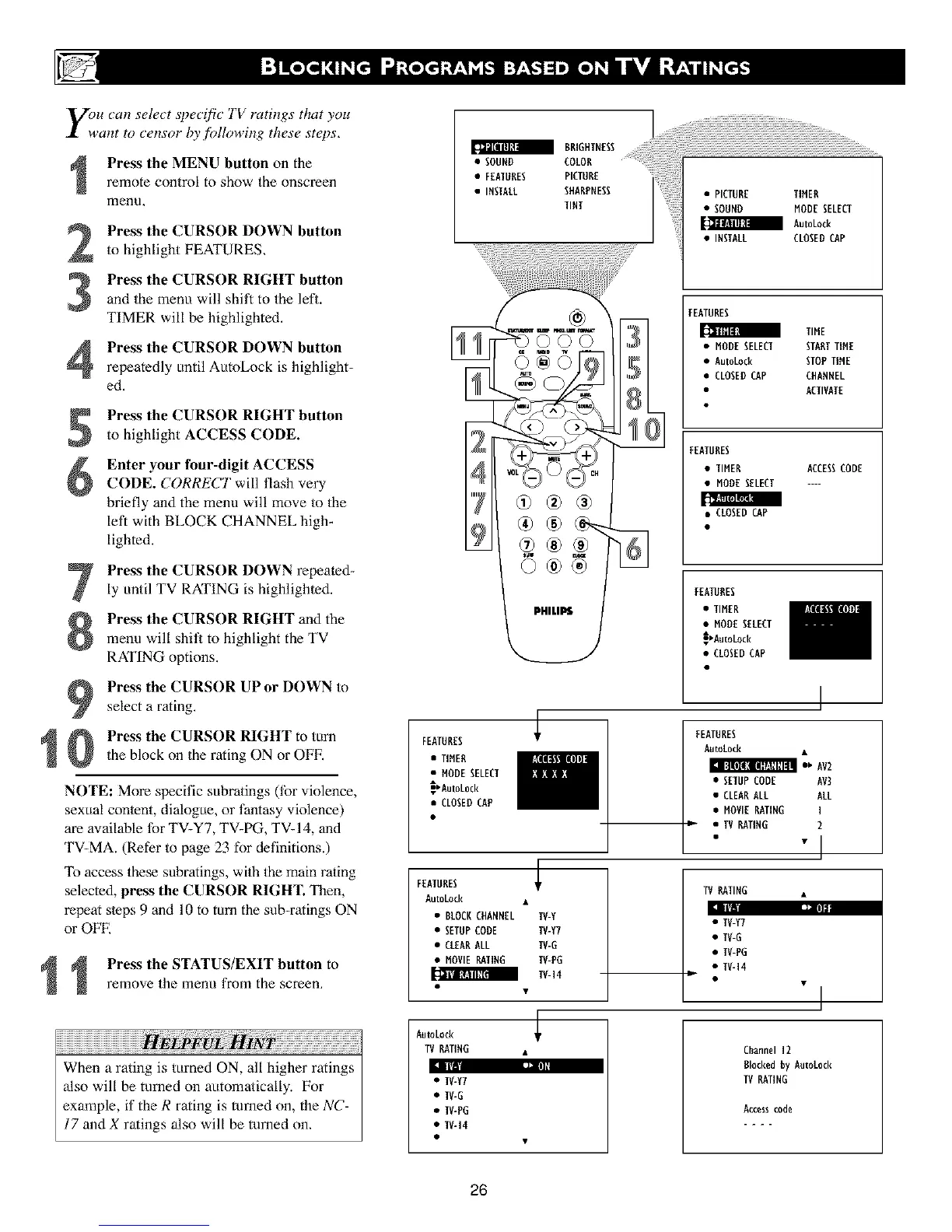
Press the MENU button on the
remote control to show the onscreen
menu,
2
3
Press the CURSOR DOWN button
to highlight FEATURES.
Press the CURSOR RIGHT button
and the menu will shift to the lefl.
TIMER will be highlighted.
Press the CURSOR DOWN button
repeatedly until AutoLock is highlight-
ed.
1
Press the CURSOR RIGHT button
to highlight ACCESS CODE.
Enter your four-digit ACCESS
CODE. CORRECT will flash very
briefly and the menu will move to the
left with BLOCK CHANNEL high_
lighted.
Press the CURSOR DOWN repeated-
ly until TV RATING is highlighted.
Press the CURSOR RIGHT and the
menu will shit_ to highlight the TV
RATING options.
Press the CURSOR UP or DOWN to
select a rating.
Press the CURSOR RIGHT to mm
the block on the rating ON or OFF.
NOTE: More specific subratings (tbr violence,
sexual content, dialogue, or fantasy violence)
are available for TV-Y7, TV-PG, TV-14, and
TV-MA. (Refer to page 23 for definitions.)
To access these suhratings, wilh the main rating
selected, press the CURSOR RIGHT. Then,
repeat s/eps 9 and 10 to turn the sub-ratings ON
or OFE
1
Press the STATUS/EXIT button to
remove the menu from the screen,
When a rating is turned ON, all higher ratings
also will be turned on automa/ically. For
example, if the R rating is turned on, the NC-
17 and X ratings also will be turned on.
PHILIPS
FEATURES
• TIHEB
• MODESELECT
_Autokock
• CLOSEDCAP
FEATURES
AutoLock •
• BLOCK CHANNEL TV-Y
• SETUP CODE IV-Y7
• CLEAR ALL TV-G
• HOVIE RRTIRG TV-PG
_ I_l[l:l III TV- 14
AntoLock
W RATIRG •
hiDI illl
• TV-Y7
• TV-G
• TV-PG
• IV-14
FEATURES
[[_1 I[tll_l TIHE
• HODESELECT STARTTIHE
• Autokock STOPTIHE
• CLOSEDCAP CHARNEL
ACTIVATE
FEATUBES
• TIHER ACCESSCODE
• HODESELECT ....
• CLOSED CAP
FEATUBES
• TIHER
• HODESELECT
_AatoLock
• CLOSEDCAP
FEATURES
AutoEock
• SETUPCODE AV3
• CLEARALL ALL
• HOVI[ RATING I
w, • IV RATIRG 2
• "l
TV RATING
• TV-Y7
• TV-G
• TV-PG
• TV-14
!
I
Channel 12
Blocked By Autot0ck
IV RATING
Access code
26












 To Next Page