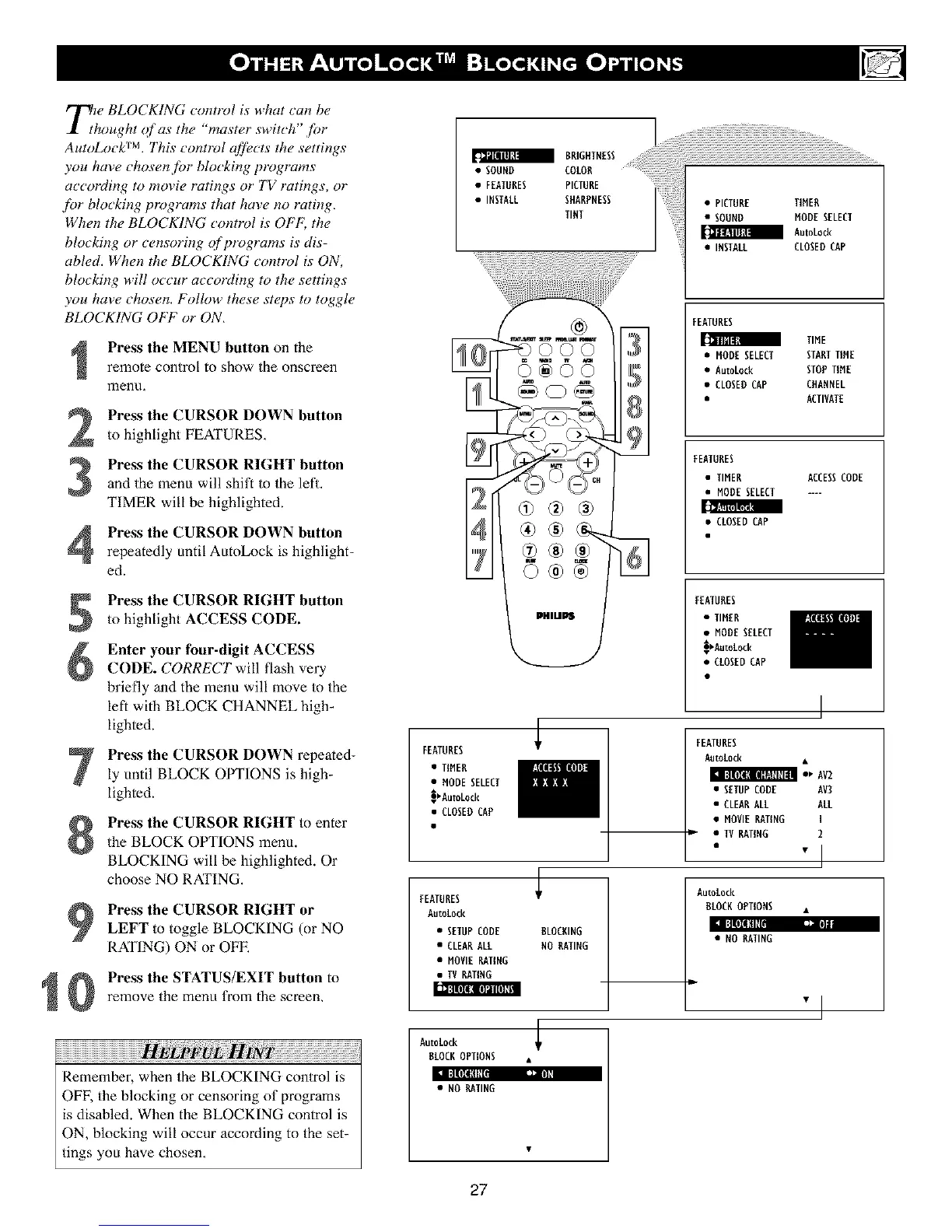
T_e BLOCKING control is what can be
hought <4fas the "master switch" f!)r
AutoLock TM. This contlz_l afi},c ts the settings
you hme chosen,for blocking t)rogrvms
according to movie _tings or' TV i_tings, or
f!)r blocking prr)grams that hme no rvting,
When the BLOCKING contrz_l is OFF; the
blocking or censoring ()f progrvms is dis-
abled. When the BLOCKING cont_vl is ON,
blocking will occur according to the settings
you have chosen. Follow these steps to toggle
BLOCKING OFF or ON,
2
3
Press the MENU button on the
remote control to show the onscreen
menu,
Press the CURSOR DOWN button
to highlight FEATURES,
Press the CURSOR RIGHT button
and the menu will shift to the lefl.
T|MER will be highlighted.
Press the CURSOR DOWN button
repeatedly until AutoLock is highlight-
ed.
Press the CURSOR RIGHT button
to highlight ACCESS CODE.
Enter your four-digit ACCESS
CODE. CORRECT will flash very
briefly and the menu will move to the
left with BLOCK CHANNEL high-
lighted.
Press the CURSOR DOWN repeated-
ly until BLOCK OPTIONS is high-
lighted.
Press the CURSOR RIGHT to enter
the BLOCK OPTIONS menu.
BLOCKING will he highlighted. Or
choose NO RATING.
:n :]|Ill[fiE.
1
Press the CURSOR RIGHT or
LEFT to toggle BLOCKING (or NO
RATING) ON or OFE
Press the STATUS/EXIT button to
remove the menu from the screen,
iiiiiiiiiiiiiiiiiiiiiiiiiiiiiiiiiiiiiiiiiiiiiiiiiiiiiiiiiiiiiiiiiiiiiiiiiiiiiiiiiiiiiiiiiiiiiiiiiii !!!TM iiiiiiiiiiiiiiiiiiiiiiiiiiiiiiiiiiiiiiiiiiiiiiiTM
Remember, when the BLOCKING control is
OFF, the blocking or censoring of programs
is disabled. When the BLOCKING control is
ON, blocking will occur according to the set-
tings you have chosen,
FEATURES
• TIMER
• MODESELECT
_AutoLock
• CLOSEDCAP
FEATURES
Autotock
• SETUPCODE
• CLEARALL
• MOVIERATING
• IV RATING
BRIGHTNESS
SOUND COLOR
• FEATURES PICTURE
• INSTALL SHARPNESS
TINT
PHlUPS
ULOCRING
NO RATING
iTMiTMiTMiTMiTMiTMiTMiTMiTMiTMiTMiTMiTMiTMiTMiTMiTMiTMiTMiTMiTMiTMiTMiTMiTMiTMiTMiTMiTMiTMiTMiTMiTMiTMiTMiTMiTMiTMiTMiTMiTMiTMiTMiTMiTMiTMiTMiTMiTMiTMiTMiTMiTMiTMiTMiTMiTMiTMiTMiTMiTMiTMiTMiTMiTMiTMiTMiTMiTMiTMiTMiTMiTMiTMiTMiTMiTMiTMiTMiTMiTMiTMiTMiTMiTMiTMiTMiTMiTMiTMiTMiTMiTMiTMiTMiTMII
• PICTURE TIMER
• SOUND NODE SELECT
AutoLock
• INSTALL CLOSEDCAP
FEATURES
1[tl I[tlRll
TIME
• NODE SELECT STARTTIME
• AutoLock STOPTIME
• CLOSEDCAP CHANNEL
• ACTIVATE
FEATURES
• TIMER ACCESSCODE
• MODESELECT ....
• CLOSEDCAP
FEATURES
• TIMER
• NODESELECT
_AatoLock
• CLOSEDCAP
FEATURES
AatoLock •
• _ AV2
• SETUPCODE AV3
• CLEARALL ALL
• MOVIERATING I
• IV RATING 2
"1
AutoLock
ULOCKOPTIONS •
• NO RATING
"l
AutoLock
ULOCKOPTIONS .
l:t Illll[lll _=']
• NO RATING
27












 To Next Page