Closed Captioning (CC) allows you to
read the voice content of television pro-
grams on the TV s_rc,en, Designed to hel l) the
hearing impaired, this f!,ature uses ons_reen
"text boxes" to show dialogue and comersa-
tions while the TV program is in progress.
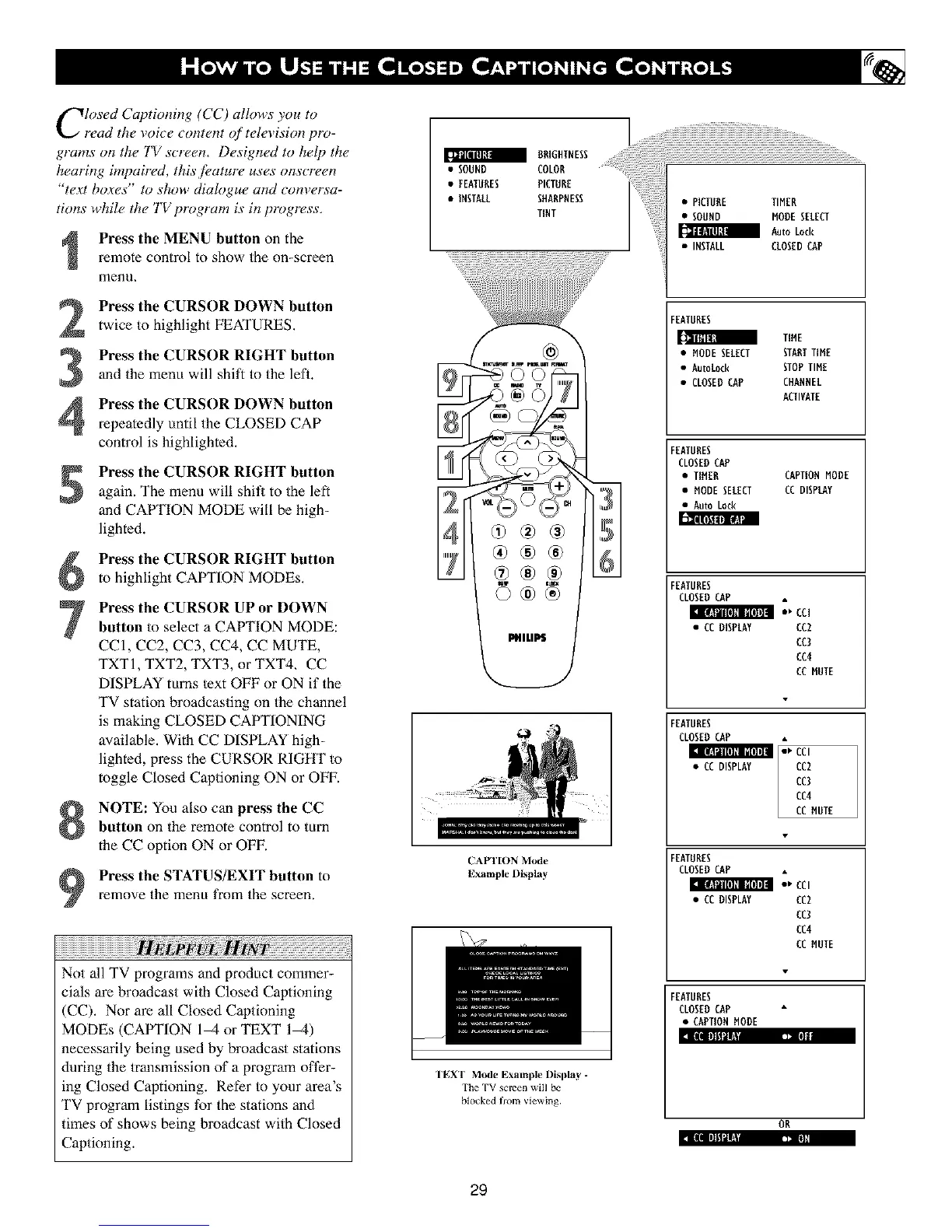
Press the MENU button on the
remote control to show the on-screen
menu,
Press the CURSOR DOWN button
twice to highlight FEATURES.
Press the CURSOR RIGHT button
and the menu will shift to the leh.
Press the CURSOR DOWN button
repeatedly until the CLOSED CAP
control is highlighted.
Press the CURSOR RIGHT button
again. The menu will shit_ to the left
and CAPTION MODE will be high-
lighted.
J
Press the CURSOR RIGHT button
to highlight CAPTION MODEs,
Press the CURSOR UP or DOWN
button to select a CAPTION MODE:
CCI, CC2, CC3, CC4, CC MUTE,
TXTI, TXT2, TXT3, or TXT4, CC
DISPLAY rams lext OFF or ON if the
TV station broadcasting on the channel
is making CLOSED CAPTIONING
available. With CC DISPLAY high-
lighted, press the CURSOR RIGHT to
toggle Closed Captioning ON or OFF.
NOTE: YOUalso can press the CC
button on the remote control to mrn
the CC option ON or OFF.
Press the STATUS/EXIT button toremove the menu from the screen.
Not all TV programs and product commer-
cials are broadcast wilh Closed Captioning
(CC). Nor are all Closed Captioning
MODEs (CAPTION 1_ or TEXT 1_)
necessarily being used by broadcast stations
during the transmission of a program oft?r-
ing Closed Captioning. Refer to your area's
TV program listings for the stations and
times of shows being broadcast wilh Closed
Captioning.
BRIGHTNESS
SOUND COLON .....
• FEATURES PICTURE
• INSTALL SHARPNESS
TINT
©®®
_ltl_
CAFI'ION Mode
Example nisplay
TEXT Mode Example l)isplay -
The TV screen will be
blocked from _iewing.
29
• PICTURE TIMER
• SOUND MODESELECT
Auto Lock
• INSTALL CLOSEDCAP
FEATURES
[[]llt_ll_
TIME
• MODESELECT STARTTIME
• Autotock STOPTIME
• CLOSEDCAP CHARNEL
ACTIVATE
FEATURES
CLOSEDCAP
• TIMER CAPTIONMODE
• MODE SELECT CCDISPLAY
• Auto Lock
FEATURES
CLOSEDCAP
• CCDISPLAY CC2
CC3
CC4
CCMUTE
FEATURES
CLOSEDCAP
ml=cc,
CCDISPLAY / CC2
CC3
CC4
CCMUTE
FEATURES
CLOSEDCAP
:,cc,
• CCDISPLAY CC2
CC3
CC4
CC MUTE
FEATURES
CLOSEDCAP
• CAPTIONMODE
OR












 To Next Page