T}e FM Radio within the TV can be set to
urn on a!_zl(?El'at a specific time, or tune to
a ,_7)ecific chwmel when it powers on. The
Timer controls also allows the FM Di,_play to
be turned on or qff]
!
2
3
4
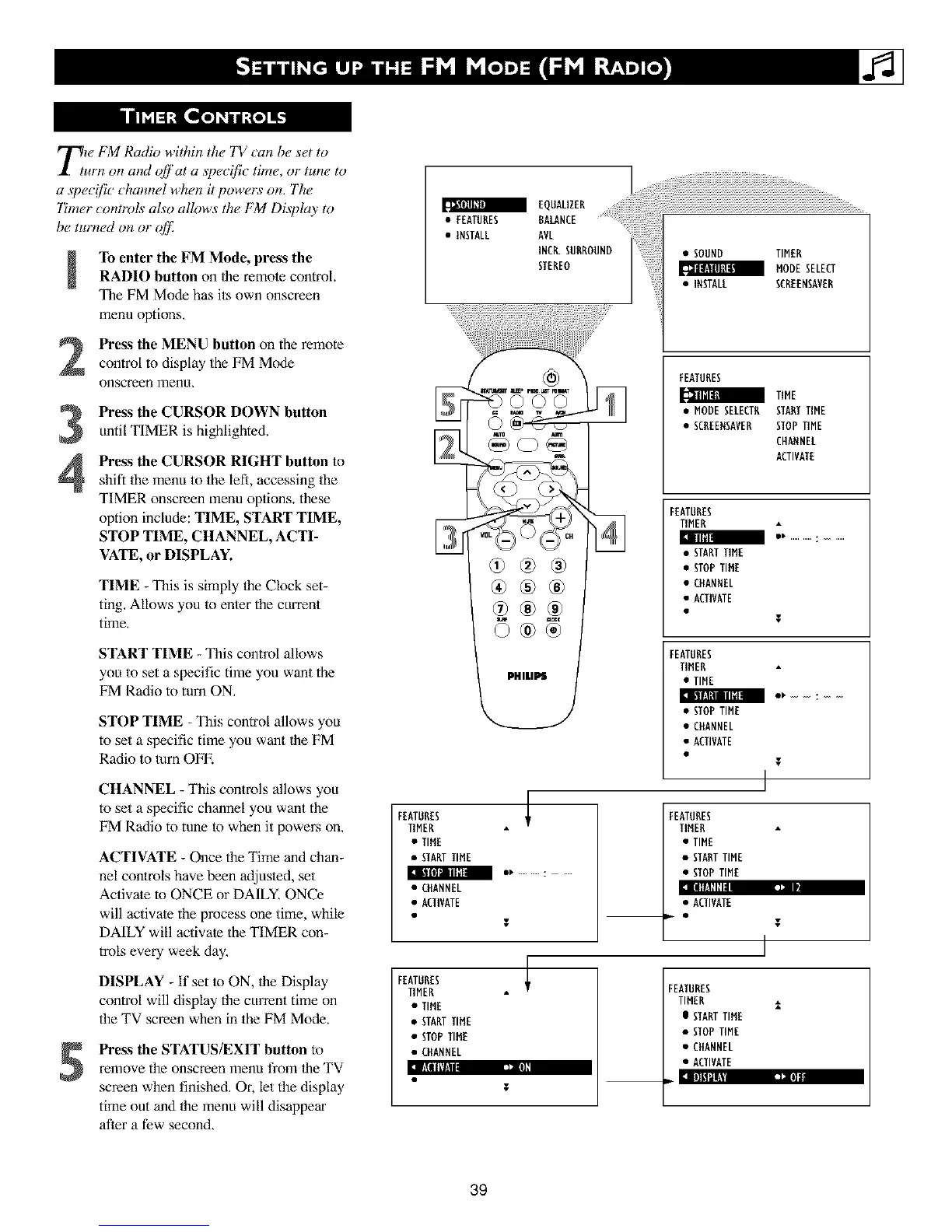
To enter the FM Mode, press the
RADIO button on Ihe remole control.
The FM Mode has its own onscreen
menu options.
Press the MENU button on the remote
control to display the FM Mode
onscreenmenu.
Press the CURSOR DOWN button
until TIMER is highlighted.
Press the CURSOR RIGHT button to
shift the menu to the left, accessing the
TIMER onscreen menu options, these
option include: TIME, START TIME,
STOP TIME, CHANNEL, ACTI-
VATE, or DISPLAY.
TIME - This is simply the Clock set-
ting. Allows you to enter the current
time,
START TIME - This control allows
you to set a specific time you want the
FM Radio to turn ON,
STOP TIME - This control allows you
to set a specific time you want lhe FM
Radio to turn OFE
CHANNEL - This controls allows you
to set a specific channel you want the
FM P,adio to tune to when it powers on.
ACTIVATE - Once the Time and chan-
nel con/rols have been adjus/ed, set
Activate r• ONCE or DAILY, ONCe
will activate the process one time, while
DAILY will activate the TIMER con-
trois every week day,
]lllll_l,
DISPLAY - ff set to ON, the Display
control will display the currant time on
the TV screen when in the FM Mode.
5
Press the STATUS/EXIT button to
remove the onscreen menu from 1heTV
screen when finished, Or, let the display
time out and the menu will disappear
after a few second,
•EEATUHESRA NCEEQOAL' ER
• INSTALL AVL
INCR.SURROUND
STEREO
®®®
_tamK
0®® ,
FEATURES I
TIMER
• TIME
• STARTTIME
• CHANNEL
• ACTIVATE
FEATURES
TIMER
• TIME
• STARTTIME
• STOPTIME
• CHANNEL
T
• SOUND TIMER
_ MODESELEU
• IMSTALL SCREENSAVER
FEATURES
_ TIME
• MODE SELECT_
• SCREEMSAVER
SIAMTIME
STOPTIME
CHAMNEL
ACTIVATE
FEATURES
TIMER
• STARTTIME
• STOPTIME
• CHANNEL
• ACTIVATE
T
FEATURES
TIHER
• TIME
• STOPTIME
• CHANNEL
• ACTIVATE
I
]
FEATURES
TIMER
• TIME
• STARTTIME
• STOPTIME
• ACTIVATE
T
I
FEATURES
TIMER
I STARTTIME
• STOPTIME
• CHANNEL
• ACTIVATE
39












 To Next Page