Tf/e Mode Select option allow you to move
"ore the FM Radio Mod_, to the TV Mod_, of
operation,
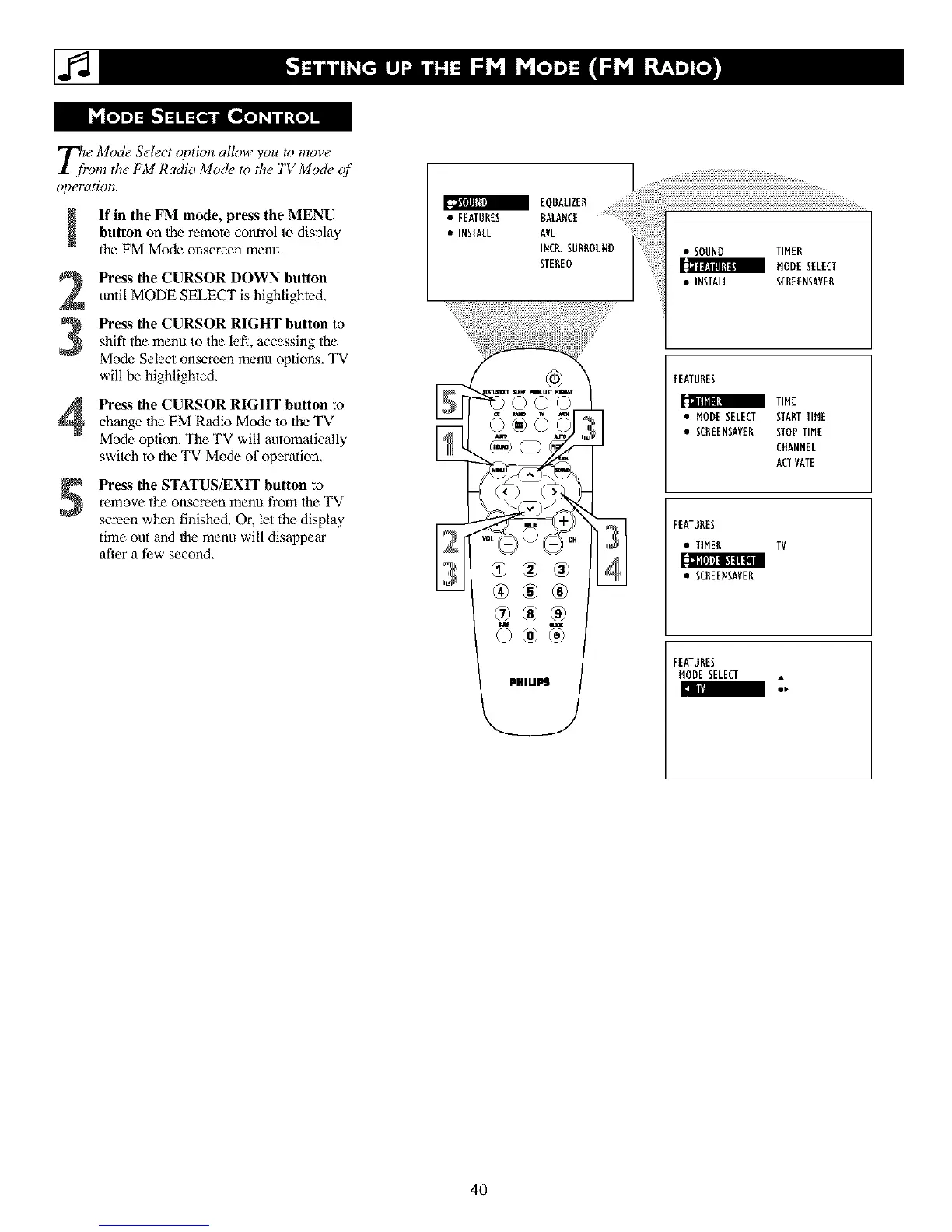
If in the FM mode, press the MENUbutton on the remote control to display
the FM Mode onscreen menu,
2
3
Press the CURSOR DOWN button
until MODE SELECT is highlighted,
Pre_s tile CURSOR RIGHT button to
shift the menu to the left, accessing the
Mode Select onscreen menu options, TV
will be highlighled,
Pre_s the CURSOR RIGHT button tochange the FM Radio Mode to the TV
Mode option. The TV will automatically
switch to the TV Mode of operation,
5
Pre_s the STATUS/EXIT button to
remove the onscreen menu from lhe TV
screen when finished, Or, let the display
time out and the menu will disappear
afler a few second,
EQNAL'ZER
• FEATURES BALANCE
• INSTALL AVL
INCR.SURROUND
STEREO
_ Afro Ul_
• SOUND TIMER
HODESELECT
• INSTALL SCREENSAVER
FEATURES
TIME
• HODE SELECT STARTTIHE
• SCREENSAVER STOPTIME
CHANNEL
ACTIVATE
FEATURES
• TIMER TV
• SCREENSAVER
FEATURES
HODE SELECT
40












 To Next Page